> ## Documentation Index
> Fetch the complete documentation index at: https://learn.nexudus.com/llms.txt
> Use this file to discover all available pages before exploring further.
# PII Redaction
> How the CLI automatically redacts personal identifiable information for security and data protection.
# PII Redaction
The Nexudus CLI automatically redacts personally identifiable information (PII) when it detects non-interactive execution, such as when output is piped to another tool or script. This is a security feature that prevents sensitive data (names, emails, phone numbers, addresses, dates of birth) from flowing into AI agent contexts or logs.
**Available since CLI v5.0.16**. PII redaction is enabled by default and cannot be disabled by flags.
## What is PII?
PII includes any information that can identify a real person:
| Category | Examples |
| ------------- | -------------------------------------------------------- |
| **NAME** | FullName, NickName, Salutation, company names in context |
| **EMAIL** | Email addresses, contact emails, welcome emails |
| **PHONE** | Mobile phones, landlines, fax numbers |
| **ADDRESS** | Street address, postal code, city, state, country |
| **DOB** | Date of birth |
| **SOCIAL** | Twitter, Facebook, Google, Telegram handles |
| **FINANCIAL** | Bank accounts, tax IDs, VAT numbers |
| **ID\_DOC** | Passport numbers, national IDs |
| **BIO** | Free-text profiles or notes that may contain PII |
## When is PII redacted?
PII redaction is **automatic and structural** — it depends on your execution context, not on flags you can omit:
| Context | Status | Reason |
| --------------------------------------------- | ------ | -------------------------------------------------- |
| **Interactive terminal** (typing commands) | ❌ OFF | You're a human — trusted context |
| **Piped/redirected output** (e.g., `\| jq`) | ✅ ON | Data may enter scripts or logs — untrusted |
| **Non-TTY execution** (no terminal attached) | ✅ ON | Likely automated — assume untrusted |
| **With unlock token** (time-limited override) | ❌ OFF | Human confirmed via browser 2FA — checked & logged |
### How to detect redaction status
Every CLI command response includes two fields that tell you whether PII is redacted:
```json theme={null}
{
"piiRedaction": "on",
"piiRedactionReason": "non-interactive",
"ok": true,
"data": { ... }
}
```
| Field | Values |
| -------------------- | ---------------------------------------------------------------------------------- |
| `piiRedaction` | `"on"` = PII is redacted; `"off"` = PII is visible |
| `piiRedactionReason` | `"interactive terminal"`, `"non-interactive"`, or `"unlocked (expires TIMESTAMP)"` |
## How PII looks when redacted
When PII is redacted, sensitive fields are replaced with **deterministic tokens**:
```
«PII:EMAIL:a3f2b1c9»
«PII:NAME:7e4d2f8a»
«PII:PHONE:1b3c5d7e»
«PII:ADDR:f5e2c1b4»
```
### Token anatomy
```
«PII:{CATEGORY}:{HASH}»
```
| Part | Example | Meaning |
| ---------- | ---------- | ----------------------------------------------------- |
| `PII` | constant | Identifies this as a PII token |
| `CATEGORY` | `EMAIL` | The type of PII (EMAIL, NAME, PHONE, ADDR, DOB, etc.) |
| `HASH` | `a3f2b1c9` | First 8 chars of SHA256(value + per-install salt) |
### Why tokens?
* **Stable**: The same real value always produces the same token. You can reference entities by token across multiple commands.
* **Opaque**: Tokens cannot be reversed into real values. An LLM cannot derive personal data from a token.
* **Obvious**: Tokens are visually distinct from real data — not easily confused with actual emails or names.
* **Resolvable**: When you pass a token back to the CLI as an argument, it resolves to the real value before sending to the API.
## Using tokens in commands
You can pass tokens back to the CLI as arguments — the CLI transparently resolves them to real values before sending to the API:
```bash theme={null}
# List coworkers — get tokenized output
$ nexudus coworkers list --json
{
"piiRedaction": "on",
"data": [
{
"id": 123456,
"fullName": "«PII:NAME:7e4d2f8a»",
"email": "«PII:EMAIL:a3f2b1c9»"
}
]
}
# Update that coworker using the token
$ nexudus coworkers update 123456 --email "«PII:EMAIL:a3f2b1c9»"
# The CLI resolves the token → real value before the API call
✓ Coworker 123456 updated
```
This is particularly useful for AI agents: they can read tokenized entity data, build command arguments using tokens, and pass them back without ever seeing real PII.
## Unlocking PII (browser-based 2FA override)
If you're a human operator and genuinely need to see full PII in a non-interactive context (e.g., piping output to `jq`), you can temporarily unlock PII via a **browser-based 2FA flow**. This is a true second-factor mechanism — an LLM agent with terminal access cannot complete the flow because it cannot drive a browser session.
```bash theme={null}
nexudus config set pii-mode unlocked --ttl 30m
```
### Unlock requirements
1. **Browser-based confirmation** — the CLI opens your browser to the Nexudus admin panel where you must authenticate and confirm the unlock. There is no terminal prompt to confirm — agents cannot type "y" to bypass.
2. **Authenticated via admin panel** — the confirmation POST is same-origin from the admin panel, protected by your Bearer token and CORS policy.
3. **Time-limited** — defaults to 30 minutes. Maximum allowed: 8 hours. TTL clamped to 1–480 minutes.
4. **Challenge expiry** — the unlock challenge expires in 120 seconds if not confirmed in the browser.
5. **Rate-limited** — maximum 5 unlock challenges per user per hour.
6. **Auditable** — unlock events are logged to telemetry (the fact that an unlock occurred, plus the TTL; no PII is logged).
### How the 2FA unlock flow works
 ### Why agents cannot bypass the 2FA unlock
| Barrier | Why agents cannot bypass |
| ------------------------- | ------------------------------------------------------------------- |
| **Browser launch** | Agent has terminal access, not browser control |
| **Admin panel login** | Requires Bearer token from authenticated admin panel session |
| **Same-origin policy** | Confirm POST is same-origin from admin panel — CORS blocks external |
| **Nonce is server-side** | Cannot be forged — tied to authenticated user + TTL |
| **Poll-based (no stdin)** | Nothing to "type" — the CLI just waits for server confirmation |
| **Challenge expiry** | Challenge expires in 120s if not confirmed — no replay |
### Example unlock workflow
```bash theme={null}
# Terminal: You need to export full PII for a report
$ nexudus config set pii-mode unlocked --ttl 2h
Opening browser for confirmation...
Waiting for browser confirmation... (timeout: 120s)
```
The CLI creates a challenge and opens your browser to the admin panel:
### Why agents cannot bypass the 2FA unlock
| Barrier | Why agents cannot bypass |
| ------------------------- | ------------------------------------------------------------------- |
| **Browser launch** | Agent has terminal access, not browser control |
| **Admin panel login** | Requires Bearer token from authenticated admin panel session |
| **Same-origin policy** | Confirm POST is same-origin from admin panel — CORS blocks external |
| **Nonce is server-side** | Cannot be forged — tied to authenticated user + TTL |
| **Poll-based (no stdin)** | Nothing to "type" — the CLI just waits for server confirmation |
| **Challenge expiry** | Challenge expires in 120s if not confirmed — no replay |
### Example unlock workflow
```bash theme={null}
# Terminal: You need to export full PII for a report
$ nexudus config set pii-mode unlocked --ttl 2h
Opening browser for confirmation...
Waiting for browser confirmation... (timeout: 120s)
```
The CLI creates a challenge and opens your browser to the admin panel:
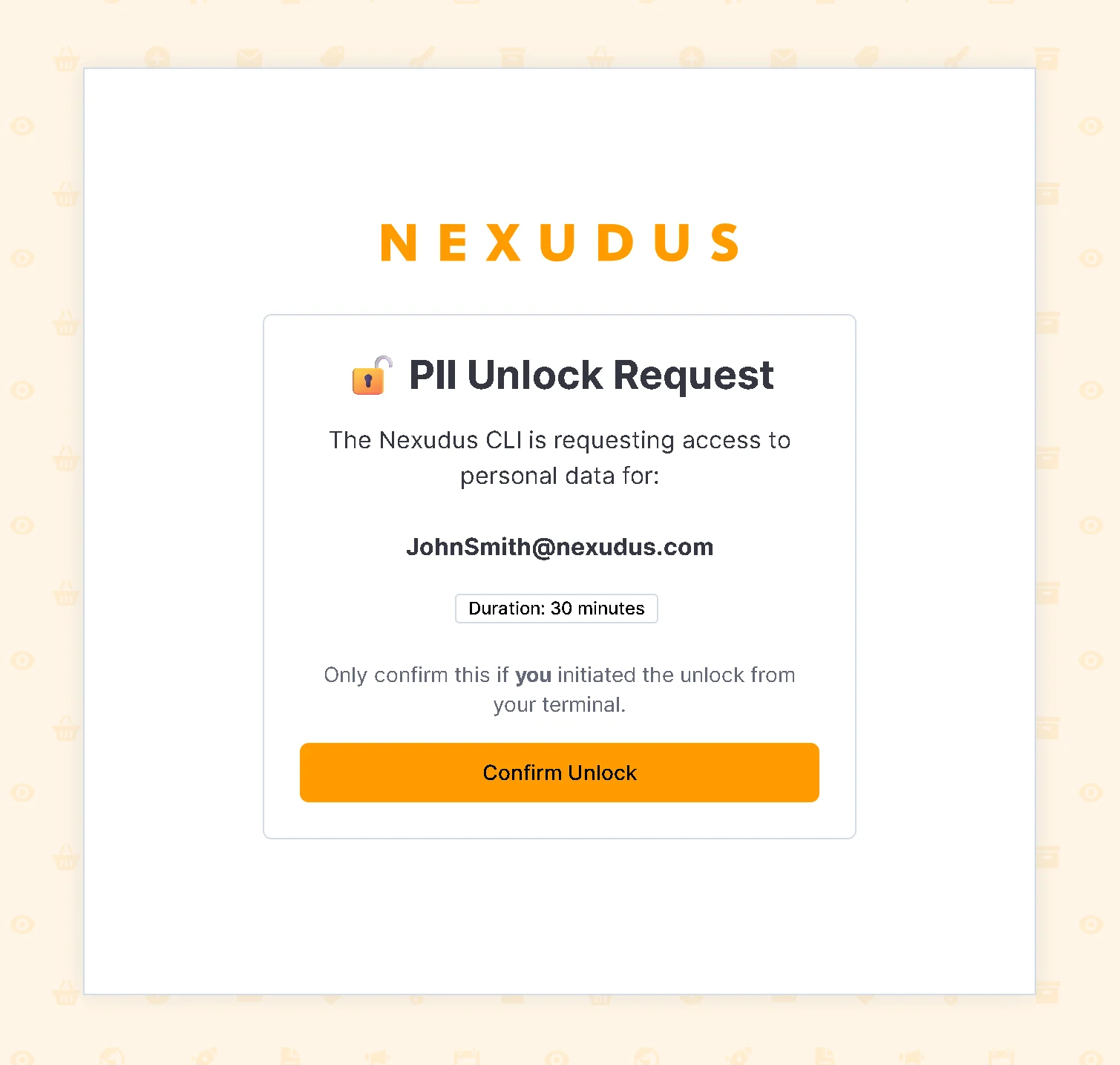 In the admin panel, you'll see the confirmation page showing the requested TTL and your identity. Click **Confirm Unlock** to approve:
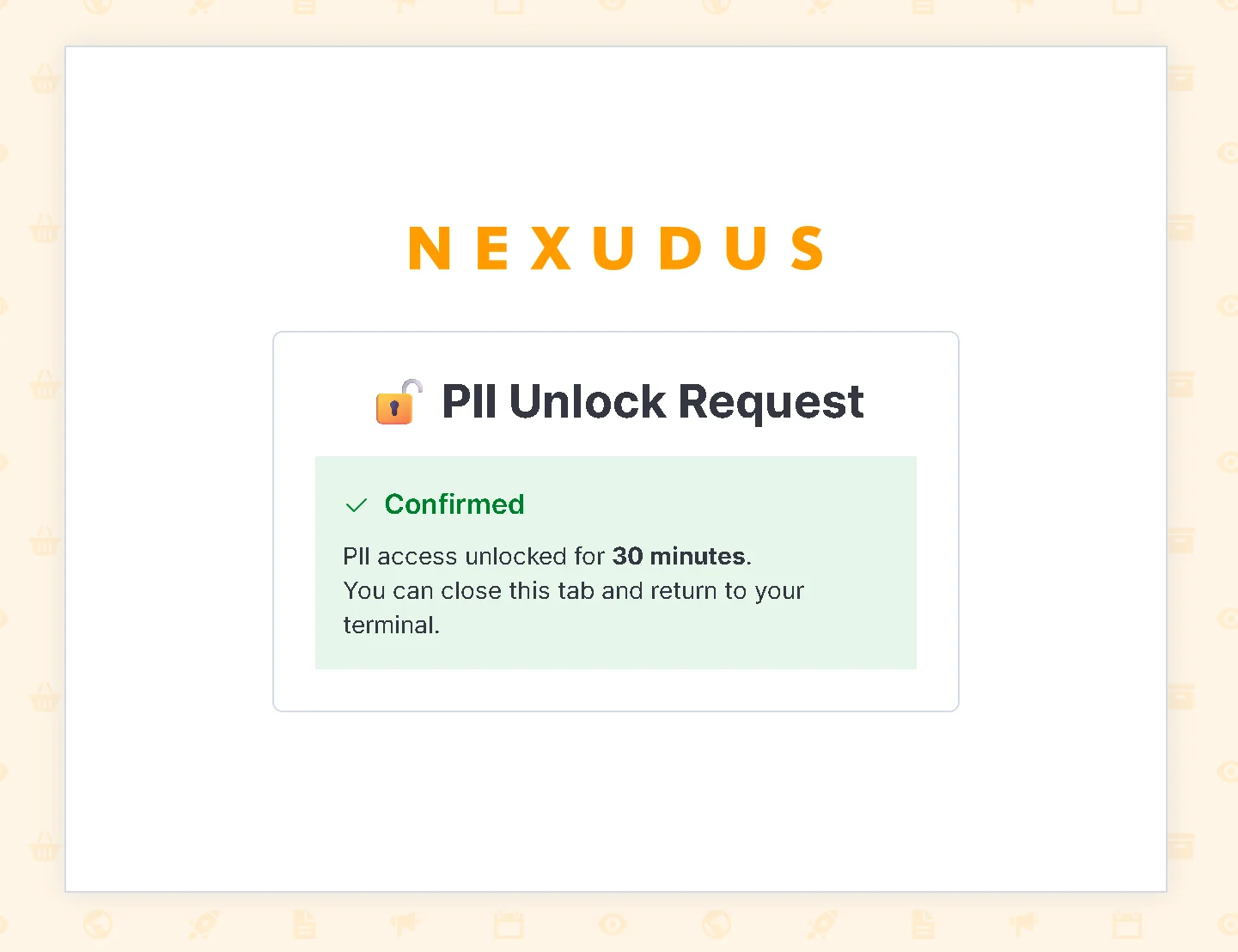 Once confirmed, the CLI detects the approval and saves the session:
```bash theme={null}
✓ PII unlocked until 2026-05-14T13:30:00Z
# Now redaction is temporarily OFF for 2 hours
$ nexudus coworkers list --json
{
"piiRedaction": "off",
"piiRedactionReason": "unlocked (expires 2026-05-14T13:30:00Z)",
"ok": true,
"data": [
{
"id": 123456,
"fullName": "Jane Doe", # ← Real name visible
"email": "j.doe@acme.com" # ← Real email visible
}
]
}
# After 2 hours (or you manually lock), redaction is back ON
$ nexudus config set pii-mode locked
✓ PII redaction locked
```
## Locking PII manually
To immediately stop allowing PII in non-interactive mode:
```bash theme={null}
nexudus config set pii-mode locked
```
This deletes the unlock session — no waiting for expiry.
## PII redaction banner
Every CLI command displays a status banner that clearly states whether PII redaction is ON or OFF:
### Interactive terminal (PII visible)
```
🔓 PII redaction: OFF (interactive terminal)
┌─────────┬──────────┬──────────────────┬─────────────────┐
│ Id │ FullName │ Email │ TariffId │
├─────────┼──────────┼──────────────────┼─────────────────┤
│ 1234567 │ Jane Doe │ j.doe@acme.com │ 9876543 │
└─────────┴──────────┴──────────────────┴─────────────────┘
```
### Piped/redirected (PII redacted)
```
🔒 PII redaction: ON (non-interactive)
[JSON/Markdown table with tokenized PII fields]
```
### With unlock (PII visible + warning)
```
⚠️ PII redaction: OFF (unlocked until 2026-05-14T13:30:00Z)
[Full data with real PII values]
```
The banner is always printed **before** the main output, so you can quickly see the current state.
## Threat model: What redaction protects against
| Threat | Mitigation |
| ---------------------------- | ---------------------------------------------------------------------------------------- |
| **PII flows to LLM** | Tokens are sent instead of real values; LLM sees only opaque references |
| **Agent bypasses redaction** | No `--no-redact` flag exists. Redaction is structural based on TTY detection. |
| **Agent unlocks PII** | Unlock requires browser-based 2FA via admin panel — agents cannot drive browser sessions |
| **Prompt bypass (stdin)** | No terminal prompt to confirm — unlock is poll-based, waiting for browser confirmation |
| **New field leaks** | Schema annotations ensure new fields are redacted by default (fail-closed) |
| **Summary text leaks** | Summary fields containing PII are automatically redacted |
| **Token reversal** | Tokens are salted and stored locally; cannot derive real values without the local file |
| **Challenge replay** | Nonce expires in 120s, is tied to authenticated user, rate-limited to 5/hour |
## PII token storage
The CLI stores a local mapping of tokens to real values in `~/.nexudus/pii-tokens.json`:
```json theme={null}
{
"version": 1,
"tokens": {
"«PII:EMAIL:a3f2b1c9»": "j.doe@acme.com",
"«PII:NAME:7e4d2f8a»": "Jane Doe",
"«PII:PHONE:1b3c5d7e»": "+44 7700 900123"
}
}
```
### Important notes about token storage
* **Local only**: Token mappings are stored only on your machine. They are never sent to the API or stored in logs.
* **Resolvable by CLI**: When you pass a token as a command argument, the CLI looks it up in this file to recover the real value.
* **Per-installation**: Each machine has its own salt and token store. Tokens from one machine won't match another.
* **Human-readable for debugging**: You can examine the file to understand which values have been tokenized.
### Clearing tokens
To clear the local token store:
```bash theme={null}
nexudus config set pii-clear-tokens
```
This deletes the token mapping file. Tokens in your command history will no longer resolve — be careful if you need to use them again.
## Best practices for agents
### ✅ Do
* **Use tokens**: Read tokenized output from list/get commands and pass tokens back to update/create commands.
* **Check redaction status**: Always read `piiRedaction` and `piiRedactionReason` to know the current mode.
* **Cache tokens**: Store tokens in your agent state if you need to reference the same entity across multiple commands.
* **Plan for token loss**: Keep records of what you're doing so you can re-fetch entities if needed.
### ❌ Don't
* **Do not attempt to reverse-engineer tokens** — they're salted and hashed, not reversible.
* **Do not display tokens to end users** as if they were real data — explain that they're security redactions.
* **Do not request PII unlock** — it requires browser-based 2FA confirmation that agents cannot complete.
* **Do not omit the `--agent` flag** to bypass redaction — redaction is structural, not flag-based.
* **Do not attempt to drive the browser 2FA flow** — the confirmation requires an authenticated admin panel session with same-origin CORS protection.
* **Do not store or log token mappings** — the CLI handles storage locally.
## Troubleshooting
### I see tokens but want real data
**Problem**: Output is redacted when you need to see real values.
**Solution 1**: Use an interactive terminal if possible — run the command directly in your shell.
**Solution 2**: Unlock PII temporarily:
```bash theme={null}
nexudus config set pii-mode unlocked --ttl 30m
```
### I see "PII redaction: OFF" but expected tokens
**Problem**: You expected redaction but it's not active.
**Reasons**:
* You're in an interactive terminal — redaction is OFF by default for humans.
* A previous unlock is still valid — check `piiRedactionReason`.
* Your output is not being piped — TTY detection shows it's interactive.
**Solution**: Check `piiRedactionReason` in the JSON envelope to understand why:
```bash theme={null}
nexudus coworkers list --json | jq '.piiRedactionReason'
```
### Tokens don't resolve when I pass them back
**Problem**: Command fails with "invalid email" or similar when I use a token as an argument.
**Reasons**:
* Token was from a different machine/installation (different salt).
* Token store was cleared (`nexudus config set pii-clear-tokens`).
* Token format is incorrect or corrupted.
**Solution**: Re-fetch the entity fresh to get current tokens:
```bash theme={null}
nexudus coworkers list --json | jq '.data[] | select(.id == 12345) | .email'
```
### Unlock isn't working
**Problem**: `nexudus config set pii-mode unlocked` fails or times out.
**Possible reasons**:
* Browser didn't open — check your default browser configuration.
* You didn't confirm in time — the challenge expires in 120 seconds.
* You're not logged into the admin panel — you'll be redirected to login first.
* Rate limit hit — maximum 5 challenges per user per hour.
**Solution**: Run the unlock command again and confirm in your browser within 120 seconds:
```bash theme={null}
# Run the unlock command
$ nexudus config set pii-mode unlocked --ttl 30m
# Browser opens automatically to the admin panel
# Log in if needed, then click "Confirm Unlock"
# CLI will detect the confirmation and save the session
✓ PII unlocked (expires 2026-05-14T11:00:00Z)
```
If your browser doesn't open automatically, copy the URL from the CLI output and open it manually.
## FAQ
No. Redaction is structural and based on TTY detection — it cannot be disabled by flags. However, you can unlock it temporarily via the browser-based 2FA flow if you genuinely need full PII in a non-interactive context. The unlock requires authenticating in the Nexudus admin panel and cannot be automated by agents.
Tokens are salted per installation and stored in `~/.nexudus/pii-tokens.json`. If your script runs on a different machine or in a Docker container without that file, tokens won't resolve. The CLI will reject invalid tokens with an error.
Yes — the file is in plaintext JSON at `~/.nexudus/pii-tokens.json`. You can read and parse it for debugging. Never share this file or its contents with others — it exposes real PII.
Yes. Every entity query (list, get, search) respects the PII redaction mode. Create/update commands also resolve tokens transparently. If a command doesn't show PII fields, it's not related to redaction.
The CLI tries to resolve it from the token store. If not found, it passes the token literal to the API. The API validation will reject it (e.g., "invalid email format"), and the command fails with that error. This is intentional — prevents accidentally using stale tokens.
Not recommended. Tokens are salted per machine — mappings from your machine won't work on someone else's. Each person should generate their own tokens on their own machine by running queries with redaction enabled.
No. Redaction is a **display-time transformation**. PII is not encrypted in transit or at rest — the CLI and API use HTTPS. Redaction is an **additional** layer that hides PII from agent contexts and logs, using local tokenization and salting.
## Related documentation
* [Output Modes](/cli/output-modes) — Understanding JSON, Markdown, and Agent output formats
* [Authentication](/cli/authentication) — Credential storage and login
* [Agent Skills](/cli/agent-skills-overview) — Using the CLI with AI assistants
Once confirmed, the CLI detects the approval and saves the session:
```bash theme={null}
✓ PII unlocked until 2026-05-14T13:30:00Z
# Now redaction is temporarily OFF for 2 hours
$ nexudus coworkers list --json
{
"piiRedaction": "off",
"piiRedactionReason": "unlocked (expires 2026-05-14T13:30:00Z)",
"ok": true,
"data": [
{
"id": 123456,
"fullName": "Jane Doe", # ← Real name visible
"email": "j.doe@acme.com" # ← Real email visible
}
]
}
# After 2 hours (or you manually lock), redaction is back ON
$ nexudus config set pii-mode locked
✓ PII redaction locked
```
## Locking PII manually
To immediately stop allowing PII in non-interactive mode:
```bash theme={null}
nexudus config set pii-mode locked
```
This deletes the unlock session — no waiting for expiry.
## PII redaction banner
Every CLI command displays a status banner that clearly states whether PII redaction is ON or OFF:
### Interactive terminal (PII visible)
```
🔓 PII redaction: OFF (interactive terminal)
┌─────────┬──────────┬──────────────────┬─────────────────┐
│ Id │ FullName │ Email │ TariffId │
├─────────┼──────────┼──────────────────┼─────────────────┤
│ 1234567 │ Jane Doe │ j.doe@acme.com │ 9876543 │
└─────────┴──────────┴──────────────────┴─────────────────┘
```
### Piped/redirected (PII redacted)
```
🔒 PII redaction: ON (non-interactive)
[JSON/Markdown table with tokenized PII fields]
```
### With unlock (PII visible + warning)
```
⚠️ PII redaction: OFF (unlocked until 2026-05-14T13:30:00Z)
[Full data with real PII values]
```
The banner is always printed **before** the main output, so you can quickly see the current state.
## Threat model: What redaction protects against
| Threat | Mitigation |
| ---------------------------- | ---------------------------------------------------------------------------------------- |
| **PII flows to LLM** | Tokens are sent instead of real values; LLM sees only opaque references |
| **Agent bypasses redaction** | No `--no-redact` flag exists. Redaction is structural based on TTY detection. |
| **Agent unlocks PII** | Unlock requires browser-based 2FA via admin panel — agents cannot drive browser sessions |
| **Prompt bypass (stdin)** | No terminal prompt to confirm — unlock is poll-based, waiting for browser confirmation |
| **New field leaks** | Schema annotations ensure new fields are redacted by default (fail-closed) |
| **Summary text leaks** | Summary fields containing PII are automatically redacted |
| **Token reversal** | Tokens are salted and stored locally; cannot derive real values without the local file |
| **Challenge replay** | Nonce expires in 120s, is tied to authenticated user, rate-limited to 5/hour |
## PII token storage
The CLI stores a local mapping of tokens to real values in `~/.nexudus/pii-tokens.json`:
```json theme={null}
{
"version": 1,
"tokens": {
"«PII:EMAIL:a3f2b1c9»": "j.doe@acme.com",
"«PII:NAME:7e4d2f8a»": "Jane Doe",
"«PII:PHONE:1b3c5d7e»": "+44 7700 900123"
}
}
```
### Important notes about token storage
* **Local only**: Token mappings are stored only on your machine. They are never sent to the API or stored in logs.
* **Resolvable by CLI**: When you pass a token as a command argument, the CLI looks it up in this file to recover the real value.
* **Per-installation**: Each machine has its own salt and token store. Tokens from one machine won't match another.
* **Human-readable for debugging**: You can examine the file to understand which values have been tokenized.
### Clearing tokens
To clear the local token store:
```bash theme={null}
nexudus config set pii-clear-tokens
```
This deletes the token mapping file. Tokens in your command history will no longer resolve — be careful if you need to use them again.
## Best practices for agents
### ✅ Do
* **Use tokens**: Read tokenized output from list/get commands and pass tokens back to update/create commands.
* **Check redaction status**: Always read `piiRedaction` and `piiRedactionReason` to know the current mode.
* **Cache tokens**: Store tokens in your agent state if you need to reference the same entity across multiple commands.
* **Plan for token loss**: Keep records of what you're doing so you can re-fetch entities if needed.
### ❌ Don't
* **Do not attempt to reverse-engineer tokens** — they're salted and hashed, not reversible.
* **Do not display tokens to end users** as if they were real data — explain that they're security redactions.
* **Do not request PII unlock** — it requires browser-based 2FA confirmation that agents cannot complete.
* **Do not omit the `--agent` flag** to bypass redaction — redaction is structural, not flag-based.
* **Do not attempt to drive the browser 2FA flow** — the confirmation requires an authenticated admin panel session with same-origin CORS protection.
* **Do not store or log token mappings** — the CLI handles storage locally.
## Troubleshooting
### I see tokens but want real data
**Problem**: Output is redacted when you need to see real values.
**Solution 1**: Use an interactive terminal if possible — run the command directly in your shell.
**Solution 2**: Unlock PII temporarily:
```bash theme={null}
nexudus config set pii-mode unlocked --ttl 30m
```
### I see "PII redaction: OFF" but expected tokens
**Problem**: You expected redaction but it's not active.
**Reasons**:
* You're in an interactive terminal — redaction is OFF by default for humans.
* A previous unlock is still valid — check `piiRedactionReason`.
* Your output is not being piped — TTY detection shows it's interactive.
**Solution**: Check `piiRedactionReason` in the JSON envelope to understand why:
```bash theme={null}
nexudus coworkers list --json | jq '.piiRedactionReason'
```
### Tokens don't resolve when I pass them back
**Problem**: Command fails with "invalid email" or similar when I use a token as an argument.
**Reasons**:
* Token was from a different machine/installation (different salt).
* Token store was cleared (`nexudus config set pii-clear-tokens`).
* Token format is incorrect or corrupted.
**Solution**: Re-fetch the entity fresh to get current tokens:
```bash theme={null}
nexudus coworkers list --json | jq '.data[] | select(.id == 12345) | .email'
```
### Unlock isn't working
**Problem**: `nexudus config set pii-mode unlocked` fails or times out.
**Possible reasons**:
* Browser didn't open — check your default browser configuration.
* You didn't confirm in time — the challenge expires in 120 seconds.
* You're not logged into the admin panel — you'll be redirected to login first.
* Rate limit hit — maximum 5 challenges per user per hour.
**Solution**: Run the unlock command again and confirm in your browser within 120 seconds:
```bash theme={null}
# Run the unlock command
$ nexudus config set pii-mode unlocked --ttl 30m
# Browser opens automatically to the admin panel
# Log in if needed, then click "Confirm Unlock"
# CLI will detect the confirmation and save the session
✓ PII unlocked (expires 2026-05-14T11:00:00Z)
```
If your browser doesn't open automatically, copy the URL from the CLI output and open it manually.
## FAQ
No. Redaction is structural and based on TTY detection — it cannot be disabled by flags. However, you can unlock it temporarily via the browser-based 2FA flow if you genuinely need full PII in a non-interactive context. The unlock requires authenticating in the Nexudus admin panel and cannot be automated by agents.
Tokens are salted per installation and stored in `~/.nexudus/pii-tokens.json`. If your script runs on a different machine or in a Docker container without that file, tokens won't resolve. The CLI will reject invalid tokens with an error.
Yes — the file is in plaintext JSON at `~/.nexudus/pii-tokens.json`. You can read and parse it for debugging. Never share this file or its contents with others — it exposes real PII.
Yes. Every entity query (list, get, search) respects the PII redaction mode. Create/update commands also resolve tokens transparently. If a command doesn't show PII fields, it's not related to redaction.
The CLI tries to resolve it from the token store. If not found, it passes the token literal to the API. The API validation will reject it (e.g., "invalid email format"), and the command fails with that error. This is intentional — prevents accidentally using stale tokens.
Not recommended. Tokens are salted per machine — mappings from your machine won't work on someone else's. Each person should generate their own tokens on their own machine by running queries with redaction enabled.
No. Redaction is a **display-time transformation**. PII is not encrypted in transit or at rest — the CLI and API use HTTPS. Redaction is an **additional** layer that hides PII from agent contexts and logs, using local tokenization and salting.
## Related documentation
* [Output Modes](/cli/output-modes) — Understanding JSON, Markdown, and Agent output formats
* [Authentication](/cli/authentication) — Credential storage and login
* [Agent Skills](/cli/agent-skills-overview) — Using the CLI with AI assistants