> ## Documentation Index
> Fetch the complete documentation index at: https://learn.nexudus.com/llms.txt
> Use this file to discover all available pages before exploring further.
# Kisi
> Connect Kisi cloud access control to Nexudus, so customers open doors based on their passes and bookings, and door unlocks check them in.
## Overview
**Kisi** is cloud-based access control. The integration adds your customers to Kisi and puts them in the right Kisi **access groups** based on what they have in Nexudus. You decide which doors each group opens in Kisi; Nexudus decides who's in each group.
The integration is free in Nexudus. You need a Kisi account with your doors installed — contact Kisi to set one up.
## How access works
| Customers get access through | When |
| - | - |
| **Passes** | While the pass is active — including passes included in their plan, passes shared by their team, and the pass they're checked in with. |
| **Resource bookings** | From about 15 minutes before the booking starts until it ends. Customers added as guests to the booking get the same access. |
Kisi doesn't support access through desks and offices. To give contract customers access, include a pass with Kisi access in their plan.
When a customer no longer has any access, Nexudus suspends or deletes their Kisi user, depending on your **No access policy**.
## Before you start
**Set up your access groups in Kisi.** Groups can only be created and edited in Kisi. Each group should include every door a customer needs — the building entrance and floor doors as well as the room itself. One group per type of access (for example *24/7 access* or *Meeting rooms*) is easier to manage than one group per plan.
**Create a Kisi API key.** In Kisi, select your name in the top-right corner, then **API → Add API Key**. Name it *Nexudus*, enter your Kisi password, and copy the token. Keep it safe — treat it like a password.
## Setting up Kisi
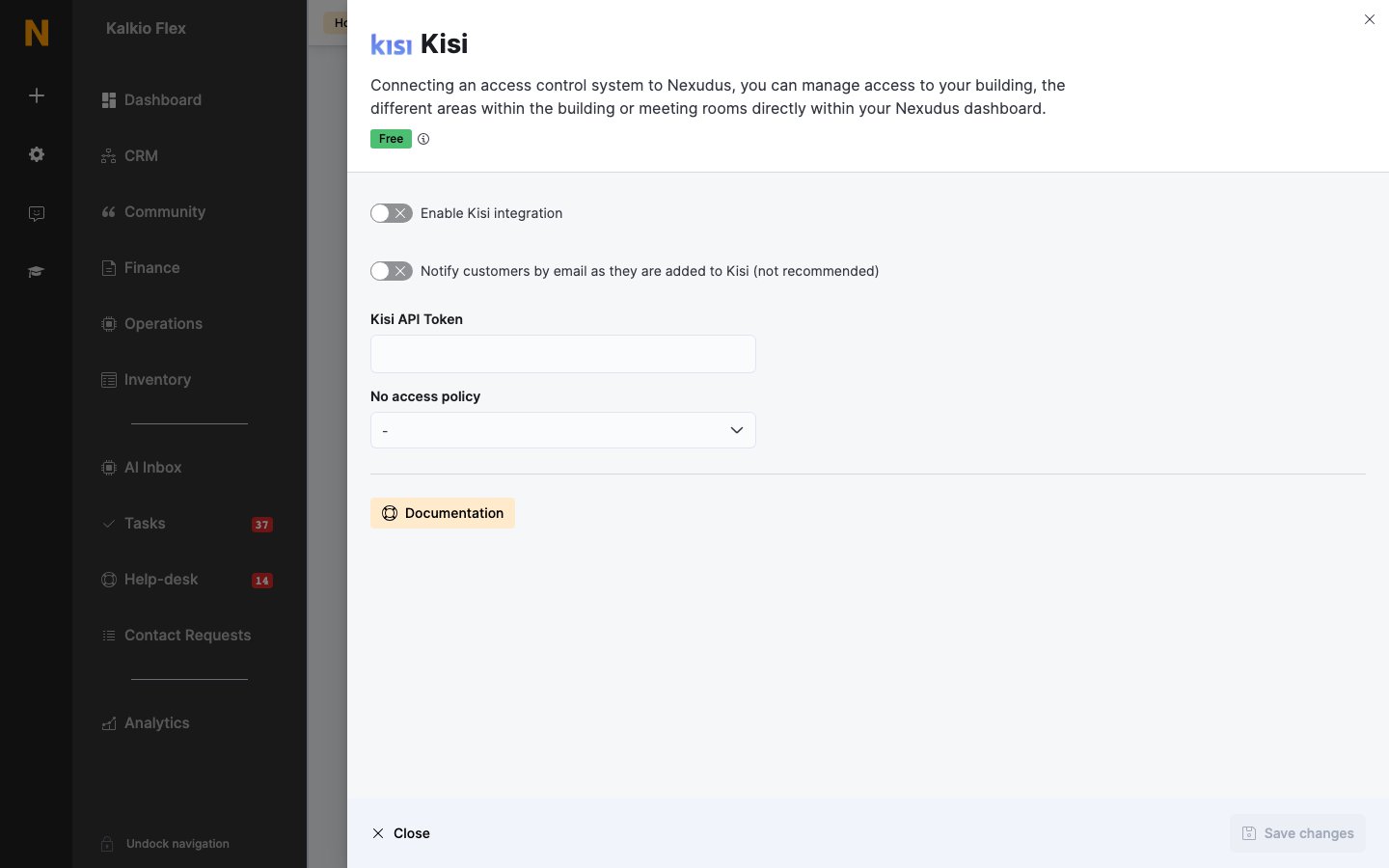
Go to **Settings → Integrations → Kisi**, turn on **Enable Kisi integration**, enter the **Kisi API Token**, choose a **No access policy**, and save.
Under **Passes** and **Resources**, choose the **Kisi access group** for each item. Leave an item blank if it shouldn't open any doors.
Under **Presence tracking**, choose an **Action** for each lock (below).
Save, then check access with a test customer before going live.
 | Setting | What it does |
| - | - |
| **Notify customers by email as they are added to Kisi (not recommended)** | Kisi emails customers when they're added, and lets them set up their own Kisi login. Leave off so access stays managed through Nexudus. |
| **No access policy** | What happens to a customer's Kisi user when they lose all access: **Suspend Kisi user account** (they can be re-enabled later) or **Delete Kisi user account**. |
## Checking customers in from door unlocks
Under **Presence tracking**, set each lock's **Action**:
* **Check customer in** — for example, your main entrance.
* **Check customer out** — for example, an exit door.
* **Toggle customer check-in status** — each unlock switches between checked in and checked out.
* **Do nothing** — the door opens but doesn't affect check-ins.
Door unlocks reach Nexudus every few minutes, so check-ins can take up to 10 minutes to appear. Kisi matches customers by email address, so it must be the same in both systems.
## How customers open doors
Customers with access open doors with their phone in the [white-label Passport app](/passport/white-label-setup): with Bluetooth turned on and the app signed in, they hold their phone near the reader until the light turns green. They can also tap the **Unlock door** tile, or scan an [automation tile](/platform/settings/automation-tiles) set to **Unlock KISI door**.
## Troubleshooting
Check that they have an active pass or a booking that starts within the next 15 minutes, and that the pass or resource is linked to a Kisi group containing that door. Check the door is in the group in Kisi. If they use the app, make sure Bluetooth is on.
Check the lock's **Action** under **Presence tracking**, and allow up to 10 minutes. Make sure the customer's email address is the same in Kisi and Nexudus.
If Kisi rejects the API token, Nexudus turns the integration off. Create a new API key in Kisi, enter it, turn the integration back on, and save. Errors are also listed in [Business checkup](/platform/analytics/business-checkup).
## Related
* [Access control](/integrations/access-control/overview) — how access control works in Nexudus
* [Passes](/platform/billing/time-passes) — giving customers access through passes
* [Check-ins](/platform/operations/check-ins) — tracking who's in your space
This documentation is built and hosted on [Mintlify](https://mintlify.com), a developer documentation platform.
| Setting | What it does |
| - | - |
| **Notify customers by email as they are added to Kisi (not recommended)** | Kisi emails customers when they're added, and lets them set up their own Kisi login. Leave off so access stays managed through Nexudus. |
| **No access policy** | What happens to a customer's Kisi user when they lose all access: **Suspend Kisi user account** (they can be re-enabled later) or **Delete Kisi user account**. |
## Checking customers in from door unlocks
Under **Presence tracking**, set each lock's **Action**:
* **Check customer in** — for example, your main entrance.
* **Check customer out** — for example, an exit door.
* **Toggle customer check-in status** — each unlock switches between checked in and checked out.
* **Do nothing** — the door opens but doesn't affect check-ins.
Door unlocks reach Nexudus every few minutes, so check-ins can take up to 10 minutes to appear. Kisi matches customers by email address, so it must be the same in both systems.
## How customers open doors
Customers with access open doors with their phone in the [white-label Passport app](/passport/white-label-setup): with Bluetooth turned on and the app signed in, they hold their phone near the reader until the light turns green. They can also tap the **Unlock door** tile, or scan an [automation tile](/platform/settings/automation-tiles) set to **Unlock KISI door**.
## Troubleshooting
Check that they have an active pass or a booking that starts within the next 15 minutes, and that the pass or resource is linked to a Kisi group containing that door. Check the door is in the group in Kisi. If they use the app, make sure Bluetooth is on.
Check the lock's **Action** under **Presence tracking**, and allow up to 10 minutes. Make sure the customer's email address is the same in Kisi and Nexudus.
If Kisi rejects the API token, Nexudus turns the integration off. Create a new API key in Kisi, enter it, turn the integration back on, and save. Errors are also listed in [Business checkup](/platform/analytics/business-checkup).
## Related
* [Access control](/integrations/access-control/overview) — how access control works in Nexudus
* [Passes](/platform/billing/time-passes) — giving customers access through passes
* [Check-ins](/platform/operations/check-ins) — tracking who's in your space
This documentation is built and hosted on [Mintlify](https://mintlify.com), a developer documentation platform.