> ## Documentation Index
> Fetch the complete documentation index at: https://learn.nexudus.com/llms.txt
> Use this file to discover all available pages before exploring further.
# Payment Gateways
> Connect card and direct debit payment gateways so customers can pay invoices online and have future invoices collected automatically.
## Overview
A payment gateway connects Nexudus to the provider that moves the money, such as Stripe, GoCardless or PayPal. Once a gateway is enabled for a location, customers can pay their invoices in the Members Portal and app, and Nexudus can collect future invoices automatically from the card or bank account they saved.
You can enable more than one gateway per location. A common setup is one card gateway for one-off purchases plus one direct debit gateway for recurring plan invoices.
## How to access
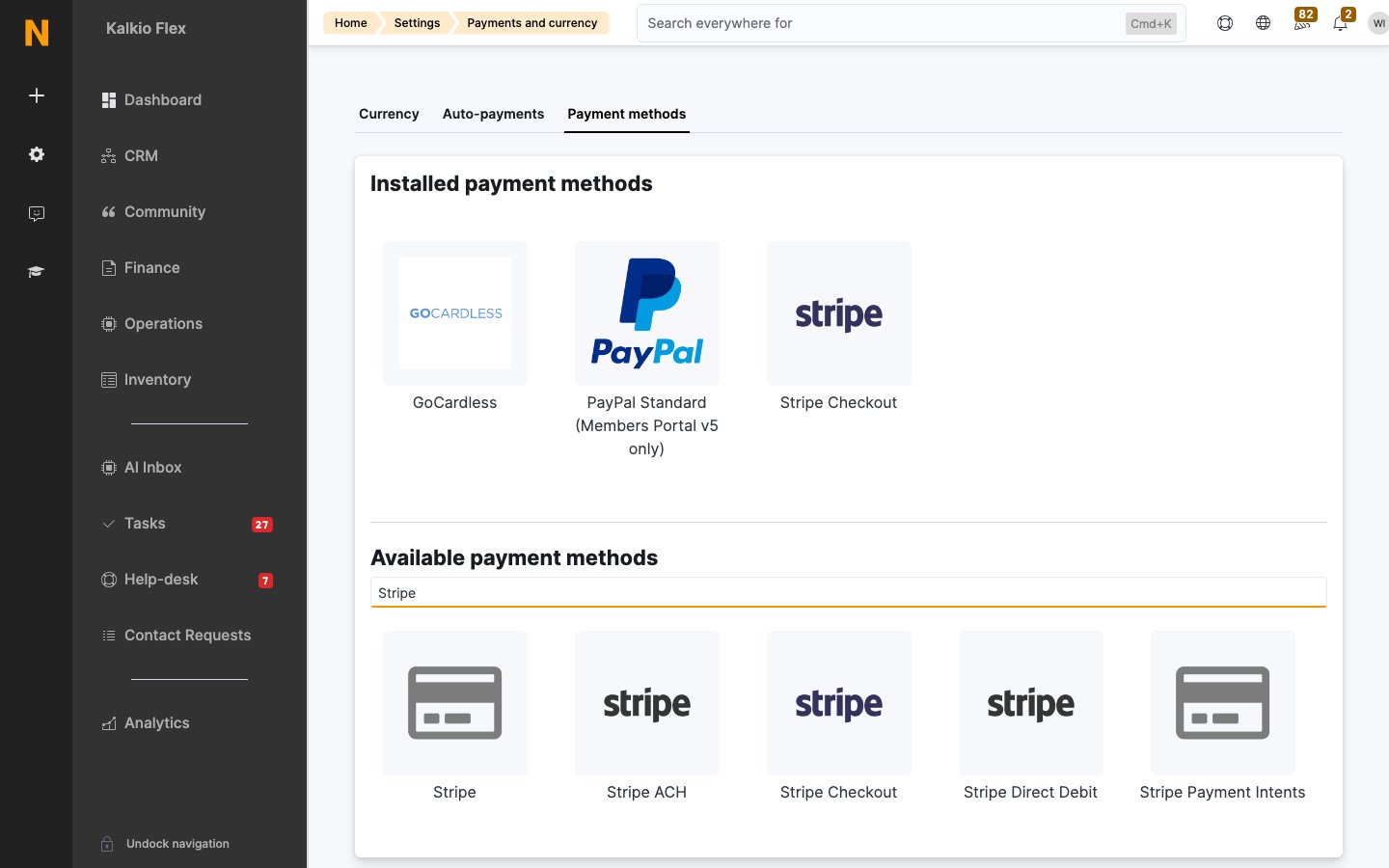
Go to **Settings → Billing and payments → Payments and currency** and open the **Payment methods** tab.
The top of the tab lists the payment methods already installed for your location. Below it, under **Available payment methods**, type a provider's name in the search box to find it, then select its tile to open its settings.
 Payment methods are configured per location. If you run several locations, switch to each one and enable the gateway there too. You can use the same provider account for every location or a different account per location.
## Key concepts
### Card gateways and direct debit
| | Card gateways | Direct debit and ACH |
| - | - | - |
| **How it works** | The customer enters card details and the payment is authorised straight away. | Money is pulled from the customer's bank account under a mandate the customer and their bank approve. |
| **Settlement time** | Minutes. | At least 3 working days, and up to 12 working days for the first payment on a new mandate. |
| **Best for** | One-off purchases, bookings, passes and event tickets. | Larger recurring invoices, such as monthly plans. |
| **Nexudus charge** | Only for gateways connected through Spreedly. See [Costs](#costs). | None |
### Costs
Card gateways connected through [Spreedly](/integrations/payment-gateways/spreedly) add a charge to your Nexudus subscription. All other gateways, including Stripe Checkout and direct debit, have no Nexudus charge.
| Gateway | Monthly | Per transaction |
| - | - | - |
| Card gateways connected through Spreedly | \$10 / £10 / €10 | \$0.04 / £0.04 / €0.04 |
| All other gateways | None | None |
Payment providers charge their own fees on top. Each gateway's **Payment gateway features** panel shows whether the Nexudus charge applies.
### When payments are collected
Nexudus tries to collect payment automatically when an invoice falls due, as long as the customer has saved payment details and **Automatically collect payment for due invoices if payment details are available** is ticked on their record. See [Customer payment methods](/integrations/payment-gateways/customer-payment-methods).
Direct debit takes several working days to settle, so allow for it when you set the default due date (**Settings → Billing and payments → Payments and currency → Auto-payments**). For example, if you issue plan invoices on the 1st with a due date of the 3rd, direct debit payments usually arrive on the 6th or later.
### Strong Customer Authentication (SCA)
If both your business and your customer's bank are in the European Economic Area, card payments must use Strong Customer Authentication (two-factor approval, usually through 3D Secure). Pick a card gateway that supports 3D Secure. [Stripe Checkout](/integrations/payment-gateways/stripe-checkout) and [Stripe Payment Intents](/integrations/payment-gateways/spreedly#stripe-payment-intents) both do.
## Choose a gateway
| Gateway | Type | Automatic recurring payments | Guide |
| - | - | - | - |
| Stripe Checkout | Card, wallets, and bank debits you enable in Stripe, including US ACH | Yes | [Stripe Checkout](/integrations/payment-gateways/stripe-checkout) |
| Stripe Direct Debit (BACS) | UK direct debit | Yes | [Stripe Direct Debit](/integrations/payment-gateways/stripe-direct-debit) |
| Stripe ACH | Deprecated. Use Stripe Checkout for US ACH. | — | [ACH payments](/integrations/payment-gateways/stripe-checkout#ach-payments) |
| GoCardless | Direct debit | Yes | [GoCardless](/integrations/payment-gateways/gocardless) |
| Card gateways through Spreedly (Stripe Payment Intents, Worldpay, Authorize.net, QuickBooks Payments, Mercado Pago and many more) | Card | Yes | [Card gateways (Spreedly)](/integrations/payment-gateways/spreedly) |
| Forte ACH | US bank debit | Yes | [Forte](/integrations/payment-gateways/forte) |
| PayPal Standard (Members Portal v5 only) | PayPal account or card | No | [PayPal](/integrations/payment-gateways/paypal) |
| Xero payment links | Whatever your Xero organisation accepts | No | [Xero payment links](/integrations/payment-gateways/xero) |
| Hosted payment page | Your own payment page | No | [Hosted payment pages](/integrations/payment-gateways/hosted-payment-pages) |
| Razorpay, Klarna, Midtrans, Peach Payments and others | Varies | No | [Other gateways](/integrations/payment-gateways/other-gateways) |
### Which gateways work in my country?
Availability depends on the provider, not on Nexudus:
* **Card gateways through Spreedly**: search [Spreedly's gateway directory](https://www.spreedly.com/gateways) for your country. If you need SCA, check that the gateway supports Spreedly 3DS2 Global or gateway-specific 3DS2.
* **Stripe**: see [Stripe's supported countries](https://stripe.com/global).
* **GoCardless**: see [GoCardless's supported countries](https://gocardless.com/en-us/countries/).
* **PayPal**: see [PayPal's country list](https://www.paypal.com/uk/webapps/mpp/country-worldwide).
## Enable a payment gateway
Open an account with the provider and make sure it is fully activated for live payments. Collect the API keys or other credentials the gateway's guide lists.
Go to **Settings → Billing and payments → Payments and currency → Payment methods** and search for the provider under **Available payment methods**. Select its tile.
Turn on **Enabled** (the switch name varies slightly by gateway) and paste in your credentials. Card gateways connected through Spreedly also ask for a **Payment gateway name**, which customers see at checkout, and an optional transaction fee.
Select **Save changes**. The gateway moves to the list of installed payment methods at the top of the tab.
Make a small test payment before you rely on the gateway. See [Test a payment method](#test-a-payment-method) below.
Keep API keys and secrets private. Anyone with your secret key can take payments or issue refunds on your provider account.
### Transaction fees
Card gateways connected through Spreedly can add a transaction fee to invoices paid through them. The fee is a percentage of the amount paid and appears as a separate **Transaction fee** line on the invoice. You can choose a **Tax rate** for the fee (the fee is treated as tax-inclusive) and a **Financial account** to record it against.
Surcharging card payments is not allowed in many countries, including the UK and most of the EU. Check your local rules before you set a transaction fee.
### Allowlist Nexudus IP addresses
Some providers only accept API calls from approved IP addresses. If your provider asks, allow these addresses: `18.211.189.236`, `54.204.55.35`, `54.147.89.101`, `18.203.12.142`, `63.35.156.43` and `52.213.77.170`.
## Test a payment method
Test every gateway in each location before you rely on it. Test payments use **real money**, so pay with a card or bank account you own and refund it afterwards.
Add a customer you control, with a customer account so they can sign in to the Members Portal.
Open the customer, sell them a product from the **Sales** tab, then issue an invoice for it. Charge at least \$1: some gateways decline very small amounts as suspected fraud.
Sign in to the Members Portal as the test customer, open the unpaid invoice and pay it with the gateway you are testing.
Card payments show as paid within a few minutes. Direct debit payments need a mandate first and take at least 3 working days to settle.
Refund the test invoice. See [Credits, refunds and cancellations](/platform/finance/invoices/credits-refunds-and-cancellations#refund-an-invoice).
## Disable a payment gateway
Open the gateway from the list of installed payment methods, turn off its enabled switch and select **Save changes**. Customers no longer see it in the Members Portal and Nexudus stops attempting payments through it.
Card gateways connected through Spreedly can also be removed completely with **Delete**.
Enable a replacement gateway before you disable the old one, so automatic collection keeps working. Customers who paid through the old gateway need to save new payment details.
## Troubleshooting
* **A gateway doesn't appear at checkout.** Check it is enabled in the location the customer is buying from. Gateways only appear when there is an amount to pay.
* **Payments fail straight after setup.** Most often the credentials are test or sandbox keys, or the provider account is not fully activated. Use live credentials from an activated account.
* **A card gateway shows a red badge.** The gateway is installed but not enabled or connected in the current location. Open it and turn it on under **This gateway is available at**.
* **Invoices aren't collected automatically.** Check the gateway supports automatic recurring payments (see the table above), that the customer has saved payment details, and that automatic collection is on for the customer.
## Related
* [Customer payment methods](/integrations/payment-gateways/customer-payment-methods)
* [Invoices](/platform/finance/invoices)
* [Contracts](/platform/finance/contracts)
* [Financial accounts](/platform/finance/financial-accounts)
This documentation is built and hosted on [Mintlify](https://mintlify.com), a developer documentation platform.
Payment methods are configured per location. If you run several locations, switch to each one and enable the gateway there too. You can use the same provider account for every location or a different account per location.
## Key concepts
### Card gateways and direct debit
| | Card gateways | Direct debit and ACH |
| - | - | - |
| **How it works** | The customer enters card details and the payment is authorised straight away. | Money is pulled from the customer's bank account under a mandate the customer and their bank approve. |
| **Settlement time** | Minutes. | At least 3 working days, and up to 12 working days for the first payment on a new mandate. |
| **Best for** | One-off purchases, bookings, passes and event tickets. | Larger recurring invoices, such as monthly plans. |
| **Nexudus charge** | Only for gateways connected through Spreedly. See [Costs](#costs). | None |
### Costs
Card gateways connected through [Spreedly](/integrations/payment-gateways/spreedly) add a charge to your Nexudus subscription. All other gateways, including Stripe Checkout and direct debit, have no Nexudus charge.
| Gateway | Monthly | Per transaction |
| - | - | - |
| Card gateways connected through Spreedly | \$10 / £10 / €10 | \$0.04 / £0.04 / €0.04 |
| All other gateways | None | None |
Payment providers charge their own fees on top. Each gateway's **Payment gateway features** panel shows whether the Nexudus charge applies.
### When payments are collected
Nexudus tries to collect payment automatically when an invoice falls due, as long as the customer has saved payment details and **Automatically collect payment for due invoices if payment details are available** is ticked on their record. See [Customer payment methods](/integrations/payment-gateways/customer-payment-methods).
Direct debit takes several working days to settle, so allow for it when you set the default due date (**Settings → Billing and payments → Payments and currency → Auto-payments**). For example, if you issue plan invoices on the 1st with a due date of the 3rd, direct debit payments usually arrive on the 6th or later.
### Strong Customer Authentication (SCA)
If both your business and your customer's bank are in the European Economic Area, card payments must use Strong Customer Authentication (two-factor approval, usually through 3D Secure). Pick a card gateway that supports 3D Secure. [Stripe Checkout](/integrations/payment-gateways/stripe-checkout) and [Stripe Payment Intents](/integrations/payment-gateways/spreedly#stripe-payment-intents) both do.
## Choose a gateway
| Gateway | Type | Automatic recurring payments | Guide |
| - | - | - | - |
| Stripe Checkout | Card, wallets, and bank debits you enable in Stripe, including US ACH | Yes | [Stripe Checkout](/integrations/payment-gateways/stripe-checkout) |
| Stripe Direct Debit (BACS) | UK direct debit | Yes | [Stripe Direct Debit](/integrations/payment-gateways/stripe-direct-debit) |
| Stripe ACH | Deprecated. Use Stripe Checkout for US ACH. | — | [ACH payments](/integrations/payment-gateways/stripe-checkout#ach-payments) |
| GoCardless | Direct debit | Yes | [GoCardless](/integrations/payment-gateways/gocardless) |
| Card gateways through Spreedly (Stripe Payment Intents, Worldpay, Authorize.net, QuickBooks Payments, Mercado Pago and many more) | Card | Yes | [Card gateways (Spreedly)](/integrations/payment-gateways/spreedly) |
| Forte ACH | US bank debit | Yes | [Forte](/integrations/payment-gateways/forte) |
| PayPal Standard (Members Portal v5 only) | PayPal account or card | No | [PayPal](/integrations/payment-gateways/paypal) |
| Xero payment links | Whatever your Xero organisation accepts | No | [Xero payment links](/integrations/payment-gateways/xero) |
| Hosted payment page | Your own payment page | No | [Hosted payment pages](/integrations/payment-gateways/hosted-payment-pages) |
| Razorpay, Klarna, Midtrans, Peach Payments and others | Varies | No | [Other gateways](/integrations/payment-gateways/other-gateways) |
### Which gateways work in my country?
Availability depends on the provider, not on Nexudus:
* **Card gateways through Spreedly**: search [Spreedly's gateway directory](https://www.spreedly.com/gateways) for your country. If you need SCA, check that the gateway supports Spreedly 3DS2 Global or gateway-specific 3DS2.
* **Stripe**: see [Stripe's supported countries](https://stripe.com/global).
* **GoCardless**: see [GoCardless's supported countries](https://gocardless.com/en-us/countries/).
* **PayPal**: see [PayPal's country list](https://www.paypal.com/uk/webapps/mpp/country-worldwide).
## Enable a payment gateway
Open an account with the provider and make sure it is fully activated for live payments. Collect the API keys or other credentials the gateway's guide lists.
Go to **Settings → Billing and payments → Payments and currency → Payment methods** and search for the provider under **Available payment methods**. Select its tile.
Turn on **Enabled** (the switch name varies slightly by gateway) and paste in your credentials. Card gateways connected through Spreedly also ask for a **Payment gateway name**, which customers see at checkout, and an optional transaction fee.
Select **Save changes**. The gateway moves to the list of installed payment methods at the top of the tab.
Make a small test payment before you rely on the gateway. See [Test a payment method](#test-a-payment-method) below.
Keep API keys and secrets private. Anyone with your secret key can take payments or issue refunds on your provider account.
### Transaction fees
Card gateways connected through Spreedly can add a transaction fee to invoices paid through them. The fee is a percentage of the amount paid and appears as a separate **Transaction fee** line on the invoice. You can choose a **Tax rate** for the fee (the fee is treated as tax-inclusive) and a **Financial account** to record it against.
Surcharging card payments is not allowed in many countries, including the UK and most of the EU. Check your local rules before you set a transaction fee.
### Allowlist Nexudus IP addresses
Some providers only accept API calls from approved IP addresses. If your provider asks, allow these addresses: `18.211.189.236`, `54.204.55.35`, `54.147.89.101`, `18.203.12.142`, `63.35.156.43` and `52.213.77.170`.
## Test a payment method
Test every gateway in each location before you rely on it. Test payments use **real money**, so pay with a card or bank account you own and refund it afterwards.
Add a customer you control, with a customer account so they can sign in to the Members Portal.
Open the customer, sell them a product from the **Sales** tab, then issue an invoice for it. Charge at least \$1: some gateways decline very small amounts as suspected fraud.
Sign in to the Members Portal as the test customer, open the unpaid invoice and pay it with the gateway you are testing.
Card payments show as paid within a few minutes. Direct debit payments need a mandate first and take at least 3 working days to settle.
Refund the test invoice. See [Credits, refunds and cancellations](/platform/finance/invoices/credits-refunds-and-cancellations#refund-an-invoice).
## Disable a payment gateway
Open the gateway from the list of installed payment methods, turn off its enabled switch and select **Save changes**. Customers no longer see it in the Members Portal and Nexudus stops attempting payments through it.
Card gateways connected through Spreedly can also be removed completely with **Delete**.
Enable a replacement gateway before you disable the old one, so automatic collection keeps working. Customers who paid through the old gateway need to save new payment details.
## Troubleshooting
* **A gateway doesn't appear at checkout.** Check it is enabled in the location the customer is buying from. Gateways only appear when there is an amount to pay.
* **Payments fail straight after setup.** Most often the credentials are test or sandbox keys, or the provider account is not fully activated. Use live credentials from an activated account.
* **A card gateway shows a red badge.** The gateway is installed but not enabled or connected in the current location. Open it and turn it on under **This gateway is available at**.
* **Invoices aren't collected automatically.** Check the gateway supports automatic recurring payments (see the table above), that the customer has saved payment details, and that automatic collection is on for the customer.
## Related
* [Customer payment methods](/integrations/payment-gateways/customer-payment-methods)
* [Invoices](/platform/finance/invoices)
* [Contracts](/platform/finance/contracts)
* [Financial accounts](/platform/finance/financial-accounts)
This documentation is built and hosted on [Mintlify](https://mintlify.com), a developer documentation platform.