> ## Documentation Index
> Fetch the complete documentation index at: https://learn.nexudus.com/llms.txt
> Use this file to discover all available pages before exploring further.
# Membership Plans
> How the AI presents and sells membership plans — hot desks, dedicated desks, and virtual offices — across all channels.
The AI can present your membership plans and generate direct sign-up links for prospects. This is the primary sales tool for recurring memberships and works on all channels: chat, email, WhatsApp, and voice. On voice, the AI describes the plans and offers to send a sign-up link via email or WhatsApp.
 ## Start date requirement
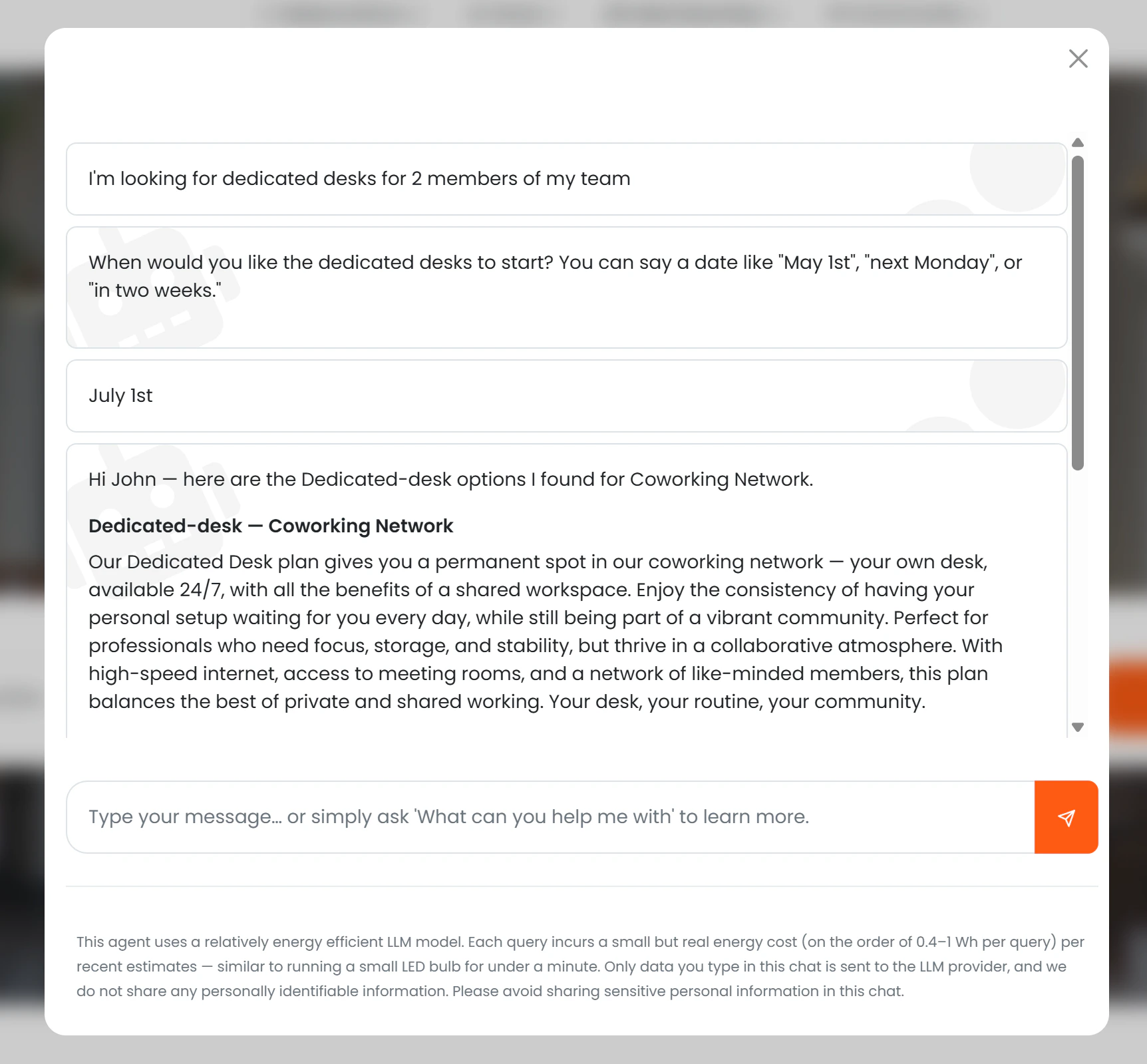
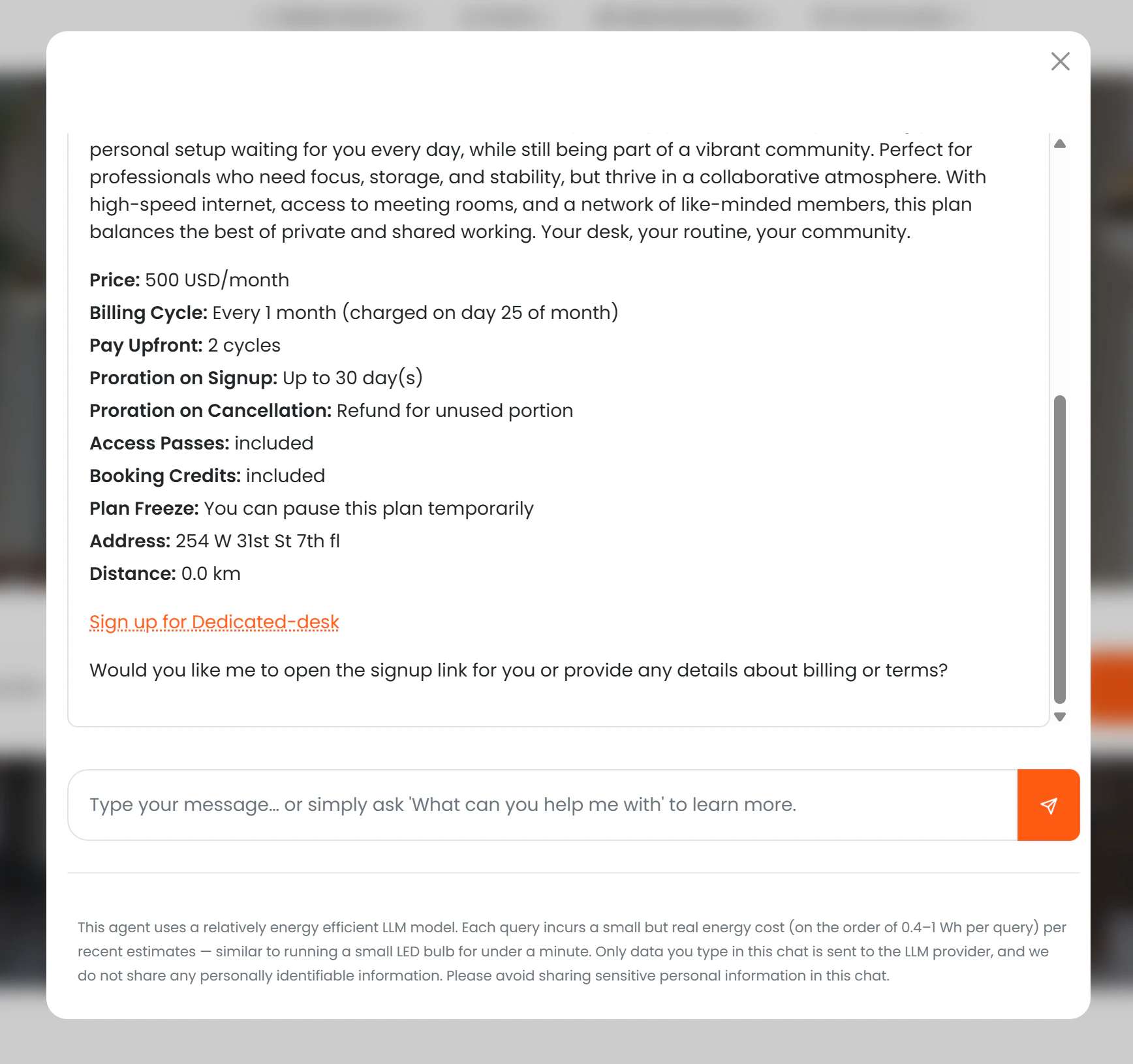
A start date is required to generate a valid checkout link. If the prospect has not mentioned one, the AI asks for it before presenting plans. Once a start date is provided, each plan card includes a **"Sign up for \[Plan Name]"** button that takes the prospect directly to checkout with the plan and start date pre-selected.
## What the AI shows
For each eligible plan, the AI presents:
* Name and description
* Monthly price (if *Show price to AI* is enabled)
* Sign-up fee (if applicable)
* Billing cycle
* Notice period
* Whether the plan includes time passes or booking credits
* Location name, address, and distance from the user
* A **"Sign up for \[Plan Name]"** call-to-action button
Up to five visible plans are shown per request.
## Plan types
The AI understands natural-language descriptions of plan types and maps them to the correct tariff categories in Nexudus:
| What the prospect says | What Nexudus searches |
| ---------------------------------------------------- | ---------------------------------------------- |
| Hot desk / flexible desk / coworking | Full-time and part-time hot desk tariffs |
| Dedicated desk / fixed desk | Full-time and part-time dedicated desk tariffs |
| Virtual office / postal address / registered address | Virtual office and virtual tariffs |
## Visibility rules
| Condition | What the AI does |
| --------------------------------------- | ---------------------------------------------------------------------- |
| *Available to AI* = off | Plan is never mentioned |
| *Available to AI* = on, *Visible* = on | Full details and sign-up link are shown |
| *Available to AI* = on, *Visible* = off | AI acknowledges options exist and directs the user to contact the team |
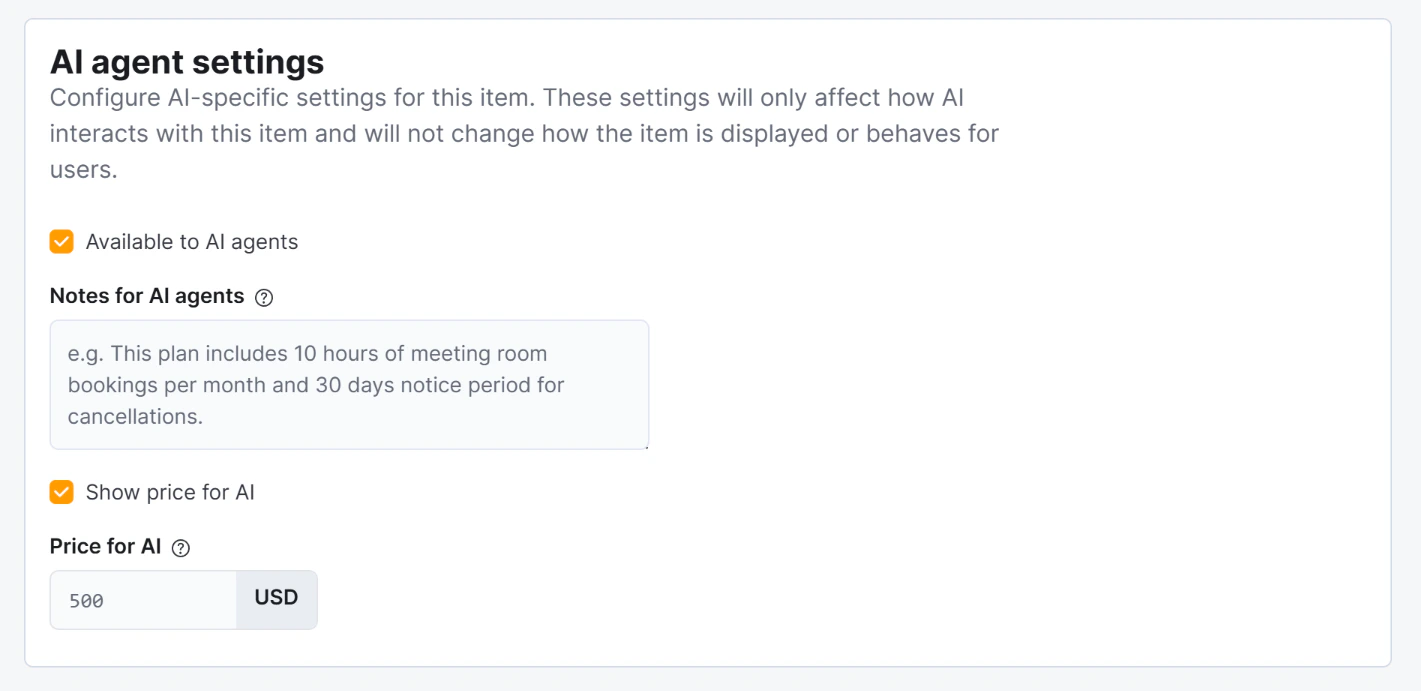
| *Show price to AI* = off | Plan is described without a price |
| *Price for AI* is set | That price is shown instead of the regular price |
*Notes for AI* are incorporated naturally into the AI's description of the plan. Archived tariffs are never shown.
## Start date requirement
A start date is required to generate a valid checkout link. If the prospect has not mentioned one, the AI asks for it before presenting plans. Once a start date is provided, each plan card includes a **"Sign up for \[Plan Name]"** button that takes the prospect directly to checkout with the plan and start date pre-selected.
## What the AI shows
For each eligible plan, the AI presents:
* Name and description
* Monthly price (if *Show price to AI* is enabled)
* Sign-up fee (if applicable)
* Billing cycle
* Notice period
* Whether the plan includes time passes or booking credits
* Location name, address, and distance from the user
* A **"Sign up for \[Plan Name]"** call-to-action button
Up to five visible plans are shown per request.
## Plan types
The AI understands natural-language descriptions of plan types and maps them to the correct tariff categories in Nexudus:
| What the prospect says | What Nexudus searches |
| ---------------------------------------------------- | ---------------------------------------------- |
| Hot desk / flexible desk / coworking | Full-time and part-time hot desk tariffs |
| Dedicated desk / fixed desk | Full-time and part-time dedicated desk tariffs |
| Virtual office / postal address / registered address | Virtual office and virtual tariffs |
## Visibility rules
| Condition | What the AI does |
| --------------------------------------- | ---------------------------------------------------------------------- |
| *Available to AI* = off | Plan is never mentioned |
| *Available to AI* = on, *Visible* = on | Full details and sign-up link are shown |
| *Available to AI* = on, *Visible* = off | AI acknowledges options exist and directs the user to contact the team |
| *Show price to AI* = off | Plan is described without a price |
| *Price for AI* is set | That price is shown instead of the regular price |
*Notes for AI* are incorporated naturally into the AI's description of the plan. Archived tariffs are never shown.
 ## Conversion tracking
The sign-up link contains the **session ID**, the selected tariff ID, and the chosen start date. When the prospect completes checkout and a contract is created in Nexudus, the system records the link between that contract and the chat session.
This produces up to two conversion badges in the [AI Conversations list](./admin-panel):
* **"Customer created"** (green) — if the person was not already in Nexudus as a customer
* **"Contract created"** (blue) — for the membership contract itself
## Conversion tracking
The sign-up link contains the **session ID**, the selected tariff ID, and the chosen start date. When the prospect completes checkout and a contract is created in Nexudus, the system records the link between that contract and the chat session.
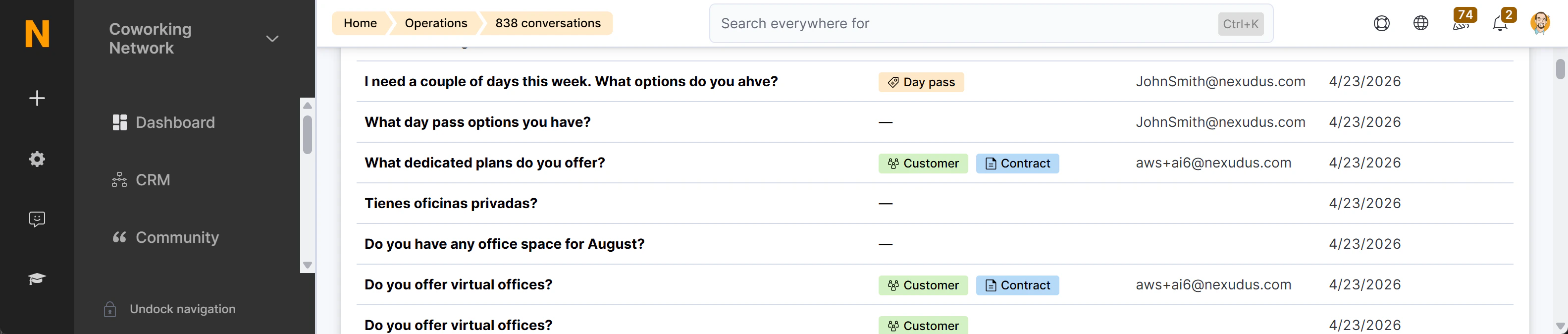
This produces up to two conversion badges in the [AI Conversations list](./admin-panel):
* **"Customer created"** (green) — if the person was not already in Nexudus as a customer
* **"Contract created"** (blue) — for the membership contract itself
 See [Conversion Tracking](./conversion-tracking) for a full explanation of how session IDs work.