> ## Documentation Index
> Fetch the complete documentation index at: https://learn.nexudus.com/llms.txt
> Use this file to discover all available pages before exploring further.
# Sign In
> The authentication page with email/password, magic links, OTP, and SSO options.
# Sign In
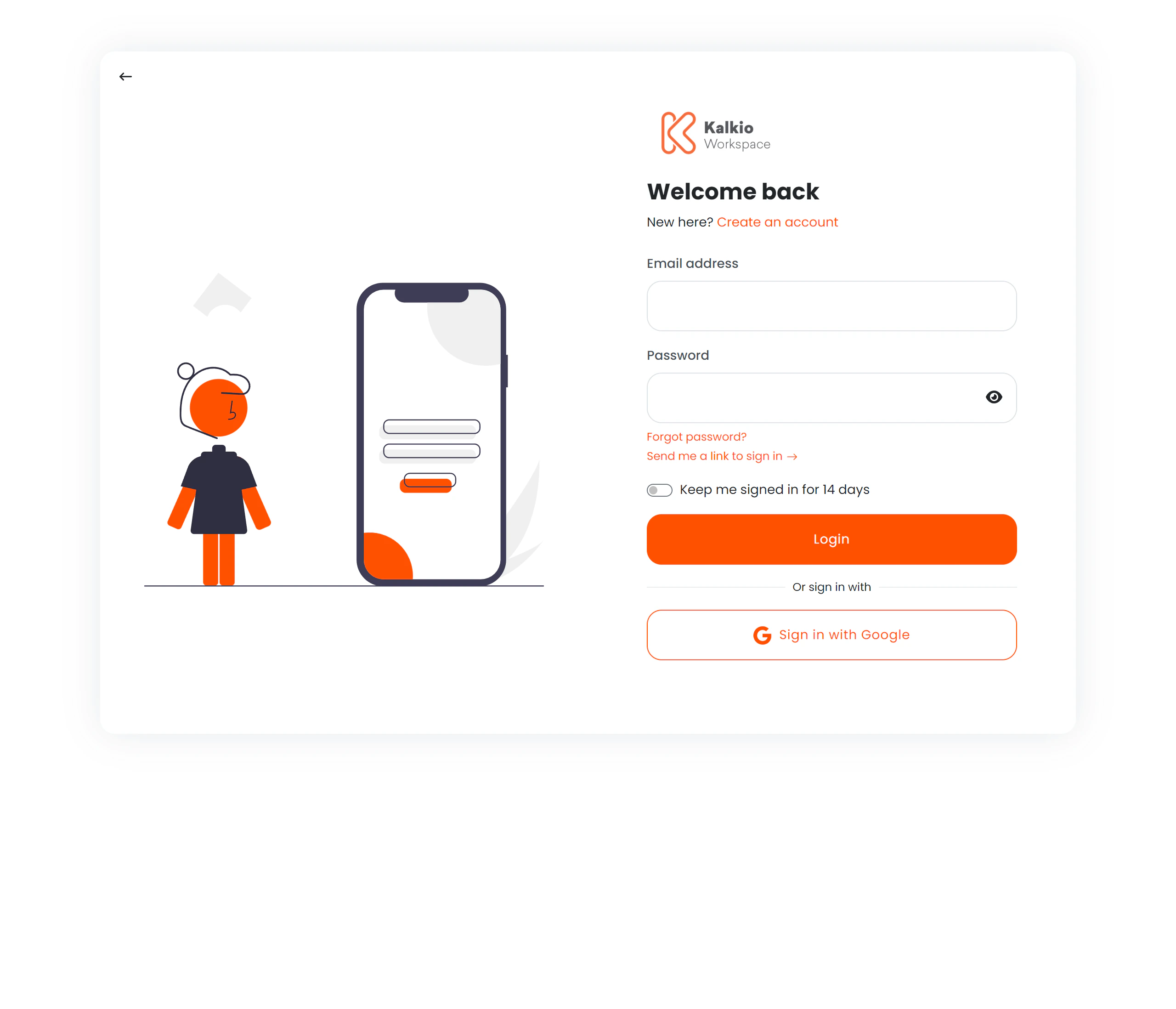
The sign-in page is the gateway to the Members Portal. It supports multiple authentication methods to suit different security and convenience needs.
 ## Authentication methods
### Email & password
The standard login flow:
| Field | Description |
| --------------- | --------------------------------------------- |
| **Email** | Member's registered email address (validated) |
| **Password** | Account password with show/hide toggle |
| **Remember me** | Checkbox to extend the session to 14 days |
A **Forgot password?** link leads to the [password recovery](./password-recovery) flow.
### Magic link
Instead of typing a password, members can request a one-time login link sent to their email. After clicking "Send magic link", the page shows a **Go to Inbox** section with quick links to popular email providers (Gmail, Outlook, iCloud, Yahoo).
### Two-factor authentication (TOTP)
If enabled, members enter a 6-digit code from their authenticator app after providing their email and password. The OTP input features:
* Auto-focus advancing between digits
* Numeric-only input
* Keyboard navigation with backspace support
### Single Sign-On (SSO)
Buttons for external identity providers appear when configured:
| Provider | Description |
| -------------------------- | ------------------------------------- |
| **Google** | OAuth via Google accounts |
| **Okta** | Enterprise SSO via Okta |
| **Azure Active Directory** | Enterprise SSO via Microsoft Azure AD |
| **OpenID Connect** | Generic OpenID Connect provider |
SSO buttons display provider names with fallback labels.
## Account creation
If signup is enabled for the location, a **Create an account** link opens a signup form as a modal overlay — members can register without leaving the login page.
## Page layout
The page uses a split layout:
| Side | Content |
| --------- | ---------------------------------------- |
| **Left** | Illustration graphic (hidden on mobile) |
| **Right** | Login form, SSO buttons, and signup link |
The business logo and primary colour theme are applied automatically from your location settings.
## Redirect handling
After successful login, members are redirected to their intended destination. The redirect URL is validated against a list of allowed domains to prevent open-redirect vulnerabilities.
## Configuration
| Setting | Effect |
| -------------- | ----------------------------------------------------- |
| Signup enabled | Controls whether the "Create an account" link appears |
| Google SSO | Enables Google login button |
| Okta SSO | Enables Okta login button |
| Azure AD SSO | Enables Azure AD login button |
| OpenID Connect | Enables OpenID Connect login button |
| Magic link | Built-in, always available |
## Authentication methods
### Email & password
The standard login flow:
| Field | Description |
| --------------- | --------------------------------------------- |
| **Email** | Member's registered email address (validated) |
| **Password** | Account password with show/hide toggle |
| **Remember me** | Checkbox to extend the session to 14 days |
A **Forgot password?** link leads to the [password recovery](./password-recovery) flow.
### Magic link
Instead of typing a password, members can request a one-time login link sent to their email. After clicking "Send magic link", the page shows a **Go to Inbox** section with quick links to popular email providers (Gmail, Outlook, iCloud, Yahoo).
### Two-factor authentication (TOTP)
If enabled, members enter a 6-digit code from their authenticator app after providing their email and password. The OTP input features:
* Auto-focus advancing between digits
* Numeric-only input
* Keyboard navigation with backspace support
### Single Sign-On (SSO)
Buttons for external identity providers appear when configured:
| Provider | Description |
| -------------------------- | ------------------------------------- |
| **Google** | OAuth via Google accounts |
| **Okta** | Enterprise SSO via Okta |
| **Azure Active Directory** | Enterprise SSO via Microsoft Azure AD |
| **OpenID Connect** | Generic OpenID Connect provider |
SSO buttons display provider names with fallback labels.
## Account creation
If signup is enabled for the location, a **Create an account** link opens a signup form as a modal overlay — members can register without leaving the login page.
## Page layout
The page uses a split layout:
| Side | Content |
| --------- | ---------------------------------------- |
| **Left** | Illustration graphic (hidden on mobile) |
| **Right** | Login form, SSO buttons, and signup link |
The business logo and primary colour theme are applied automatically from your location settings.
## Redirect handling
After successful login, members are redirected to their intended destination. The redirect URL is validated against a list of allowed domains to prevent open-redirect vulnerabilities.
## Configuration
| Setting | Effect |
| -------------- | ----------------------------------------------------- |
| Signup enabled | Controls whether the "Create an account" link appears |
| Google SSO | Enables Google login button |
| Okta SSO | Enables Okta login button |
| Azure AD SSO | Enables Azure AD login button |
| OpenID Connect | Enables OpenID Connect login button |
| Magic link | Built-in, always available |