> ## Documentation Index
> Fetch the complete documentation index at: https://learn.nexudus.com/llms.txt
> Use this file to discover all available pages before exploring further.
# Booking Checkout
> The booking checkout flow where members create or edit resource bookings.
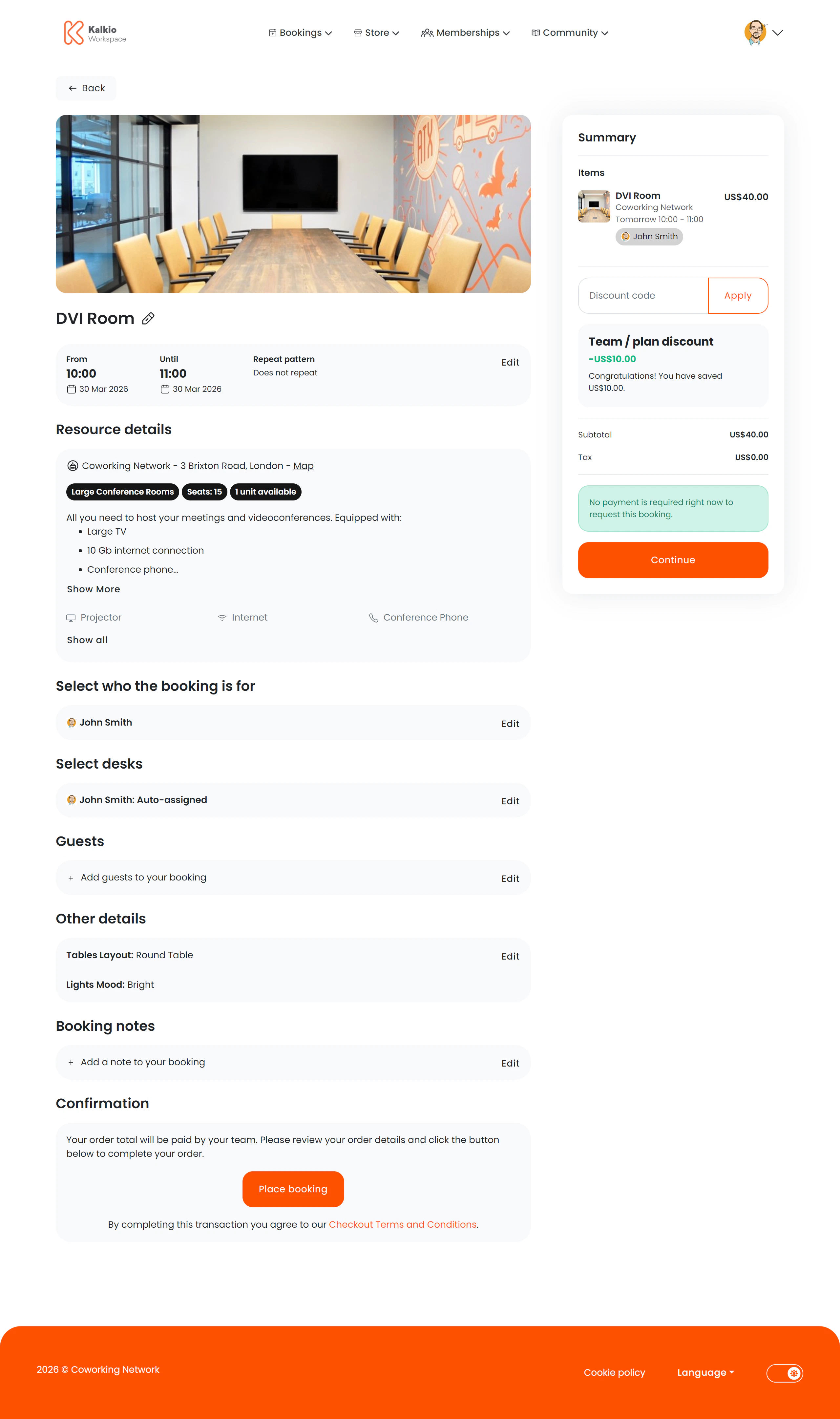
The booking checkout page is where members finalise a resource booking — selecting dates, desks, visitors, add-ons, and completing payment.
 ## What members see
The page uses a two-column layout: booking details on the left and a basket summary on the right.
### Booking details (left column)
| Section | Description |
| ------------------------ | --------------------------------------------------------------------------------- |
| **Resource information** | Resource image, name, features, and selected dates |
| **Booking for** | Specifies who the booking is for (self or a team member) |
| **Desk selection** | Choose a specific desk if the resource supports desk-level booking |
| **Visitors** | Add and manage visitors who will attend |
| **Add-on products** | Select related products to include with the booking (e.g. catering, AV equipment) |
| **Custom fields** | Fill in any custom fields your space requires for bookings |
| **Notes** | Add optional booking notes or comments |
| **Payment method** | Choose how to pay for the booking |
### Basket summary (right column)
A running total showing line items, taxes, and the final amount. Updates in real time as the member adds or removes items.
## Key features
* **Create or edit** — the same page handles both new bookings and modifications to existing ones.
* **Resource switching** — members can change the selected resource via a modal without leaving checkout.
* **Recurring bookings** — set recurrence patterns for regular bookings.
* **Real-time pricing** — the basket recalculates as options change.
* **Desk picker** — visual desk selection for resources with assigned desks.
* **Visitor tracking** — add visitor names and details directly during checkout.
## Configurable sections
Every section of this page can be independently shown or hidden from the Page Editor:
| Setting | Default | Effect |
| --------------------- | ------- | ---------------------------------- |
| Show resource image | On | Display the resource photo |
| Show resource details | On | Display resource features and info |
| Show desk selection | On | Enable desk picker |
| Show visitors | On | Show visitor management fields |
| Show add-on products | On | Allow product add-ons |
| Show custom fields | On | Display custom field inputs |
| Show notes | On | Show the notes field |
| Show payment method | On | Show payment method picker |
| Show basket summary | On | Show the cost summary sidebar |
| Show back button | On | Show back navigation |
If your space doesn't use desk-level bookings or visitor tracking, turn those sections off to keep the checkout flow simple and focused.
## What members see
The page uses a two-column layout: booking details on the left and a basket summary on the right.
### Booking details (left column)
| Section | Description |
| ------------------------ | --------------------------------------------------------------------------------- |
| **Resource information** | Resource image, name, features, and selected dates |
| **Booking for** | Specifies who the booking is for (self or a team member) |
| **Desk selection** | Choose a specific desk if the resource supports desk-level booking |
| **Visitors** | Add and manage visitors who will attend |
| **Add-on products** | Select related products to include with the booking (e.g. catering, AV equipment) |
| **Custom fields** | Fill in any custom fields your space requires for bookings |
| **Notes** | Add optional booking notes or comments |
| **Payment method** | Choose how to pay for the booking |
### Basket summary (right column)
A running total showing line items, taxes, and the final amount. Updates in real time as the member adds or removes items.
## Key features
* **Create or edit** — the same page handles both new bookings and modifications to existing ones.
* **Resource switching** — members can change the selected resource via a modal without leaving checkout.
* **Recurring bookings** — set recurrence patterns for regular bookings.
* **Real-time pricing** — the basket recalculates as options change.
* **Desk picker** — visual desk selection for resources with assigned desks.
* **Visitor tracking** — add visitor names and details directly during checkout.
## Configurable sections
Every section of this page can be independently shown or hidden from the Page Editor:
| Setting | Default | Effect |
| --------------------- | ------- | ---------------------------------- |
| Show resource image | On | Display the resource photo |
| Show resource details | On | Display resource features and info |
| Show desk selection | On | Enable desk picker |
| Show visitors | On | Show visitor management fields |
| Show add-on products | On | Allow product add-ons |
| Show custom fields | On | Display custom field inputs |
| Show notes | On | Show the notes field |
| Show payment method | On | Show payment method picker |
| Show basket summary | On | Show the cost summary sidebar |
| Show back button | On | Show back navigation |
If your space doesn't use desk-level bookings or visitor tracking, turn those sections off to keep the checkout flow simple and focused.