> ## Documentation Index
> Fetch the complete documentation index at: https://learn.nexudus.com/llms.txt
> Use this file to discover all available pages before exploring further.
# Course Checkout
> The checkout flow for enrolling in a course.
The course checkout page lets members enrol in and pay for a course in a single step.
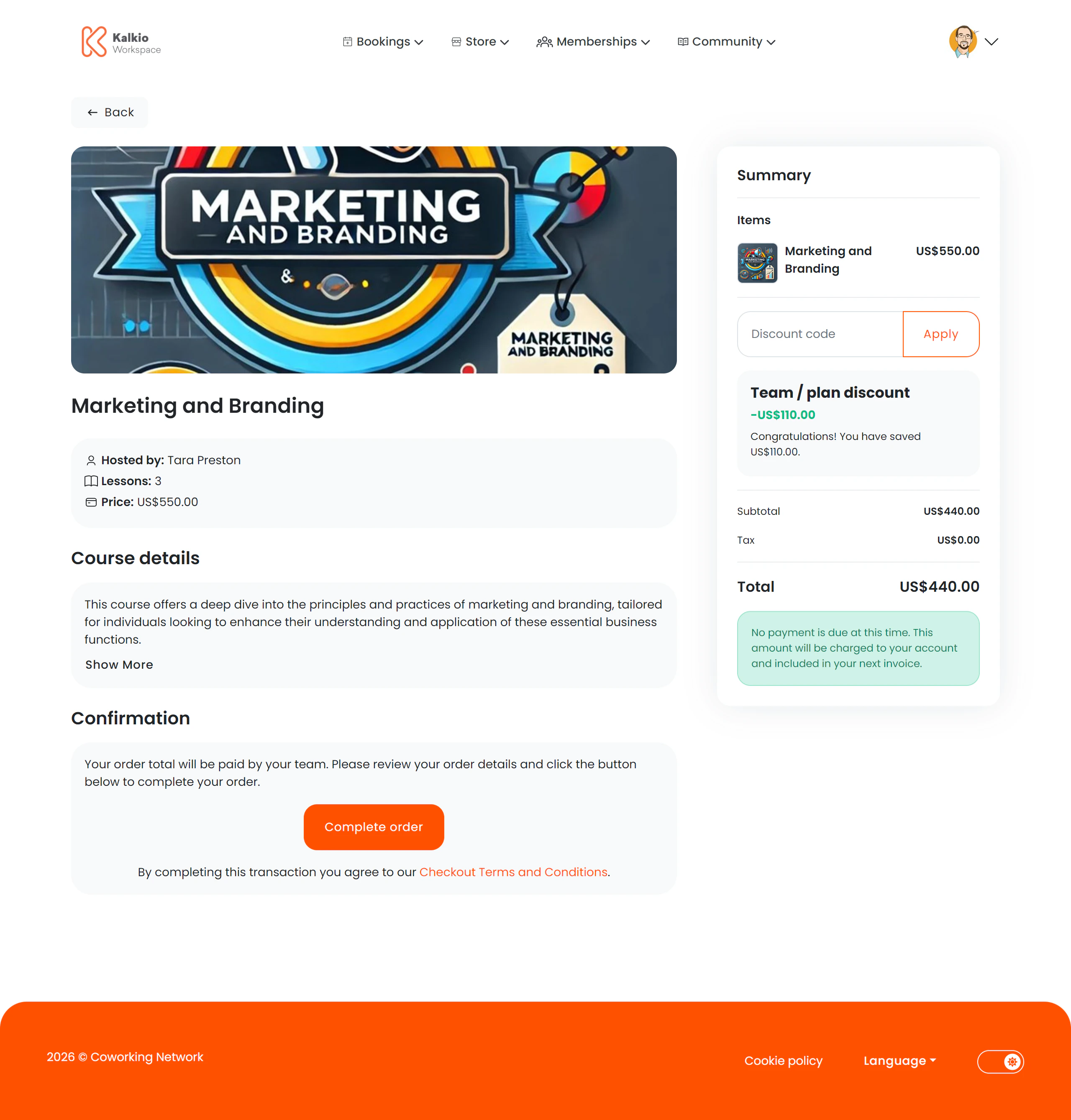 ## What members see
A two-column layout with course details on the left and a basket summary on the right.
### Course information
* **Course title and featured image**
* **Instructor / host name**
* **Number of lessons**
* **Price** displayed in the location's currency
* **Collapsible description** — full course details rendered from markdown
### Payment & summary
* **Payment method selector** — choose how to pay
* **Basket summary** — total cost including any taxes
## Key features
* **One-step enrolment** — members review the course details and purchase in a single flow.
* **Localised pricing** — prices are formatted in the location's currency.
* **Analytics tracking** — enrolment initiation is tracked for reporting.
## Configurable sections
| Setting | Default | Effect |
| ----------------------- | ------- | ---------------------------------- |
| Show back button | On | Show back navigation |
| Show basket summary | On | Display the cost summary sidebar |
| Show course image | On | Display the course featured image |
| Show course description | On | Show the expandable course details |
After enrolling, members can track their course progress from the [My Courses](../dashboard/my-courses) activity page.
## What members see
A two-column layout with course details on the left and a basket summary on the right.
### Course information
* **Course title and featured image**
* **Instructor / host name**
* **Number of lessons**
* **Price** displayed in the location's currency
* **Collapsible description** — full course details rendered from markdown
### Payment & summary
* **Payment method selector** — choose how to pay
* **Basket summary** — total cost including any taxes
## Key features
* **One-step enrolment** — members review the course details and purchase in a single flow.
* **Localised pricing** — prices are formatted in the location's currency.
* **Analytics tracking** — enrolment initiation is tracked for reporting.
## Configurable sections
| Setting | Default | Effect |
| ----------------------- | ------- | ---------------------------------- |
| Show back button | On | Show back navigation |
| Show basket summary | On | Display the cost summary sidebar |
| Show course image | On | Display the course featured image |
| Show course description | On | Show the expandable course details |
After enrolling, members can track their course progress from the [My Courses](../dashboard/my-courses) activity page.