> ## Documentation Index
> Fetch the complete documentation index at: https://learn.nexudus.com/llms.txt
> Use this file to discover all available pages before exploring further.
# Event Checkout
> The checkout flow for purchasing event tickets.
The event checkout page handles ticket purchases for events, including multi-ticket orders with per-attendee information.
 ## What members see
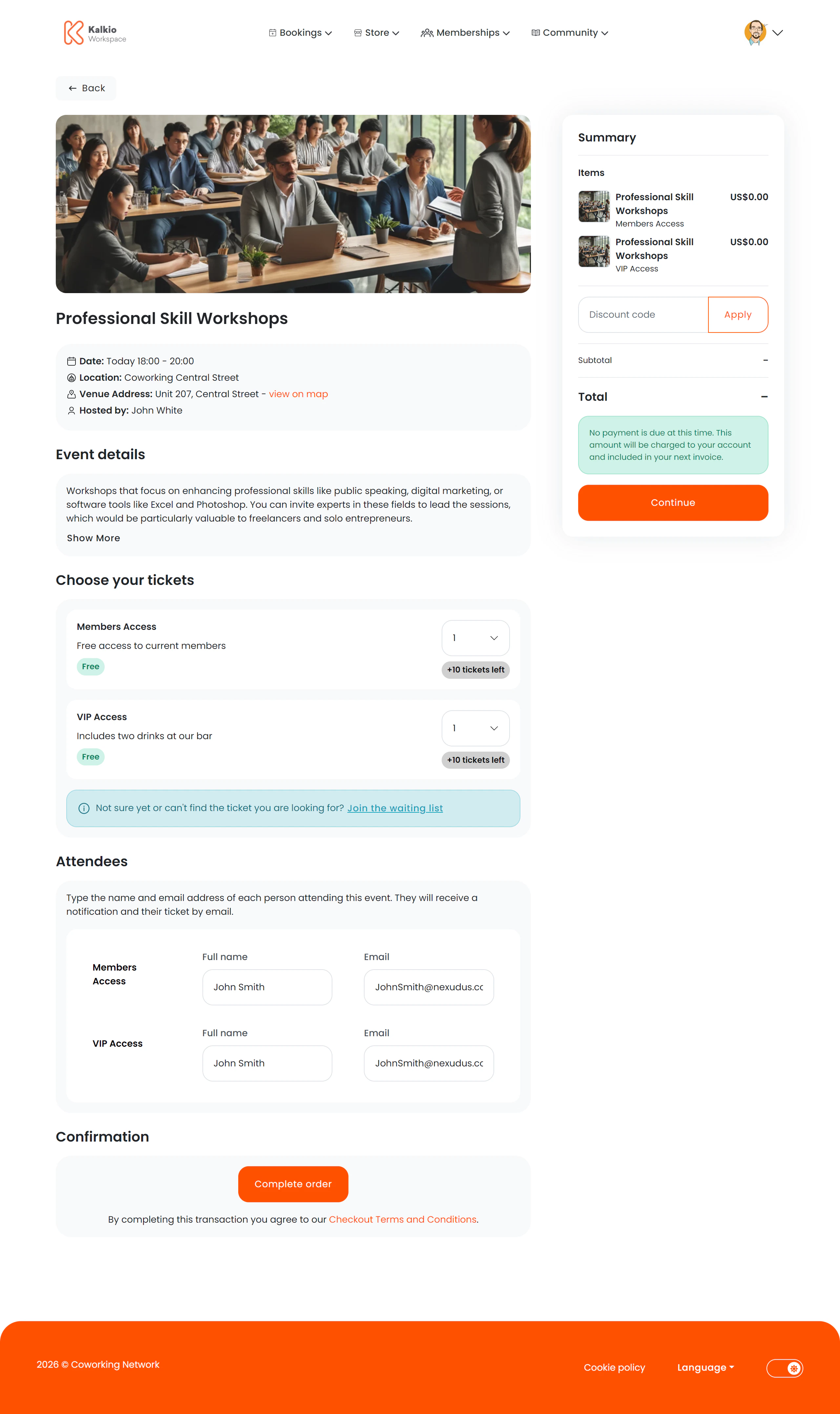
A two-column layout with event and ticket details on the left and a basket summary on the right.
### Event information
* **Event name, image, and date/time range**
* **Location and venue address** with a map link
* **Host / organiser name**
* **Collapsible description** — full event details that expand on demand
### Ticket selection
Multiple ticket types can be listed, each showing:
* **Ticket name and price**
* **Tickets remaining** — or a "Sold out" badge
* **Quantity dropdown** — select how many of each ticket type to purchase
### Attendee information
For each ticket purchased, members fill in:
* **Attendee name**
* **Attendee email address**
A responsive table lets members enter details for all tickets at once, with real-time validation.
### Waiting list
If all ticket types are sold out, members can optionally register for a waiting list.
## Key features
* **Multi-ticket checkout** — buy different ticket types in a single order.
* **Per-attendee capture** — collect individual attendee details for every ticket.
* **Live availability** — ticket counts update to reflect remaining inventory.
* **Waitlist support** — keep demand visible even when tickets are sold out.
## Configurable sections
| Setting | Default | Effect |
| ---------------------- | ------- | --------------------------------- |
| Show back button | On | Show back navigation |
| Show basket summary | On | Display the cost summary sidebar |
| Show event image | On | Display the event featured image |
| Show event description | On | Show the expandable event details |
## What members see
A two-column layout with event and ticket details on the left and a basket summary on the right.
### Event information
* **Event name, image, and date/time range**
* **Location and venue address** with a map link
* **Host / organiser name**
* **Collapsible description** — full event details that expand on demand
### Ticket selection
Multiple ticket types can be listed, each showing:
* **Ticket name and price**
* **Tickets remaining** — or a "Sold out" badge
* **Quantity dropdown** — select how many of each ticket type to purchase
### Attendee information
For each ticket purchased, members fill in:
* **Attendee name**
* **Attendee email address**
A responsive table lets members enter details for all tickets at once, with real-time validation.
### Waiting list
If all ticket types are sold out, members can optionally register for a waiting list.
## Key features
* **Multi-ticket checkout** — buy different ticket types in a single order.
* **Per-attendee capture** — collect individual attendee details for every ticket.
* **Live availability** — ticket counts update to reflect remaining inventory.
* **Waitlist support** — keep demand visible even when tickets are sold out.
## Configurable sections
| Setting | Default | Effect |
| ---------------------- | ------- | --------------------------------- |
| Show back button | On | Show back navigation |
| Show basket summary | On | Display the cost summary sidebar |
| Show event image | On | Display the event featured image |
| Show event description | On | Show the expandable event details |