> ## Documentation Index
> Fetch the complete documentation index at: https://learn.nexudus.com/llms.txt
> Use this file to discover all available pages before exploring further.
# Product Checkout
> The checkout page for purchasing a single product.
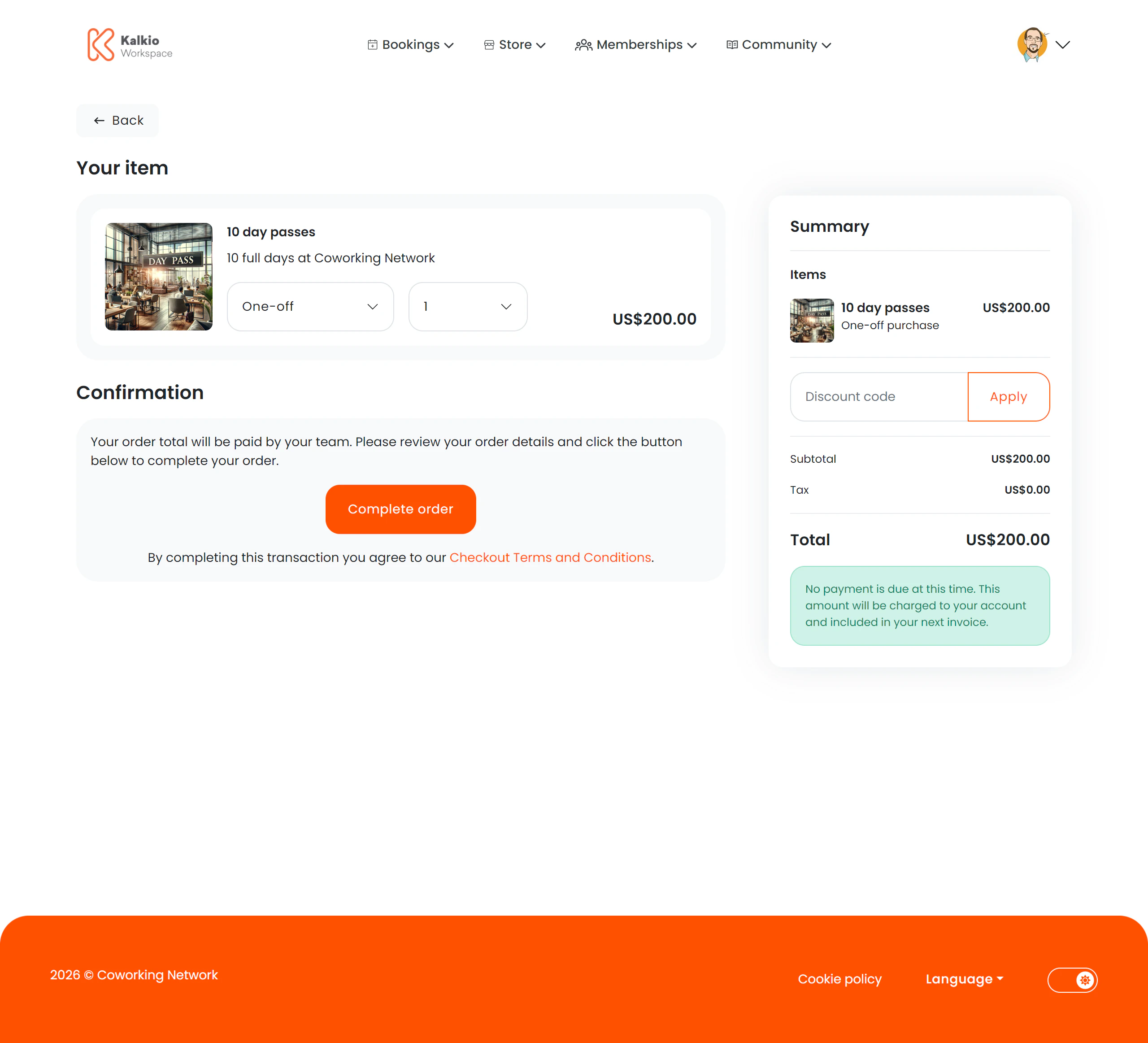
The product checkout page handles the purchase of an individual product — whether it's a one-time purchase or a recurring add-on to a membership.
 ## What members see
A two-column layout with product details on the left and a basket summary on the right.
### Product details
* **Product name, description, and image**
* **Price** displayed in the location's currency
* **Quantity selector** — adjust how many units to purchase
* **Purchase type** — choose between a one-time purchase or adding the product to a membership plan (if the product supports it)
* **Stock availability** — an out-of-stock indicator prevents purchase when inventory is depleted
### Payment & summary
* **Payment method selector** — choose how to pay
* **Basket summary** — shows the total cost including taxes
## Key features
* **Stock management** — the page respects inventory levels and prevents overselling.
* **Flexible purchase types** — supports both standalone purchases and plan-linked recurring products.
* **Analytics tracking** — checkout initiation is tracked for reporting.
## Configurable sections
| Setting | Default | Effect |
| ------------------- | ------- | ------------------------------------ |
| Show basket summary | On | Display the cost summary sidebar |
| Show title | On | Show the "Your item" section heading |
| Show payment method | On | Show payment method picker |
| Show back button | On | Show back navigation |
Products are created in the Nexudus dashboard under the Products module. Set stock levels there to control availability in the portal.
## What members see
A two-column layout with product details on the left and a basket summary on the right.
### Product details
* **Product name, description, and image**
* **Price** displayed in the location's currency
* **Quantity selector** — adjust how many units to purchase
* **Purchase type** — choose between a one-time purchase or adding the product to a membership plan (if the product supports it)
* **Stock availability** — an out-of-stock indicator prevents purchase when inventory is depleted
### Payment & summary
* **Payment method selector** — choose how to pay
* **Basket summary** — shows the total cost including taxes
## Key features
* **Stock management** — the page respects inventory levels and prevents overselling.
* **Flexible purchase types** — supports both standalone purchases and plan-linked recurring products.
* **Analytics tracking** — checkout initiation is tracked for reporting.
## Configurable sections
| Setting | Default | Effect |
| ------------------- | ------- | ------------------------------------ |
| Show basket summary | On | Display the cost summary sidebar |
| Show title | On | Show the "Your item" section heading |
| Show payment method | On | Show payment method picker |
| Show back button | On | Show back navigation |
Products are created in the Nexudus dashboard under the Products module. Set stock levels there to control availability in the portal.