> ## Documentation Index
> Fetch the complete documentation index at: https://learn.nexudus.com/llms.txt
> Use this file to discover all available pages before exploring further.
# Help Desk
> The support ticket system where members submit and track help requests.
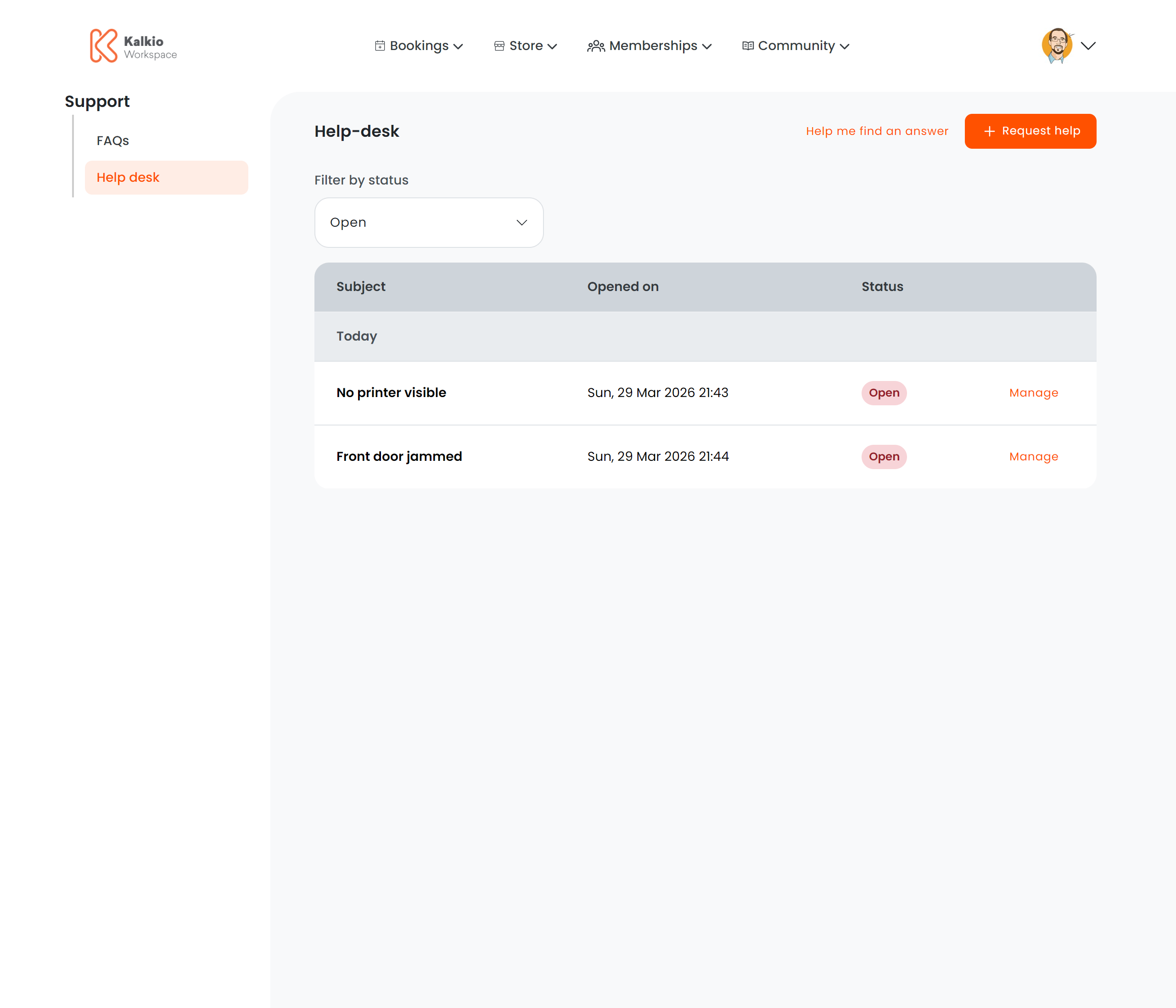
The Help Desk page provides a built-in support ticket system so members can request assistance and track the progress of their enquiries.
 ## What members see
### Quick actions
| Button | Description |
| ---------------- | ---------------------------------------------------------------- |
| **Help Me Find** | Opens an AI chat assistant for self-service answers (if enabled) |
| **Request Help** | Opens a form to submit a new support ticket |
### Ticket list
A table of submitted tickets with the following columns:
| Column | Description |
| ----------- | -------------------------------------- |
| **Subject** | Ticket subject line (truncated) |
| **Opened** | Date and time the ticket was created |
| **Status** | Red badge = Open, Green badge = Closed |
Members can filter tickets by **Open** or **Closed** status.
### Ticket detail
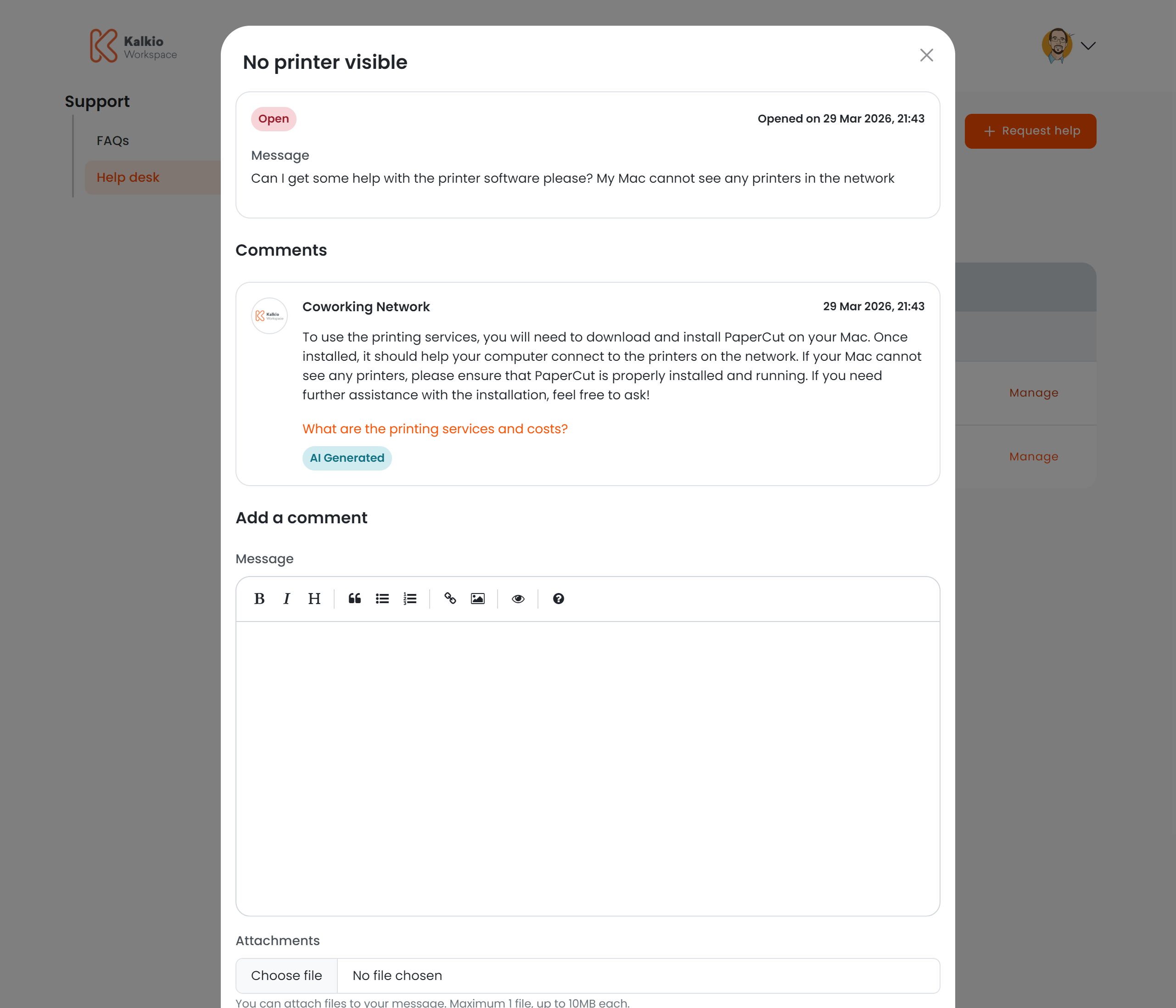
Clicking **Manage** on a ticket opens a detail modal where members can:
* View the full conversation history
* Read staff responses
* Add comments and replies
* Close or reopen the ticket
## What members see
### Quick actions
| Button | Description |
| ---------------- | ---------------------------------------------------------------- |
| **Help Me Find** | Opens an AI chat assistant for self-service answers (if enabled) |
| **Request Help** | Opens a form to submit a new support ticket |
### Ticket list
A table of submitted tickets with the following columns:
| Column | Description |
| ----------- | -------------------------------------- |
| **Subject** | Ticket subject line (truncated) |
| **Opened** | Date and time the ticket was created |
| **Status** | Red badge = Open, Green badge = Closed |
Members can filter tickets by **Open** or **Closed** status.
### Ticket detail
Clicking **Manage** on a ticket opens a detail modal where members can:
* View the full conversation history
* Read staff responses
* Add comments and replies
* Close or reopen the ticket
 ### Creating a ticket
The "Request Help" button opens a modal form. Support for deep linking is built in — append `?action=create&subject=X&message=Y` to the URL to pre-populate the form (useful for contextual help links).
## Key features
* **AI-powered self-service** — the "Help Me Find" button uses AI to answer common questions before creating a ticket.
* **Threaded conversations** — staff and members can exchange messages within each ticket.
* **Deep-link support** — pre-fill ticket subject and message from URL parameters.
* **Analytics** — AI chat usage is tracked for reporting.
## Module requirements
| Requirement | Effect |
| -------------------- | ------------------------------------------------------------- |
| Help desk enabled | The entire page is gated by the help desk module being active |
| New messages enabled | Controls whether members can create new tickets |
## Configurable sections
| Setting | Default | Effect |
| ------------------------ | ------- | ----------------------------------------------------------------------- |
| Show title | On | Display the section heading |
| Show filter bar | On | Show the status filter |
| Show Help Me Find button | On | Display the AI assistant button (also requires feature flag) |
| Show Request Help button | On | Display the new ticket button (also requires help desk module settings) |
Combine the Help Desk with the FAQ page to deflect common questions — members can search the FAQ before submitting a ticket.
### Creating a ticket
The "Request Help" button opens a modal form. Support for deep linking is built in — append `?action=create&subject=X&message=Y` to the URL to pre-populate the form (useful for contextual help links).
## Key features
* **AI-powered self-service** — the "Help Me Find" button uses AI to answer common questions before creating a ticket.
* **Threaded conversations** — staff and members can exchange messages within each ticket.
* **Deep-link support** — pre-fill ticket subject and message from URL parameters.
* **Analytics** — AI chat usage is tracked for reporting.
## Module requirements
| Requirement | Effect |
| -------------------- | ------------------------------------------------------------- |
| Help desk enabled | The entire page is gated by the help desk module being active |
| New messages enabled | Controls whether members can create new tickets |
## Configurable sections
| Setting | Default | Effect |
| ------------------------ | ------- | ----------------------------------------------------------------------- |
| Show title | On | Display the section heading |
| Show filter bar | On | Show the status filter |
| Show Help Me Find button | On | Display the AI assistant button (also requires feature flag) |
| Show Request Help button | On | Display the new ticket button (also requires help desk module settings) |
Combine the Help Desk with the FAQ page to deflect common questions — members can search the FAQ before submitting a ticket.