> ## Documentation Index
> Fetch the complete documentation index at: https://learn.nexudus.com/llms.txt
> Use this file to discover all available pages before exploring further.
# My Bookings
> Where members view and manage their past and upcoming resource bookings.
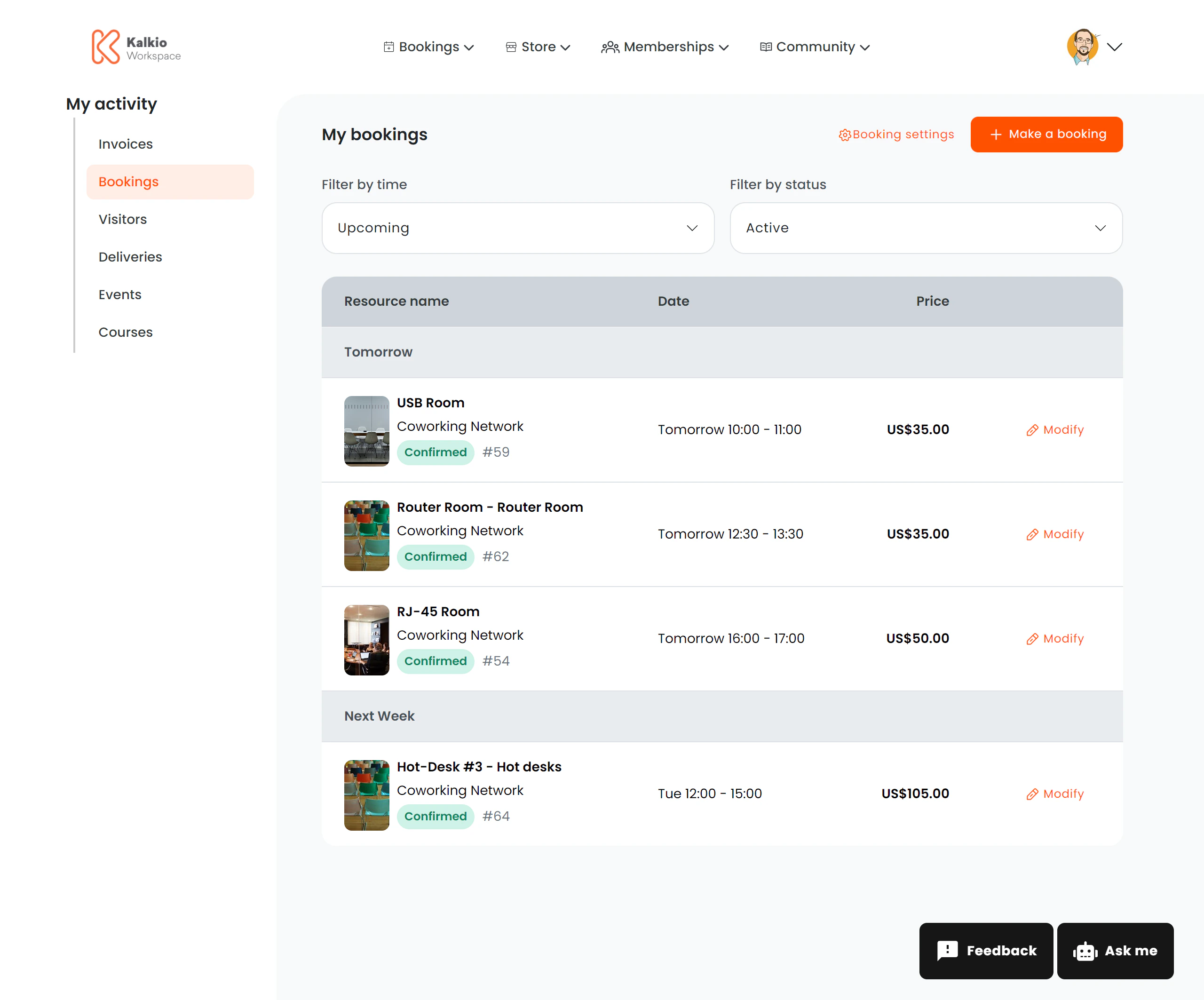
The bookings page shows all of a member's resource reservations — upcoming and past — with status tracking and quick actions.
 ## What members see
A list of bookings grouped by date. Each row shows:
| Column | Description |
| -------------------- | ---------------------------------------------------------------------- |
| **Resource name** | The booked resource (room, desk, etc.) |
| **Resource image** | A thumbnail of the resource (optional) |
| **Desk / location** | Specific desk or area within the resource |
| **Business name** | The location where the resource belongs |
| **Start & end time** | Booking date and time range in human-readable format |
| **Price** | Booking cost (shown for individual bookings, hidden for team bookings) |
| **Status** | Colour-coded badge |
### Status badges
| Status | Colour | Meaning |
| --------------------- | ------ | ---------------------------- |
| Confirmed | Green | Booking is confirmed |
| Cancelled | Red | Booking was cancelled |
| Awaiting confirmation | Yellow | Tentative — pending approval |
| Awaiting payment | Red | Payment required to confirm |
## Actions
| Action | Description |
| ------------------ | ------------------------------------------------------------------------------------------------ |
| **Modify booking** | Opens the booking edit page to change dates, desks, or details. Disabled for cancelled bookings. |
| **Make a Booking** | Quick-action button to start a new booking |
## Configurable sections
| Setting | Default | Effect |
| ---------------------------- | ------- | ------------------------------------- |
| Show title | On | Display the section heading |
| Show filter bar | On | Show the filter controls |
| Show team bookings | Off | Include bookings made by team members |
| Show modify button | On | Show the edit booking link |
| Show resource image | On | Display resource thumbnails |
| Show booking settings button | On | Show management options |
| Show Make a Booking button | On | Display the quick book action |
## What members see
A list of bookings grouped by date. Each row shows:
| Column | Description |
| -------------------- | ---------------------------------------------------------------------- |
| **Resource name** | The booked resource (room, desk, etc.) |
| **Resource image** | A thumbnail of the resource (optional) |
| **Desk / location** | Specific desk or area within the resource |
| **Business name** | The location where the resource belongs |
| **Start & end time** | Booking date and time range in human-readable format |
| **Price** | Booking cost (shown for individual bookings, hidden for team bookings) |
| **Status** | Colour-coded badge |
### Status badges
| Status | Colour | Meaning |
| --------------------- | ------ | ---------------------------- |
| Confirmed | Green | Booking is confirmed |
| Cancelled | Red | Booking was cancelled |
| Awaiting confirmation | Yellow | Tentative — pending approval |
| Awaiting payment | Red | Payment required to confirm |
## Actions
| Action | Description |
| ------------------ | ------------------------------------------------------------------------------------------------ |
| **Modify booking** | Opens the booking edit page to change dates, desks, or details. Disabled for cancelled bookings. |
| **Make a Booking** | Quick-action button to start a new booking |
## Configurable sections
| Setting | Default | Effect |
| ---------------------------- | ------- | ------------------------------------- |
| Show title | On | Display the section heading |
| Show filter bar | On | Show the filter controls |
| Show team bookings | Off | Include bookings made by team members |
| Show modify button | On | Show the edit booking link |
| Show resource image | On | Display resource thumbnails |
| Show booking settings button | On | Show management options |
| Show Make a Booking button | On | Display the quick book action |