> ## Documentation Index
> Fetch the complete documentation index at: https://learn.nexudus.com/llms.txt
> Use this file to discover all available pages before exploring further.
# My Invoices
> Where members view, filter, download, and pay their invoices.
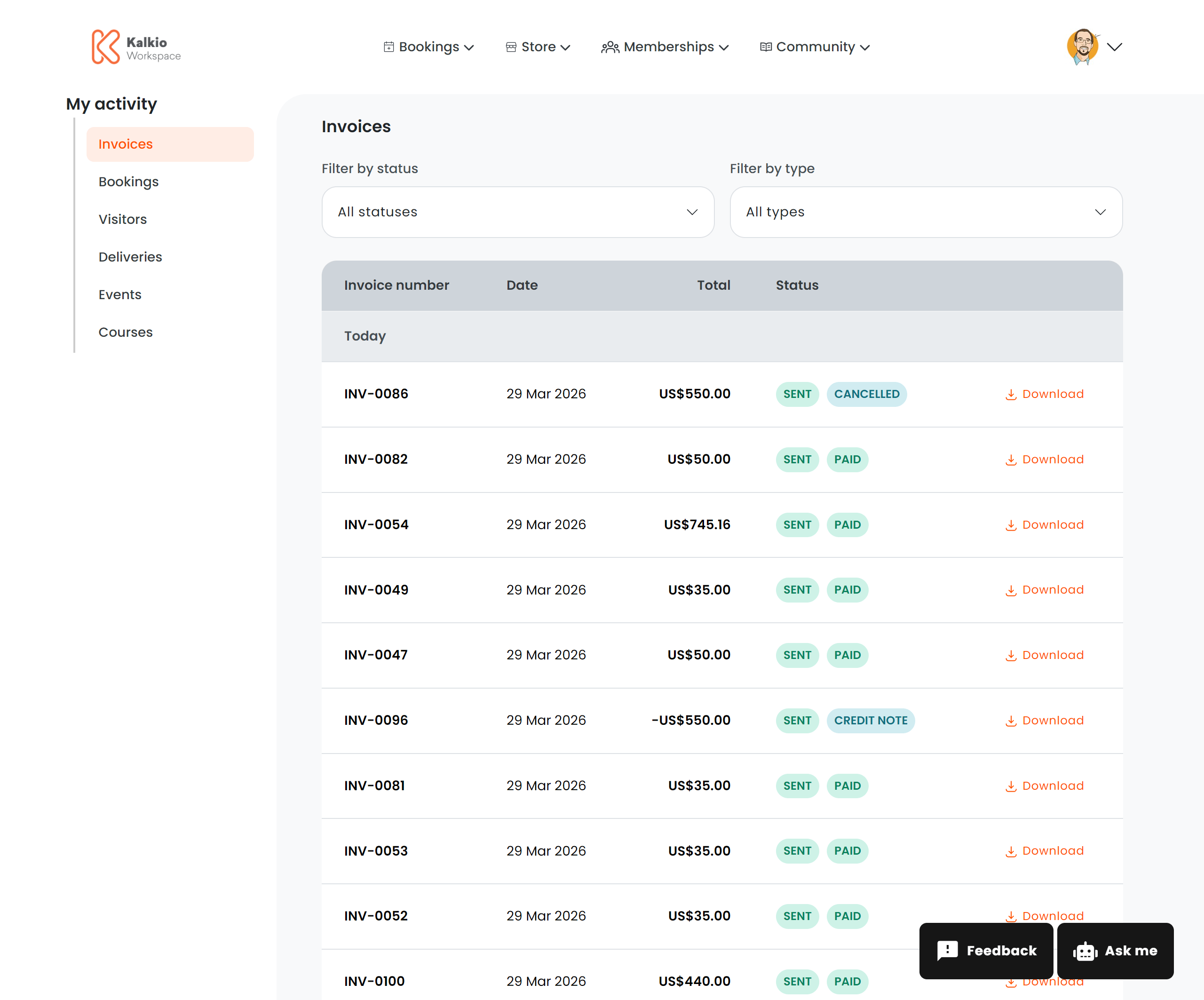
The invoices page gives members a complete view of their billing history — invoices, credit notes, payment status, and quick actions.
 ## What members see
A paginated table of all invoices and credit notes grouped by date, with the following columns:
| Column | Description |
| ------------------ | ---------------------------------------- |
| **Invoice number** | The unique invoice identifier |
| **Date** | When the invoice was issued |
| **Total** | The invoice amount in localised currency |
| **Status** | Visual badge showing the current state |
### Status badges
Invoices display colour-coded status badges:
| Status | Meaning |
| ------------------ | ------------------------------- |
| Paid | Fully paid |
| Unpaid | Payment outstanding |
| Due | Payment is due |
| Draft | Invoice not yet finalised |
| Void | Invoice cancelled |
| Sent / Not sent | Whether the invoice was emailed |
| Processing | Payment is being processed |
| Partially paid | Some payment received |
| Partially refunded | Partial refund issued |
| Refunded | Fully refunded |
| Cancelled | Invoice cancelled |
| Credited | Offset by a credit note |
## Filtering
| Filter | Description |
| ------------------ | ---------------------------------- |
| **Payment status** | Filter by Paid or Unpaid |
| **Document type** | Filter by Invoices or Credit Notes |
## Actions
| Action | Description | Requires |
| ------------------------ | -------------------------------------------------------------------- | ------------------------- |
| **Download PDF** | Download the invoice as a PDF file | Billing print permission |
| **Pay Invoice** | Navigate to the payment checkout for an unpaid invoice | Billing access permission |
| **Download statement** | Download a PDF statement summarising all invoices | Billing print permission |
| **Preview next invoice** | Preview the upcoming invoice as a PDF before it is officially issued | Billing print permission |
The **Download statement** and **Preview next invoice** links appear below the invoices table when the billing print permission is enabled.
## Configurable sections
| Setting | Default | Effect |
| -------------------- | ------- | -------------------------------------- |
| Show title | On | Display the section heading |
| Show download button | On | Enable PDF downloads |
| Show filter bar | On | Show the filter dropdowns |
| Show pay button | On | Show payment links for unpaid invoices |
Members can only see invoices for their own account. Team managers may see team-level invoices depending on their permissions.
## What members see
A paginated table of all invoices and credit notes grouped by date, with the following columns:
| Column | Description |
| ------------------ | ---------------------------------------- |
| **Invoice number** | The unique invoice identifier |
| **Date** | When the invoice was issued |
| **Total** | The invoice amount in localised currency |
| **Status** | Visual badge showing the current state |
### Status badges
Invoices display colour-coded status badges:
| Status | Meaning |
| ------------------ | ------------------------------- |
| Paid | Fully paid |
| Unpaid | Payment outstanding |
| Due | Payment is due |
| Draft | Invoice not yet finalised |
| Void | Invoice cancelled |
| Sent / Not sent | Whether the invoice was emailed |
| Processing | Payment is being processed |
| Partially paid | Some payment received |
| Partially refunded | Partial refund issued |
| Refunded | Fully refunded |
| Cancelled | Invoice cancelled |
| Credited | Offset by a credit note |
## Filtering
| Filter | Description |
| ------------------ | ---------------------------------- |
| **Payment status** | Filter by Paid or Unpaid |
| **Document type** | Filter by Invoices or Credit Notes |
## Actions
| Action | Description | Requires |
| ------------------------ | -------------------------------------------------------------------- | ------------------------- |
| **Download PDF** | Download the invoice as a PDF file | Billing print permission |
| **Pay Invoice** | Navigate to the payment checkout for an unpaid invoice | Billing access permission |
| **Download statement** | Download a PDF statement summarising all invoices | Billing print permission |
| **Preview next invoice** | Preview the upcoming invoice as a PDF before it is officially issued | Billing print permission |
The **Download statement** and **Preview next invoice** links appear below the invoices table when the billing print permission is enabled.
## Configurable sections
| Setting | Default | Effect |
| -------------------- | ------- | -------------------------------------- |
| Show title | On | Display the section heading |
| Show download button | On | Enable PDF downloads |
| Show filter bar | On | Show the filter dropdowns |
| Show pay button | On | Show payment links for unpaid invoices |
Members can only see invoices for their own account. Team managers may see team-level invoices depending on their permissions.