> ## Documentation Index
> Fetch the complete documentation index at: https://learn.nexudus.com/llms.txt
> Use this file to discover all available pages before exploring further.
# Personal Dashboard
> The member's personalised home screen with bookings, announcements, and quick actions.
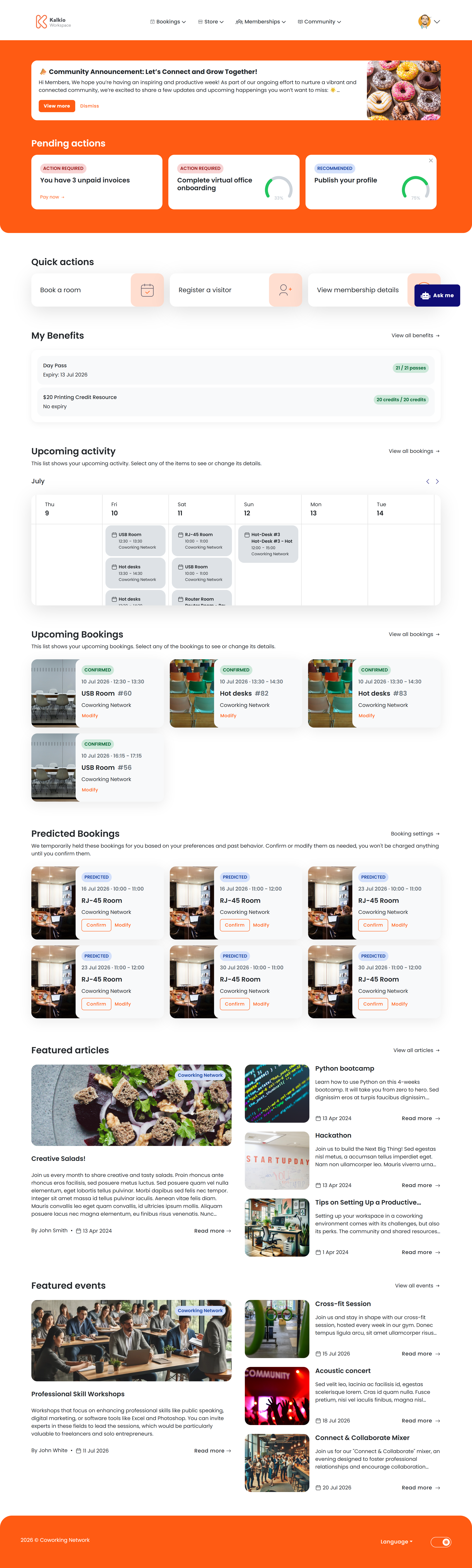
The personal dashboard is the first page members see after signing in. It provides a personalised summary of their activity and quick access to common actions.
 ## What members see
The dashboard is assembled from configurable sections:
| Section | Description |
| ----------------------- | ------------------------------------------------------------------------------------------------ |
| **Header** | Personalised greeting using the member's first name, plus a "Make a Booking" quick-action button |
| **Announcements** | A banner displaying location-specific announcements you have posted |
| **Onboarding** | Guided steps for new members to complete their profile and explore the portal |
| **My Benefits** | A summary card showing the member's available booking credits, extra services, and time passes |
| **Weekly calendar** | A visual calendar showing the member's bookings for the current week |
| **Upcoming bookings** | Cards summarising the member's next resource bookings with key details |
| **Predictive bookings** | AI-suggested booking slots based on the member's usage patterns |
| **Featured articles** | Latest articles from your location |
| **Featured events** | Upcoming events displayed as a card gallery |
## Key features
* **Personalised greeting** — addresses the member by first name.
* **Quick booking** — the header button sends members straight to the booking flow.
* **Announcement visibility** — post location news and it appears automatically on every member's dashboard.
* **Onboarding guidance** — helps new members complete setup steps (can be dismissed once done).
* **My Benefits summary** — displays the member's available booking credits, extra services, and time passes at a glance, combining both personal and team benefits.
* **Predictive bookings** — AI analyses past behaviour to suggest likely booking times.
## Configurable sections
All sections can be toggled on or off from the **Page Editor**:
| Setting | Effect |
| ------------------------ | ------------------------------------------ |
| Show announcements | Display the announcements banner |
| Show onboarding | Display the guided onboarding section |
| Show my benefits | Display the member's benefits summary card |
| Show weekly calendar | Display the week-at-a-glance calendar |
| Show upcoming bookings | Display upcoming booking summary cards |
| Show predictive bookings | Display AI-predicted booking suggestions |
| Show featured articles | Display latest articles |
| Show featured events | Display upcoming event cards |
Use announcements to broadcast important news — maintenance schedules, new amenities, or community events. Every member sees them on their
dashboard.
## What members see
The dashboard is assembled from configurable sections:
| Section | Description |
| ----------------------- | ------------------------------------------------------------------------------------------------ |
| **Header** | Personalised greeting using the member's first name, plus a "Make a Booking" quick-action button |
| **Announcements** | A banner displaying location-specific announcements you have posted |
| **Onboarding** | Guided steps for new members to complete their profile and explore the portal |
| **My Benefits** | A summary card showing the member's available booking credits, extra services, and time passes |
| **Weekly calendar** | A visual calendar showing the member's bookings for the current week |
| **Upcoming bookings** | Cards summarising the member's next resource bookings with key details |
| **Predictive bookings** | AI-suggested booking slots based on the member's usage patterns |
| **Featured articles** | Latest articles from your location |
| **Featured events** | Upcoming events displayed as a card gallery |
## Key features
* **Personalised greeting** — addresses the member by first name.
* **Quick booking** — the header button sends members straight to the booking flow.
* **Announcement visibility** — post location news and it appears automatically on every member's dashboard.
* **Onboarding guidance** — helps new members complete setup steps (can be dismissed once done).
* **My Benefits summary** — displays the member's available booking credits, extra services, and time passes at a glance, combining both personal and team benefits.
* **Predictive bookings** — AI analyses past behaviour to suggest likely booking times.
## Configurable sections
All sections can be toggled on or off from the **Page Editor**:
| Setting | Effect |
| ------------------------ | ------------------------------------------ |
| Show announcements | Display the announcements banner |
| Show onboarding | Display the guided onboarding section |
| Show my benefits | Display the member's benefits summary card |
| Show weekly calendar | Display the week-at-a-glance calendar |
| Show upcoming bookings | Display upcoming booking summary cards |
| Show predictive bookings | Display AI-predicted booking suggestions |
| Show featured articles | Display latest articles |
| Show featured events | Display upcoming event cards |
Use announcements to broadcast important news — maintenance schedules, new amenities, or community events. Every member sees them on their
dashboard.