> ## Documentation Index
> Fetch the complete documentation index at: https://learn.nexudus.com/llms.txt
> Use this file to discover all available pages before exploring further.
# Member Portal Overview
> A guide to all the sections and pages your members see in the Nexudus Members Portal.
# Member Portal Overview
The Members Portal is the member-facing web application that comes with every Nexudus location. It is the primary touchpoint between your coworking space and the people who use it — prospective visitors browsing your site, members managing bookings, and teams coordinating resources.
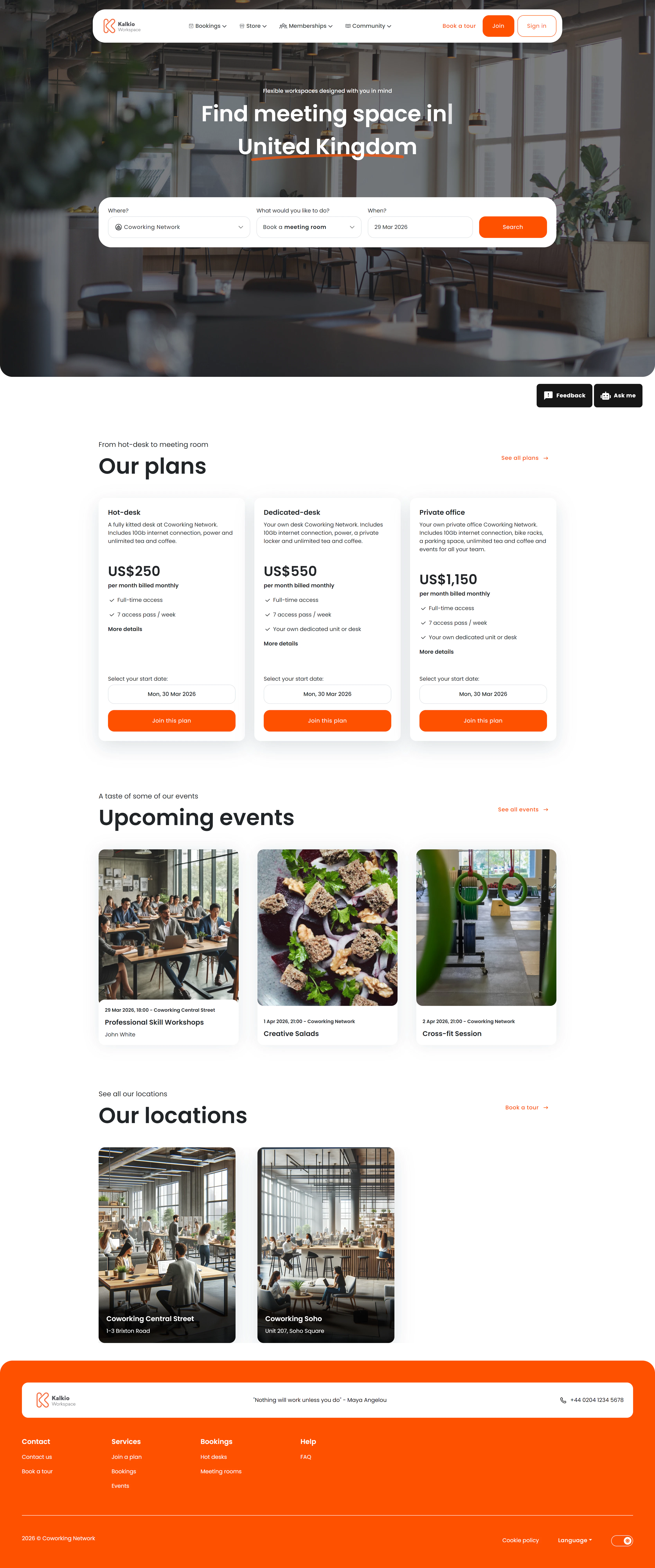 This documentation walks through **every page and section** of the portal so you know exactly what your members experience, what each page does, and how your Nexudus dashboard settings control the behaviour.
## Portal sections at a glance
| Section | What it covers |
| ----------------------------- | ---------------------------------------------------------------------------------------------------- |
| **Public / Landing** | Home page, events, courses, articles, contact, community board, directory, perks |
| **Checkout / Purchase** | Booking, product, event, and course checkout flows |
| **User Dashboard & Activity** | Personal dashboard, invoices, bookings, events, courses, visitors, deliveries, plans, FAQ, help desk |
| **User Profile & Settings** | Personal info, billing, professional profile, integrations, security, account settings |
| **Team Management** | Team bookings, attendance, members, and permissions |
| **Virtual Office** | Multi-step virtual office onboarding |
| **Authentication** | Sign in, forgot password, password reset |
Every portal page is fully customisable from the Nexudus dashboard using the Page Editor. You can show, hide, and reorder sections without writing
any code.
## How configuration flows to the portal
Settings you configure in the Nexudus admin dashboard — products, resources, events, branding, permissions — automatically appear in the portal. There is no manual syncing. When you update a resource name or add a new event, members see the change immediately.
## Portal configuration
Use your own domain name for the Members Portal instead of the default Nexudus subdomain.
Embed the Members Portal directly into your existing marketing website.
## Next steps
Pick a section from the sidebar to learn what each page does and how to make the most of it.
This documentation walks through **every page and section** of the portal so you know exactly what your members experience, what each page does, and how your Nexudus dashboard settings control the behaviour.
## Portal sections at a glance
| Section | What it covers |
| ----------------------------- | ---------------------------------------------------------------------------------------------------- |
| **Public / Landing** | Home page, events, courses, articles, contact, community board, directory, perks |
| **Checkout / Purchase** | Booking, product, event, and course checkout flows |
| **User Dashboard & Activity** | Personal dashboard, invoices, bookings, events, courses, visitors, deliveries, plans, FAQ, help desk |
| **User Profile & Settings** | Personal info, billing, professional profile, integrations, security, account settings |
| **Team Management** | Team bookings, attendance, members, and permissions |
| **Virtual Office** | Multi-step virtual office onboarding |
| **Authentication** | Sign in, forgot password, password reset |
Every portal page is fully customisable from the Nexudus dashboard using the Page Editor. You can show, hide, and reorder sections without writing
any code.
## How configuration flows to the portal
Settings you configure in the Nexudus admin dashboard — products, resources, events, branding, permissions — automatically appear in the portal. There is no manual syncing. When you update a resource name or add a new event, members see the change immediately.
## Portal configuration
Use your own domain name for the Members Portal instead of the default Nexudus subdomain.
Embed the Members Portal directly into your existing marketing website.
## Next steps
Pick a section from the sidebar to learn what each page does and how to make the most of it.