> ## Documentation Index
> Fetch the complete documentation index at: https://learn.nexudus.com/llms.txt
> Use this file to discover all available pages before exploring further.
# Payment Methods
> Where members manage their stored payment methods for Stripe, Spreedly, and GoCardless.
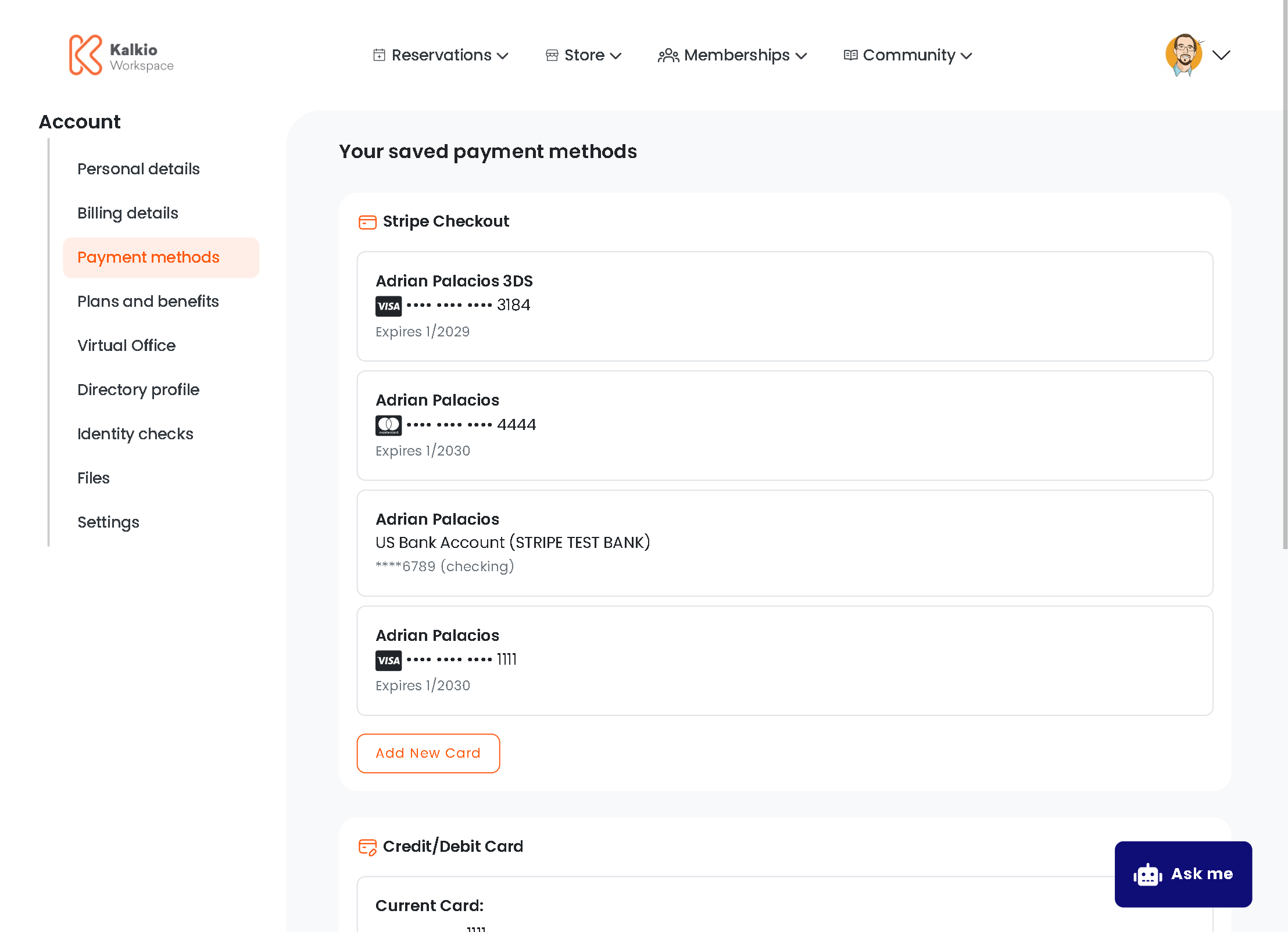
The payment methods page allows members to add, update, and view their stored payment information across multiple payment providers. This page only displays sections for payment providers that are enabled in your location settings.
 ## What members see
The page displays up to three conditional sections based on which payment providers you have enabled:
### Stripe Payment Methods
Appears when **Stripe Checkout** is enabled in your payment settings.
| Feature | Description |
| -------------------- | ---------------------------------------------------------------- |
| **View saved cards** | Lists all payment methods saved to the member's Stripe account |
| **Add new card** | Opens Stripe's embedded checkout in setup mode to add a new card |
| **Card details** | Shows card brand, last 4 digits, and expiration date |
| **Auto-refresh** | List automatically refreshes after adding a new card (2s delay) |
Members can add multiple payment methods. The embedded Stripe Checkout interface handles all security and validation.
### Payment Card (Spreedly)
Appears when **Spreedly** is enabled in your payment settings.
| Feature | Description |
| -------------------- | ----------------------------------------------------------------------------------- |
| **Current card** | Shows last 4 digits of the stored card (e.g., •••• •••• •••• 1234) |
| **Add/Update card** | Opens inline card form to tokenize and store a new card |
| **Single card only** | Spreedly supports one card per member — adding a new card replaces the existing one |
The card number is stored in the `CardNumber` field of the member's profile and displays only the last 4 digits.
### Bank Account (GoCardless)
Appears when **GoCardless** is enabled in your payment settings.
| Feature | Description |
| ------------------ | ----------------------------------------------------------------- |
| **Link status** | Shows whether a bank account is currently linked |
| **Link/Update** | Opens popup flow to connect or update bank account via GoCardless |
| **Status refresh** | Account status refreshes after popup closes (1.5s delay) |
The GoCardless flow opens in a popup window. After the member completes the authorization, the page automatically refreshes to show the updated status.
## Key features
* **Conditional rendering** — only shows sections for enabled payment providers.
* **Provider-specific UI** — each provider has its own optimized interface:
* Stripe uses embedded checkout for maximum security
* Spreedly uses inline tokenization forms
* GoCardless uses popup-based OAuth flows
* **Auto-refresh** — payment methods automatically refresh after updates.
* **Consistent styling** — all cards use the same bordered card design (`p-3 border rounded`).
* **Support notice** — informational alert directs members to contact support to remove payment methods.
## Payment provider settings
Each section is controlled by these location settings:
| Provider | Setting |
| ------------------- | ----------------------------------------- |
| **Stripe Checkout** | `MODULES.payments.stripeCheckout.enabled` |
| **Spreedly** | `MODULES.payments.spreedly.enabled` |
| **GoCardless** | `MODULES.payments.goCardless.enabled` |
If all payment providers are disabled, only the support contact notice will be visible to members.
## Removing payment methods
Members cannot remove payment methods directly through the portal. The page displays an informational alert instructing members to contact your support team for removal. This is a security measure to prevent accidental removal of active payment methods linked to subscriptions or recurring payments.
**For operators**: Payment methods should be removed through the admin dashboard after verifying the member's request and confirming there are no active subscriptions or pending payments that depend on them.
## Technical details
### Backend requirements
* **Stripe**: Requires `POST /api/public/payments/stripe/createSetupSession` endpoint to generate setup sessions.
* **Spreedly**: Requires `PUT /api/public/payments/spreedly/store` endpoint to store tokenized cards.
* **GoCardless**: Uses existing callback flow at `/Callbacks/GoCardlessPre/`.
### Data storage
| Provider | Storage location | Field content |
| ---------- | -------------------------------------- | ---------------------------------------- |
| Stripe | Stripe API | Payment method objects with full details |
| Spreedly | `Coworker.CardNumber` | Last 4 digits only |
| GoCardless | `Coworker.HasGoCardlessContractNumber` | Boolean flag indicating linked status |
## What members see
The page displays up to three conditional sections based on which payment providers you have enabled:
### Stripe Payment Methods
Appears when **Stripe Checkout** is enabled in your payment settings.
| Feature | Description |
| -------------------- | ---------------------------------------------------------------- |
| **View saved cards** | Lists all payment methods saved to the member's Stripe account |
| **Add new card** | Opens Stripe's embedded checkout in setup mode to add a new card |
| **Card details** | Shows card brand, last 4 digits, and expiration date |
| **Auto-refresh** | List automatically refreshes after adding a new card (2s delay) |
Members can add multiple payment methods. The embedded Stripe Checkout interface handles all security and validation.
### Payment Card (Spreedly)
Appears when **Spreedly** is enabled in your payment settings.
| Feature | Description |
| -------------------- | ----------------------------------------------------------------------------------- |
| **Current card** | Shows last 4 digits of the stored card (e.g., •••• •••• •••• 1234) |
| **Add/Update card** | Opens inline card form to tokenize and store a new card |
| **Single card only** | Spreedly supports one card per member — adding a new card replaces the existing one |
The card number is stored in the `CardNumber` field of the member's profile and displays only the last 4 digits.
### Bank Account (GoCardless)
Appears when **GoCardless** is enabled in your payment settings.
| Feature | Description |
| ------------------ | ----------------------------------------------------------------- |
| **Link status** | Shows whether a bank account is currently linked |
| **Link/Update** | Opens popup flow to connect or update bank account via GoCardless |
| **Status refresh** | Account status refreshes after popup closes (1.5s delay) |
The GoCardless flow opens in a popup window. After the member completes the authorization, the page automatically refreshes to show the updated status.
## Key features
* **Conditional rendering** — only shows sections for enabled payment providers.
* **Provider-specific UI** — each provider has its own optimized interface:
* Stripe uses embedded checkout for maximum security
* Spreedly uses inline tokenization forms
* GoCardless uses popup-based OAuth flows
* **Auto-refresh** — payment methods automatically refresh after updates.
* **Consistent styling** — all cards use the same bordered card design (`p-3 border rounded`).
* **Support notice** — informational alert directs members to contact support to remove payment methods.
## Payment provider settings
Each section is controlled by these location settings:
| Provider | Setting |
| ------------------- | ----------------------------------------- |
| **Stripe Checkout** | `MODULES.payments.stripeCheckout.enabled` |
| **Spreedly** | `MODULES.payments.spreedly.enabled` |
| **GoCardless** | `MODULES.payments.goCardless.enabled` |
If all payment providers are disabled, only the support contact notice will be visible to members.
## Removing payment methods
Members cannot remove payment methods directly through the portal. The page displays an informational alert instructing members to contact your support team for removal. This is a security measure to prevent accidental removal of active payment methods linked to subscriptions or recurring payments.
**For operators**: Payment methods should be removed through the admin dashboard after verifying the member's request and confirming there are no active subscriptions or pending payments that depend on them.
## Technical details
### Backend requirements
* **Stripe**: Requires `POST /api/public/payments/stripe/createSetupSession` endpoint to generate setup sessions.
* **Spreedly**: Requires `PUT /api/public/payments/spreedly/store` endpoint to store tokenized cards.
* **GoCardless**: Uses existing callback flow at `/Callbacks/GoCardlessPre/`.
### Data storage
| Provider | Storage location | Field content |
| ---------- | -------------------------------------- | ---------------------------------------- |
| Stripe | Stripe API | Payment method objects with full details |
| Spreedly | `Coworker.CardNumber` | Last 4 digits only |
| GoCardless | `Coworker.HasGoCardlessContractNumber` | Boolean flag indicating linked status |