> ## Documentation Index
> Fetch the complete documentation index at: https://learn.nexudus.com/llms.txt
> Use this file to discover all available pages before exploring further.
# Personal Information
> Where members manage their personal details, avatar, and contact information.
The personal information page lets members view and update their profile data, including photos, contact details, and custom fields.
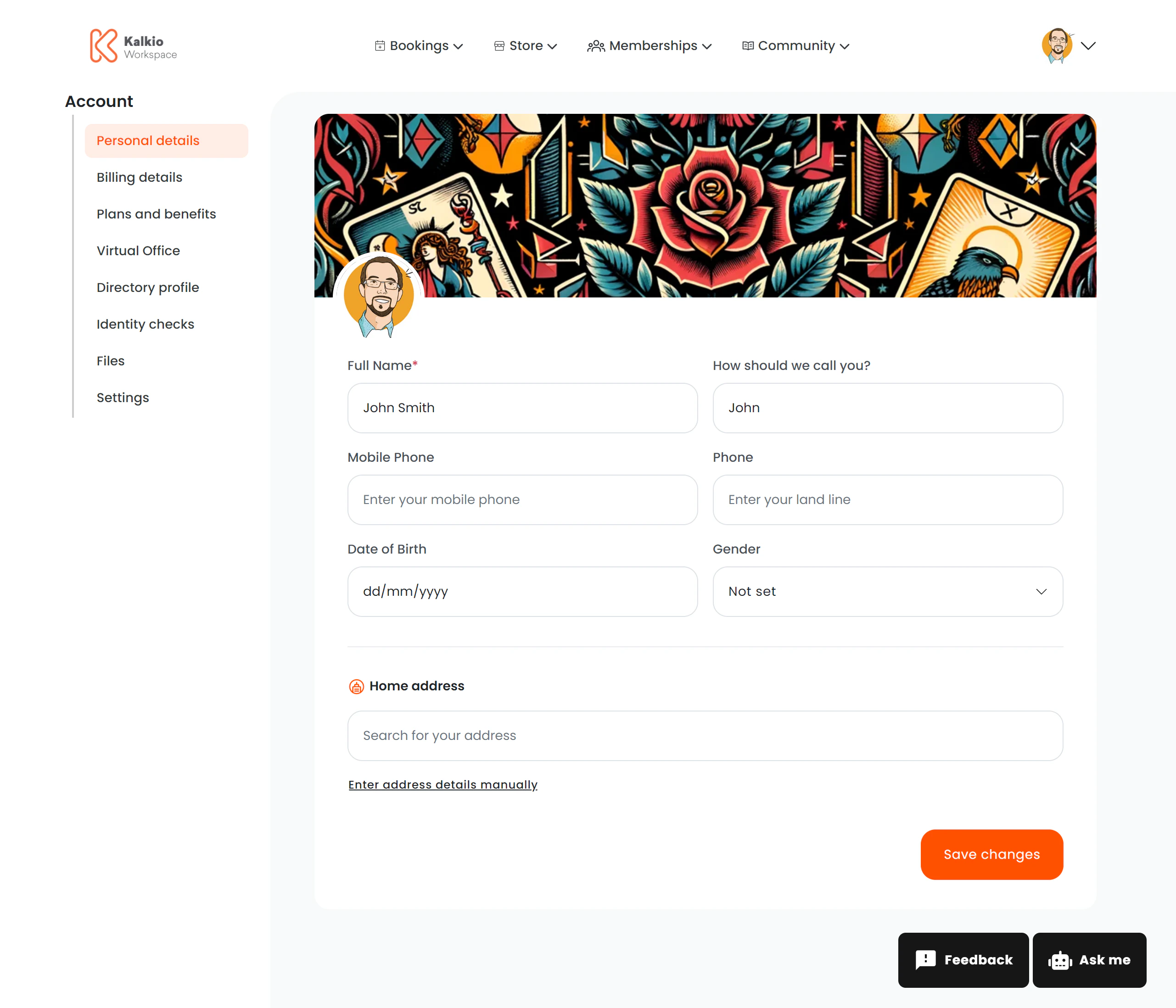 ## What members see
### Profile images
| Element | Specification |
| ---------------------------- | ---------------------------------- |
| **Banner / cover image** | Minimum 1200 × 300 px, under 10 MB |
| **Avatar / profile picture** | 400 × 400 px |
Members can upload and change both images directly from this page.
### Editable fields
The form can include any of the following fields, depending on how your location is configured:
| Field | Description |
| ---------------------------- | --------------------------------------------- |
| Full name | First and last name |
| Billing name & company | Company or billing entity name |
| Tax ID / registration number | Tax or company registration number |
| Date of birth | Member's date of birth |
| Address | Street, postal code, city, state, country |
| Mobile phone | Mobile number |
| Landline phone | Landline number |
| Gender | Gender selection |
| Salutation | Title / salutation |
| Custom fields | Any additional fields configured per business |
### Address lookup
The address field includes **location autocomplete** — members can type an address and select from suggestions rather than filling in every field manually.
## Key features
* **Dynamic form** — only the fields you enable in the dashboard appear on the page.
* **Custom fields** — add business-specific fields tailored to your operations.
* **Image handling** — failed image loads automatically reset to a placeholder.
* **Validation** — fields are validated in real time before saving.
* **Analytics** — profile updates are tracked ("profile\_updated" event).
Decide which fields are visible and required in your Nexudus dashboard location settings. Only show fields that are relevant to your operations to
keep the form short.
## What members see
### Profile images
| Element | Specification |
| ---------------------------- | ---------------------------------- |
| **Banner / cover image** | Minimum 1200 × 300 px, under 10 MB |
| **Avatar / profile picture** | 400 × 400 px |
Members can upload and change both images directly from this page.
### Editable fields
The form can include any of the following fields, depending on how your location is configured:
| Field | Description |
| ---------------------------- | --------------------------------------------- |
| Full name | First and last name |
| Billing name & company | Company or billing entity name |
| Tax ID / registration number | Tax or company registration number |
| Date of birth | Member's date of birth |
| Address | Street, postal code, city, state, country |
| Mobile phone | Mobile number |
| Landline phone | Landline number |
| Gender | Gender selection |
| Salutation | Title / salutation |
| Custom fields | Any additional fields configured per business |
### Address lookup
The address field includes **location autocomplete** — members can type an address and select from suggestions rather than filling in every field manually.
## Key features
* **Dynamic form** — only the fields you enable in the dashboard appear on the page.
* **Custom fields** — add business-specific fields tailored to your operations.
* **Image handling** — failed image loads automatically reset to a placeholder.
* **Validation** — fields are validated in real time before saving.
* **Analytics** — profile updates are tracked ("profile\_updated" event).
Decide which fields are visible and required in your Nexudus dashboard location settings. Only show fields that are relevant to your operations to
keep the form short.