> ## Documentation Index
> Fetch the complete documentation index at: https://learn.nexudus.com/llms.txt
> Use this file to discover all available pages before exploring further.
# Professional Profile
> Where members build their directory profile with skills, social links, and professional details.
The professional profile page lets members create a public-facing profile for the Members Directory, including industry details, social networks, and skills.
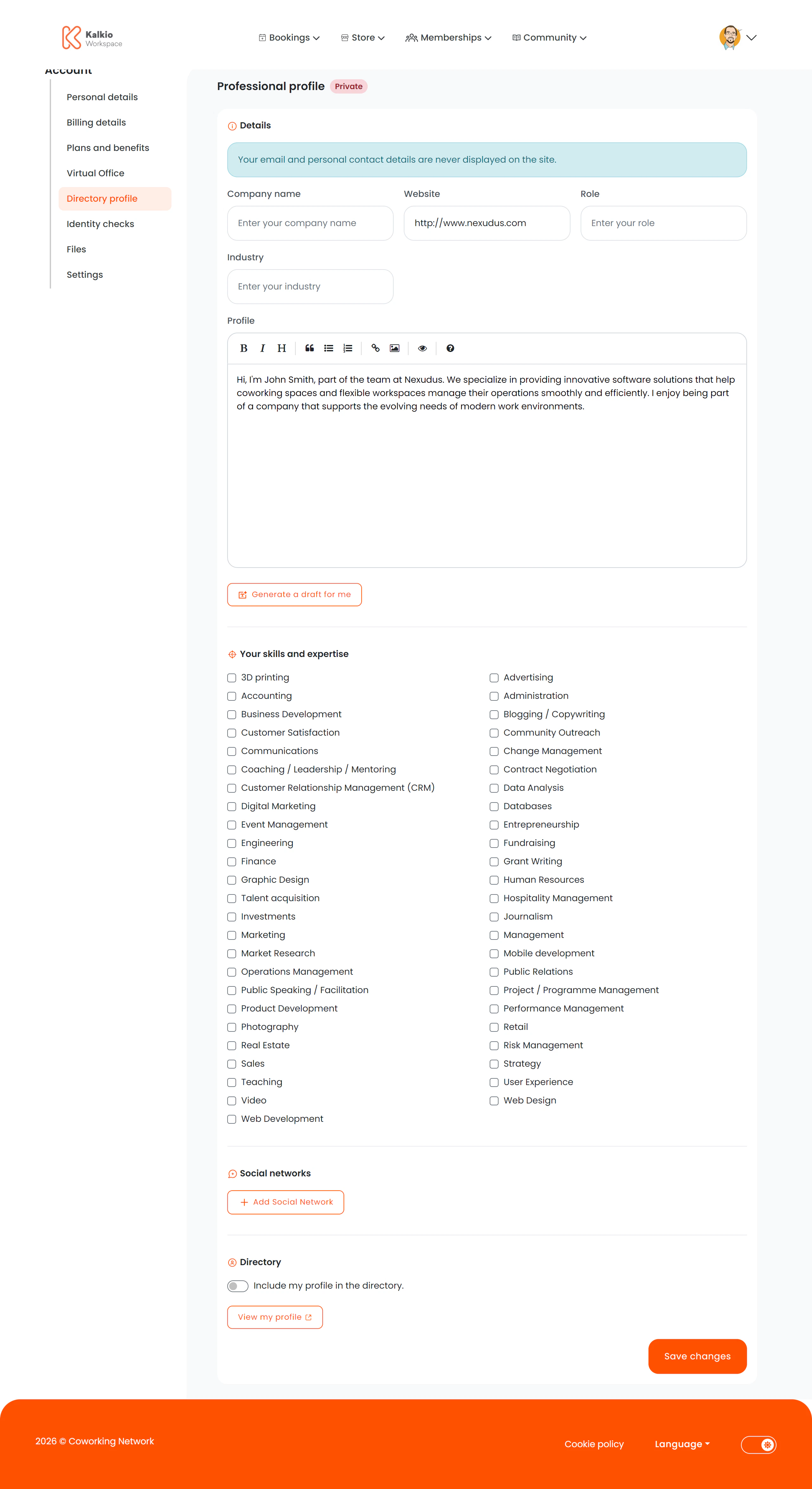 ## What members see
### Professional details
| Field | Description |
| ------------------------ | ---------------------------------------- |
| Company name | Member's company or business name |
| Job position / role | Current role or title |
| Industry / business area | The industry they operate in |
| Website / portfolio URL | Link to their website |
| Professional summary | A bio or description (supports markdown) |
### AI-generated profile
If your location has **OpenAI** integration enabled (both `OpenAI.Enabled` and `OpenAI.AutoProfile.Enabled`), members can click a button to auto-generate a professional summary from their existing profile data.
### Skills & tags
Members select from a list of configurable skills and tags defined in your business settings. Tags are displayed as multi-select checkboxes.
### Social networks
Members can add URLs for up to **11 social platforms**:
LinkedIn, Facebook, Twitter, Instagram, GitHub, Skype, Telegram, Pinterest, Vimeo, Flickr, Blogger
All URLs are validated before saving.
### Directory visibility
If the Directory module is enabled, a toggle lets members choose whether their profile appears publicly in the Members Directory or remains private.
## Key features
* **AI profile generation** — auto-creates a compelling summary from profile data (optional, per-location setting).
* **Skills/tags** — customisable per location to match your community's industries and interests.
* **Privacy control** — members decide whether they appear in the directory.
* **URL validation** — all website and social URLs are validated.
Configure relevant skills and tags in your dashboard to help members categorise themselves. This makes the Members Directory more useful for
networking.
## What members see
### Professional details
| Field | Description |
| ------------------------ | ---------------------------------------- |
| Company name | Member's company or business name |
| Job position / role | Current role or title |
| Industry / business area | The industry they operate in |
| Website / portfolio URL | Link to their website |
| Professional summary | A bio or description (supports markdown) |
### AI-generated profile
If your location has **OpenAI** integration enabled (both `OpenAI.Enabled` and `OpenAI.AutoProfile.Enabled`), members can click a button to auto-generate a professional summary from their existing profile data.
### Skills & tags
Members select from a list of configurable skills and tags defined in your business settings. Tags are displayed as multi-select checkboxes.
### Social networks
Members can add URLs for up to **11 social platforms**:
LinkedIn, Facebook, Twitter, Instagram, GitHub, Skype, Telegram, Pinterest, Vimeo, Flickr, Blogger
All URLs are validated before saving.
### Directory visibility
If the Directory module is enabled, a toggle lets members choose whether their profile appears publicly in the Members Directory or remains private.
## Key features
* **AI profile generation** — auto-creates a compelling summary from profile data (optional, per-location setting).
* **Skills/tags** — customisable per location to match your community's industries and interests.
* **Privacy control** — members decide whether they appear in the directory.
* **URL validation** — all website and social URLs are validated.
Configure relevant skills and tags in your dashboard to help members categorise themselves. This makes the Members Directory more useful for
networking.