> ## Documentation Index
> Fetch the complete documentation index at: https://learn.nexudus.com/llms.txt
> Use this file to discover all available pages before exploring further.
# Events
> How members browse, filter, and view events in the Members Portal.
The events section lets members discover upcoming happenings at your coworking space — workshops, networking sessions, socials, and more. It includes a listing page and a detail page for each event.
 ## Events listing page
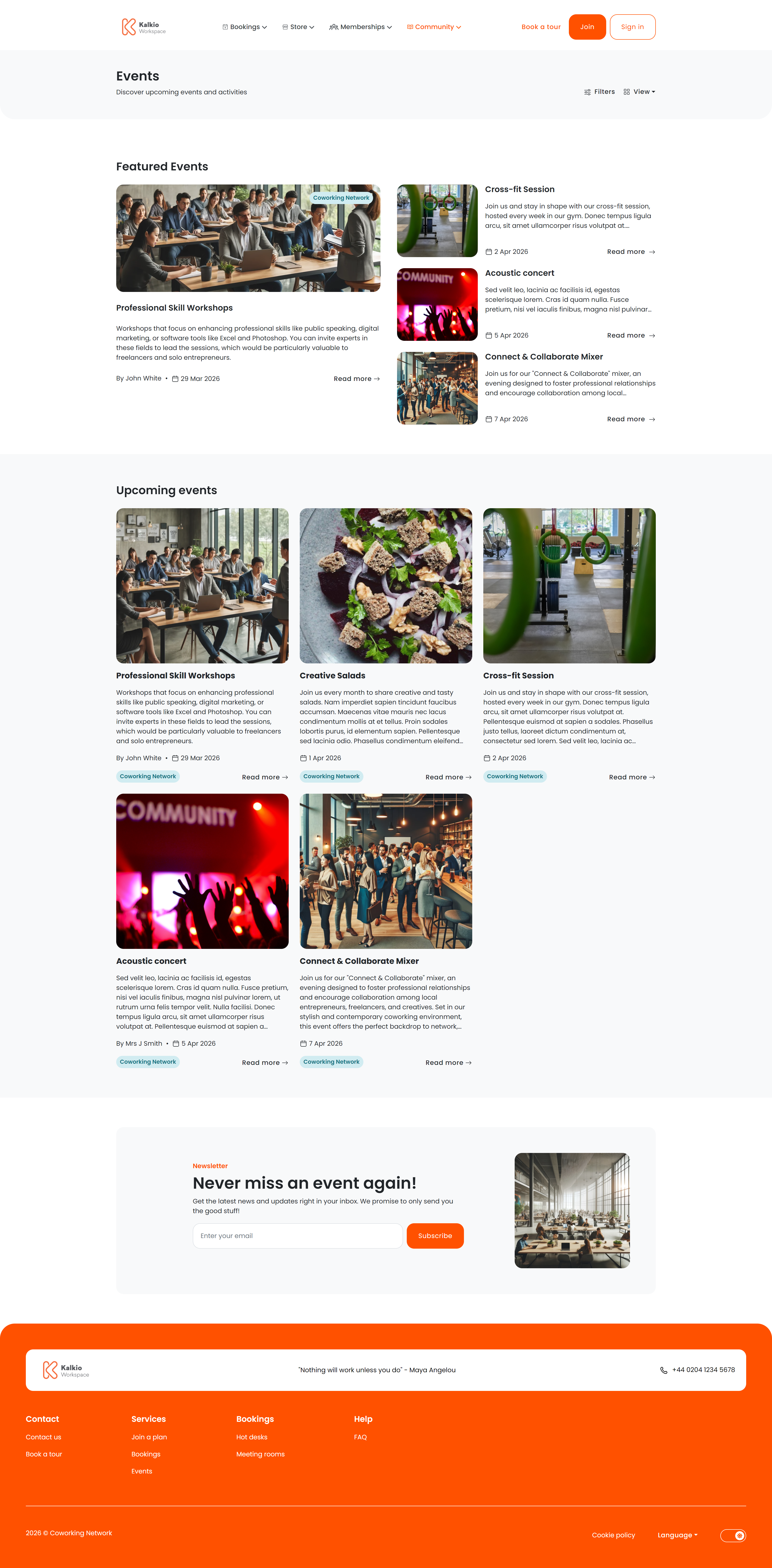
The listing page shows all published events with powerful filtering and two view modes.
### View modes
| Mode | Description |
| ----------------- | --------------------------------------------------------------------------- |
| **List view** | Events displayed as cards in a responsive grid — 9 per page with pagination |
| **Calendar view** | Monthly calendar showing events on their scheduled dates |
Members can switch between views using the toggle in the top-right corner.
### Filtering & search
| Filter | What it does |
| -------------------------- | ----------------------------------------------------------------------------------------- |
| **Category** | Dropdown of your event categories — members pick one to narrow results |
| **Search** | Free-text search across event titles and descriptions (auto-triggers after a short delay) |
| **Date range** | Start/end date pickers to find events within a window |
| **Location** | Filter by business location (useful for multi-site setups) |
| **Past / Upcoming toggle** | Switch between future events and events that have already happened |
### Featured events
On the first page of results, a dedicated **Featured Events** section highlights events you have marked as featured in the dashboard. This section does not appear on subsequent pages.
***
## Event details page
When a member clicks an event, they see the full details.
## Events listing page
The listing page shows all published events with powerful filtering and two view modes.
### View modes
| Mode | Description |
| ----------------- | --------------------------------------------------------------------------- |
| **List view** | Events displayed as cards in a responsive grid — 9 per page with pagination |
| **Calendar view** | Monthly calendar showing events on their scheduled dates |
Members can switch between views using the toggle in the top-right corner.
### Filtering & search
| Filter | What it does |
| -------------------------- | ----------------------------------------------------------------------------------------- |
| **Category** | Dropdown of your event categories — members pick one to narrow results |
| **Search** | Free-text search across event titles and descriptions (auto-triggers after a short delay) |
| **Date range** | Start/end date pickers to find events within a window |
| **Location** | Filter by business location (useful for multi-site setups) |
| **Past / Upcoming toggle** | Switch between future events and events that have already happened |
### Featured events
On the first page of results, a dedicated **Featured Events** section highlights events you have marked as featured in the dashboard. This section does not appear on subsequent pages.
***
## Event details page
When a member clicks an event, they see the full details.
 ### Information displayed
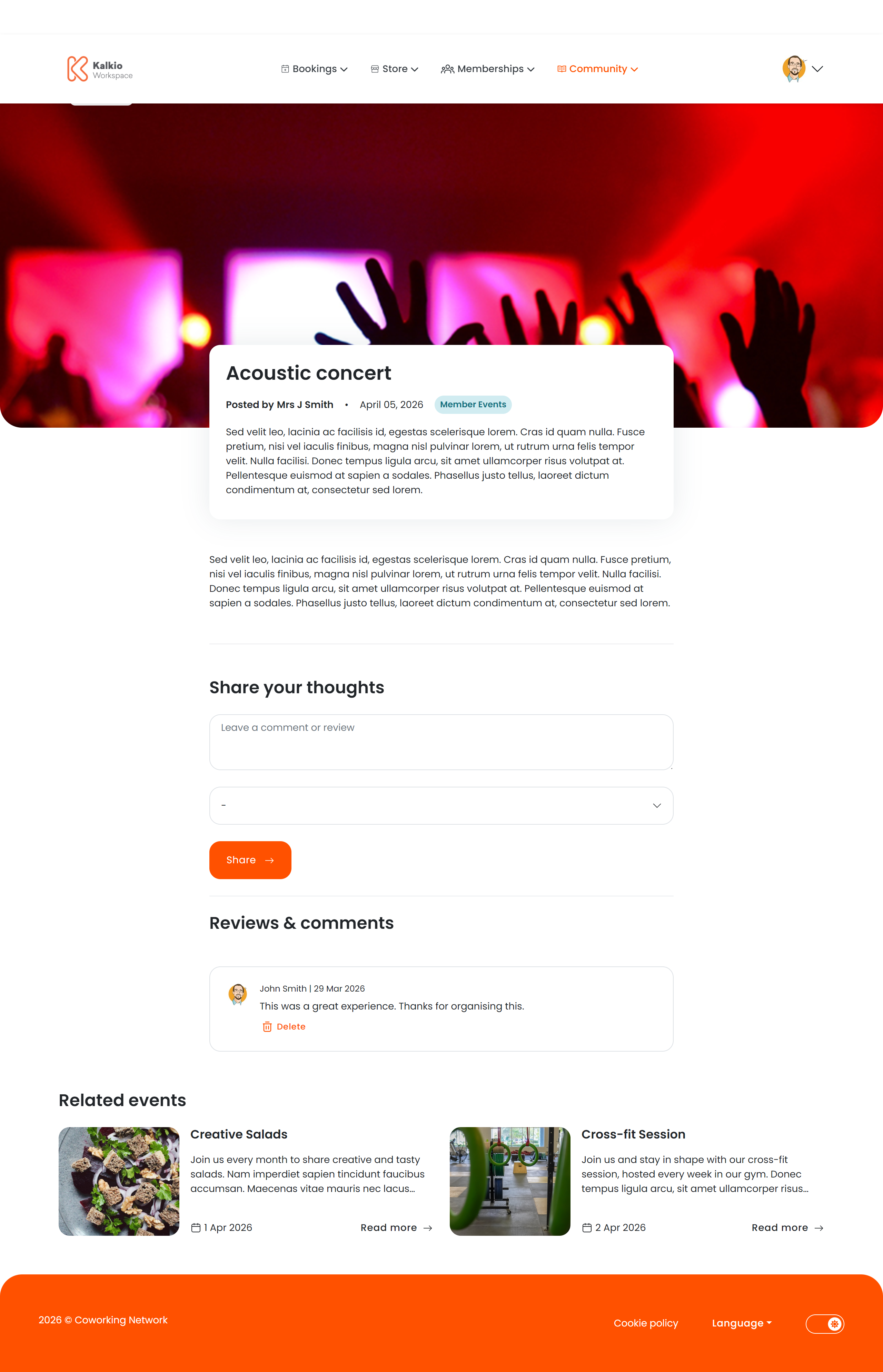
* **Event name, date, and time range**
* **Location and venue** with map link
* **Host / organiser** name
* **Full description** rendered from rich text / markdown
* **Tickets** — each ticket type shows its price and remaining availability. When tickets sell out, a "Sold out" badge appears.
* **Waiting list** — if enabled, members can join a waiting list for sold-out events.
### Comments
Members can leave comments with a text body and a star rating. Comment authors can delete their own comments. You can enable or disable the comments section from the Page Editor.
### Related events
A "Related Events" section shows similar events based on category, encouraging members to discover more. This section can also be toggled on or off.
***
## Recommended image sizes
Events use two images: a **large image** and a **small image**. Each is requested at different sizes depending on context.
### Large image
| Where it appears | Requested size | Aspect ratio |
| --------------------------- | -------------- | ------------ |
| **Detail page hero** | 1280 × 520 px | \~2.46 : 1 |
| **Featured events section** | 1280 × 520 px | \~2.46 : 1 |
### Small image
| Where it appears | Requested size | Aspect ratio |
| --------------------------- | -------------- | ------------ |
| **Event listing cards** | 600 × 540 px | \~1.11 : 1 |
| **Featured section (grid)** | 600 × 540 px | \~1.11 : 1 |
| **Related events** | 600 × 540 px | \~1.11 : 1 |
| **Checkout confirmation** | 600 × 540 px | \~1.11 : 1 |
| **Basket thumbnail** | 220 × 220 px | 1 : 1 |
For the best results across all contexts, upload a **large image** of at least **1280 × 520 px** (landscape, \~2.5:1 ratio) and a **small image** of at least **600 × 540 px** (nearly square). This avoids cropping in all areas of the portal.
### Information displayed
* **Event name, date, and time range**
* **Location and venue** with map link
* **Host / organiser** name
* **Full description** rendered from rich text / markdown
* **Tickets** — each ticket type shows its price and remaining availability. When tickets sell out, a "Sold out" badge appears.
* **Waiting list** — if enabled, members can join a waiting list for sold-out events.
### Comments
Members can leave comments with a text body and a star rating. Comment authors can delete their own comments. You can enable or disable the comments section from the Page Editor.
### Related events
A "Related Events" section shows similar events based on category, encouraging members to discover more. This section can also be toggled on or off.
***
## Recommended image sizes
Events use two images: a **large image** and a **small image**. Each is requested at different sizes depending on context.
### Large image
| Where it appears | Requested size | Aspect ratio |
| --------------------------- | -------------- | ------------ |
| **Detail page hero** | 1280 × 520 px | \~2.46 : 1 |
| **Featured events section** | 1280 × 520 px | \~2.46 : 1 |
### Small image
| Where it appears | Requested size | Aspect ratio |
| --------------------------- | -------------- | ------------ |
| **Event listing cards** | 600 × 540 px | \~1.11 : 1 |
| **Featured section (grid)** | 600 × 540 px | \~1.11 : 1 |
| **Related events** | 600 × 540 px | \~1.11 : 1 |
| **Checkout confirmation** | 600 × 540 px | \~1.11 : 1 |
| **Basket thumbnail** | 220 × 220 px | 1 : 1 |
For the best results across all contexts, upload a **large image** of at least **1280 × 520 px** (landscape, \~2.5:1 ratio) and a **small image** of at least **600 × 540 px** (nearly square). This avoids cropping in all areas of the portal.