> ## Documentation Index
> Fetch the complete documentation index at: https://learn.nexudus.com/llms.txt
> Use this file to discover all available pages before exploring further.
# Virtual Office Onboarding
> The multi-step onboarding wizard for virtual office members.
# Virtual Office Onboarding
The virtual office onboarding flow guides new virtual office members through a structured setup process, collecting company details, personal information, AML screening, identity verification, and mail handling preferences.
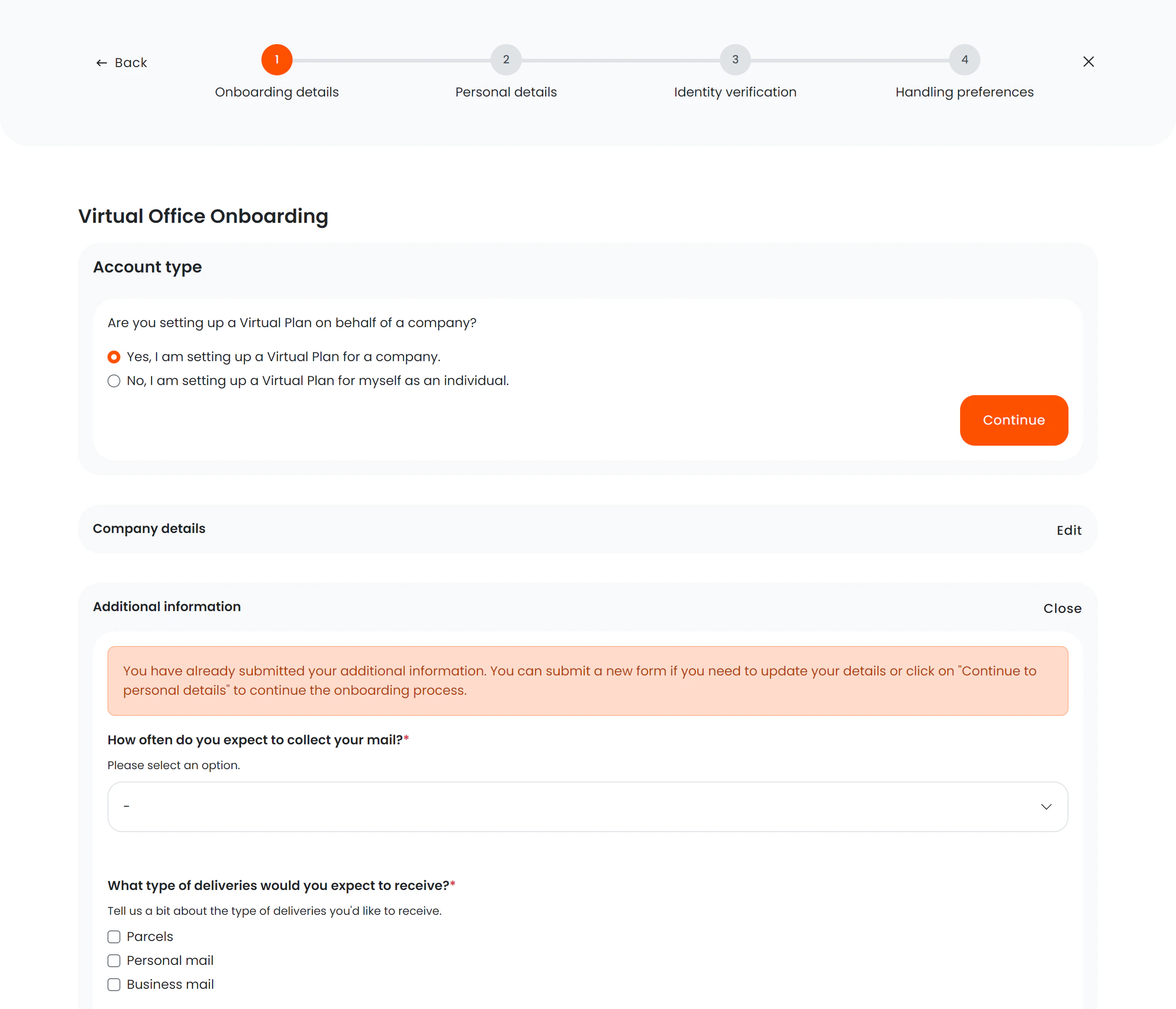 ## Onboarding steps
The wizard uses a visual progress stepper so members always know where they are in the process.
| Step | Name | Description |
| ---- | ------------------------- | ------------------------------------------------------------------------ |
| 1 | **Company details** | Company and contract information, including director/contact details |
| 2 | **Personal details** | Directors, recipients, and company aliases |
| 3 | **AML screening** | Anti-money laundering checks (conditional — only if enabled on the plan) |
| 4 | **Identity verification** | Document upload for identity checks (conditional — only if required) |
| 5 | **Mail preferences** | Mail and delivery handling preferences |
| 6 | **Complete** | Confirmation screen indicating setup is finished |
### Dynamic step count
Steps 3 and 4 are conditionally displayed based on the plan configuration. The wizard adjusts the stepper and navigation accordingly:
* **AML + Identity checks enabled** — all 6 steps shown, AML must pass before identity verification begins.
* **Only AML checks enabled** — identity verification step is skipped.
* **Only Identity checks enabled** — AML screening step is skipped.
* **Neither enabled** — both steps are skipped and the member goes directly from personal details to mail preferences.
## Compliance flow order
When both AML and identity checks are enabled on a plan, they follow a strict order:
```
Personal details → AML screening → Identity verification → Mail preferences
```
AML checks must pass (status: Clear or Manually Cleared) before identity verification is triggered. If AML checks fail, the member can go back to edit their director details.
## Key features
* **Smart routing** — the wizard detects which steps have already been completed and skips them on return visits.
* **Exit confirmation** — if a member tries to leave mid-process, a modal asks for confirmation to prevent accidental data loss.
* **Profile mismatch alert** — if the signed-in member doesn't match the expected virtual office profile, a warning is displayed.
* **Custom signup fields** — form fields adapt based on the tariff/plan the member has selected.
* **Director/contact form** — collects information about company directors or other contact persons.
* **AML confirmation dialog** — before triggering AML screening, the member is asked to confirm all directors have been added and that names, company registration numbers, and company names are correct.
* **Back navigation on failure** — if AML checks fail, the member can navigate back to the personal details step to correct director information.
## Form sections by step
### Step 1 — Company details
* Company name and registration
* Contract information
* Director/contact person details
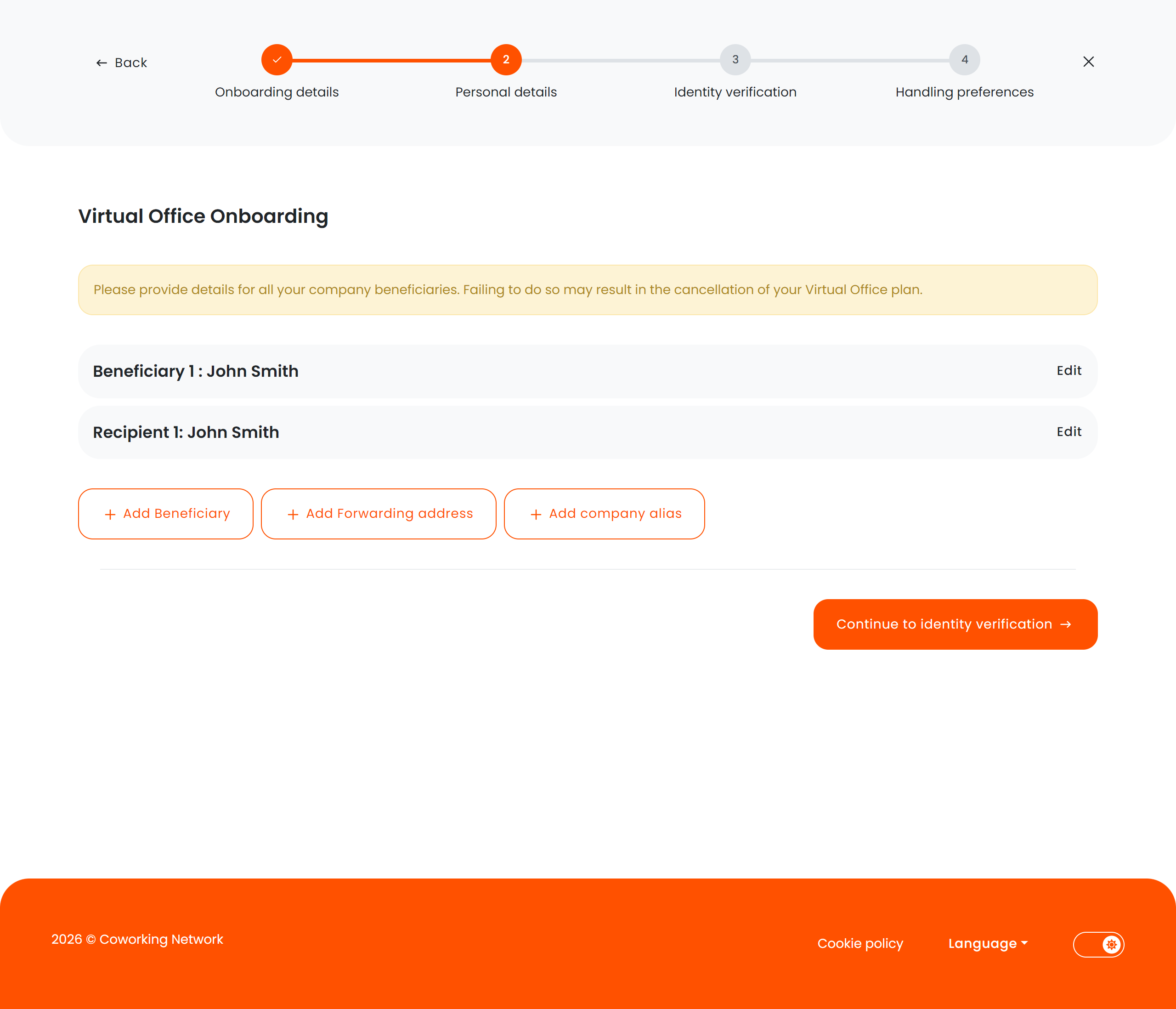
### Step 2 — Personal details
* Directors: full name, address, city, postcode, state, phone, date of birth
* Recipients: forwarding addresses
* Company aliases
The continue button at the bottom of this step adapts based on the plan:
| Plan configuration | Button label | Behavior |
| ------------------------------------- | ----------------------------------- | --------------------------------------------------- |
| AML checks required (not yet passed) | "Continue to AML screening" | Shows confirmation dialog, then triggers AML checks |
| AML passed + Identity checks required | "Continue to identity verification" | Triggers identity verification |
| Neither required | "Set up handling preferences" | Navigates to mail preferences |
## Onboarding steps
The wizard uses a visual progress stepper so members always know where they are in the process.
| Step | Name | Description |
| ---- | ------------------------- | ------------------------------------------------------------------------ |
| 1 | **Company details** | Company and contract information, including director/contact details |
| 2 | **Personal details** | Directors, recipients, and company aliases |
| 3 | **AML screening** | Anti-money laundering checks (conditional — only if enabled on the plan) |
| 4 | **Identity verification** | Document upload for identity checks (conditional — only if required) |
| 5 | **Mail preferences** | Mail and delivery handling preferences |
| 6 | **Complete** | Confirmation screen indicating setup is finished |
### Dynamic step count
Steps 3 and 4 are conditionally displayed based on the plan configuration. The wizard adjusts the stepper and navigation accordingly:
* **AML + Identity checks enabled** — all 6 steps shown, AML must pass before identity verification begins.
* **Only AML checks enabled** — identity verification step is skipped.
* **Only Identity checks enabled** — AML screening step is skipped.
* **Neither enabled** — both steps are skipped and the member goes directly from personal details to mail preferences.
## Compliance flow order
When both AML and identity checks are enabled on a plan, they follow a strict order:
```
Personal details → AML screening → Identity verification → Mail preferences
```
AML checks must pass (status: Clear or Manually Cleared) before identity verification is triggered. If AML checks fail, the member can go back to edit their director details.
## Key features
* **Smart routing** — the wizard detects which steps have already been completed and skips them on return visits.
* **Exit confirmation** — if a member tries to leave mid-process, a modal asks for confirmation to prevent accidental data loss.
* **Profile mismatch alert** — if the signed-in member doesn't match the expected virtual office profile, a warning is displayed.
* **Custom signup fields** — form fields adapt based on the tariff/plan the member has selected.
* **Director/contact form** — collects information about company directors or other contact persons.
* **AML confirmation dialog** — before triggering AML screening, the member is asked to confirm all directors have been added and that names, company registration numbers, and company names are correct.
* **Back navigation on failure** — if AML checks fail, the member can navigate back to the personal details step to correct director information.
## Form sections by step
### Step 1 — Company details
* Company name and registration
* Contract information
* Director/contact person details
### Step 2 — Personal details
* Directors: full name, address, city, postcode, state, phone, date of birth
* Recipients: forwarding addresses
* Company aliases
The continue button at the bottom of this step adapts based on the plan:
| Plan configuration | Button label | Behavior |
| ------------------------------------- | ----------------------------------- | --------------------------------------------------- |
| AML checks required (not yet passed) | "Continue to AML screening" | Shows confirmation dialog, then triggers AML checks |
| AML passed + Identity checks required | "Continue to identity verification" | Triggers identity verification |
| Neither required | "Set up handling preferences" | Navigates to mail preferences |
 ### Step 3 — AML screening (conditional)
Displayed when `RequiresAmlChecks` is enabled on the plan. The member sees the status of their AML screening for each director.
**Before triggering**: When clicking "Continue to AML screening" from the personal details step, the member sees a confirmation dialog:
> *"Please confirm that all directors have been added and that all names, company registration numbers and company names are correct. Once you proceed, the AML screening will be triggered and cannot be undone."*
**AML statuses displayed**:
| Status | Badge | Description |
| ------------ | ------ | ---------------------------------------------------- |
| Not started | Grey | Checks haven't been triggered yet |
| In progress | Blue | Screening is running |
| Clear | Green | All checks passed |
| Under review | Yellow | Manual review required by the operator |
| Match found | Red | Confirmed match — contact support |
| Error | Red | Processing error — review details or contact support |
| Cleared | Green | Manually cleared by an administrator |
**Navigation from the AML step**:
* If checks pass → "Continue to identity verification" (if identity checks enabled) or "Continue to handling preferences"
* If checks fail or are under review → "Back to edit directors" button appears, allowing the member to return to the personal details step and correct information
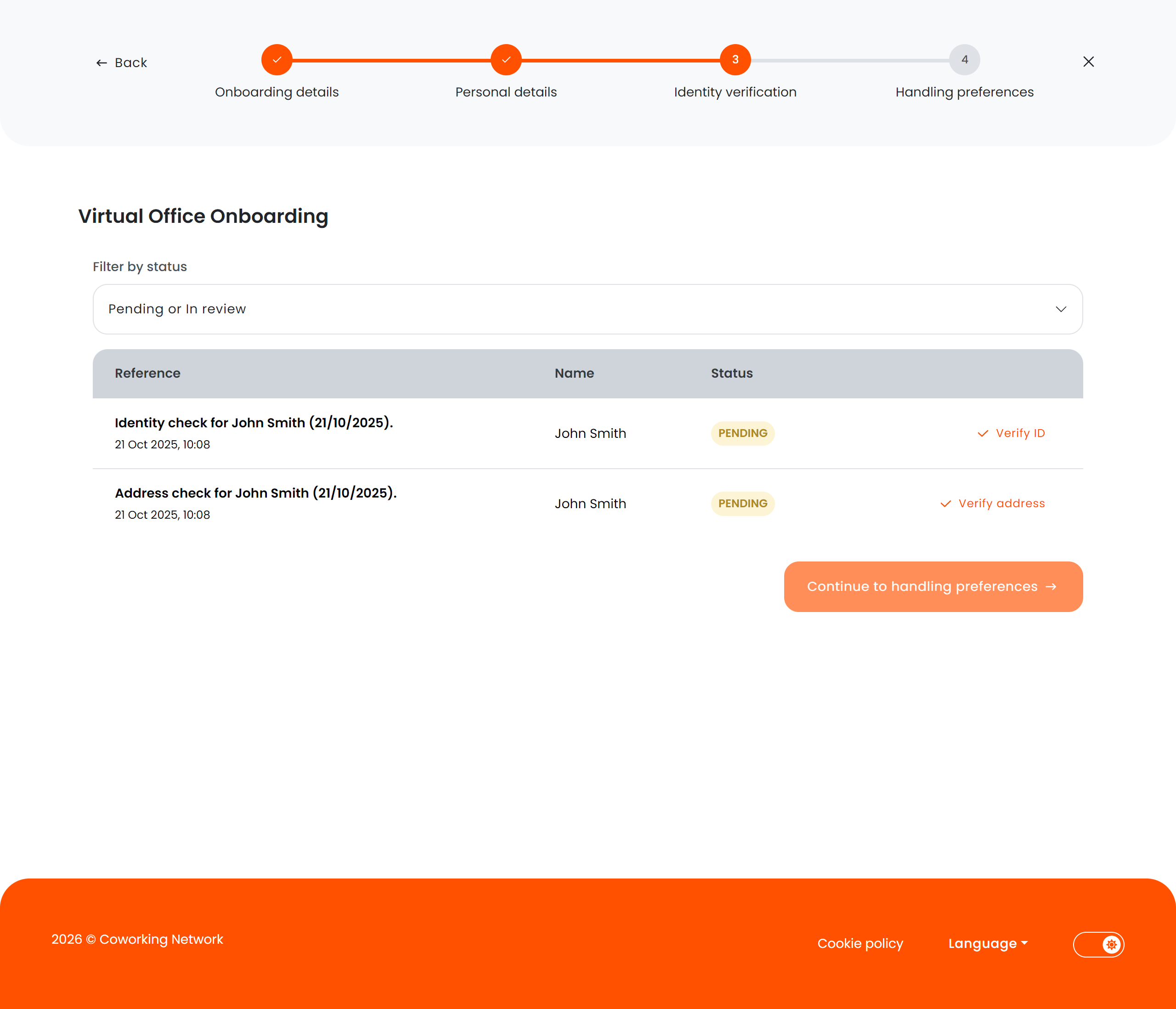
### Step 4 — Identity verification (conditional)
* Upload identity documents (passport, ID card, etc.)
* Only displayed when `RequiresIdentityChecks` is enabled for the plan
* Only reachable after AML screening passes (if AML is also enabled)
### Step 3 — AML screening (conditional)
Displayed when `RequiresAmlChecks` is enabled on the plan. The member sees the status of their AML screening for each director.
**Before triggering**: When clicking "Continue to AML screening" from the personal details step, the member sees a confirmation dialog:
> *"Please confirm that all directors have been added and that all names, company registration numbers and company names are correct. Once you proceed, the AML screening will be triggered and cannot be undone."*
**AML statuses displayed**:
| Status | Badge | Description |
| ------------ | ------ | ---------------------------------------------------- |
| Not started | Grey | Checks haven't been triggered yet |
| In progress | Blue | Screening is running |
| Clear | Green | All checks passed |
| Under review | Yellow | Manual review required by the operator |
| Match found | Red | Confirmed match — contact support |
| Error | Red | Processing error — review details or contact support |
| Cleared | Green | Manually cleared by an administrator |
**Navigation from the AML step**:
* If checks pass → "Continue to identity verification" (if identity checks enabled) or "Continue to handling preferences"
* If checks fail or are under review → "Back to edit directors" button appears, allowing the member to return to the personal details step and correct information
### Step 4 — Identity verification (conditional)
* Upload identity documents (passport, ID card, etc.)
* Only displayed when `RequiresIdentityChecks` is enabled for the plan
* Only reachable after AML screening passes (if AML is also enabled)
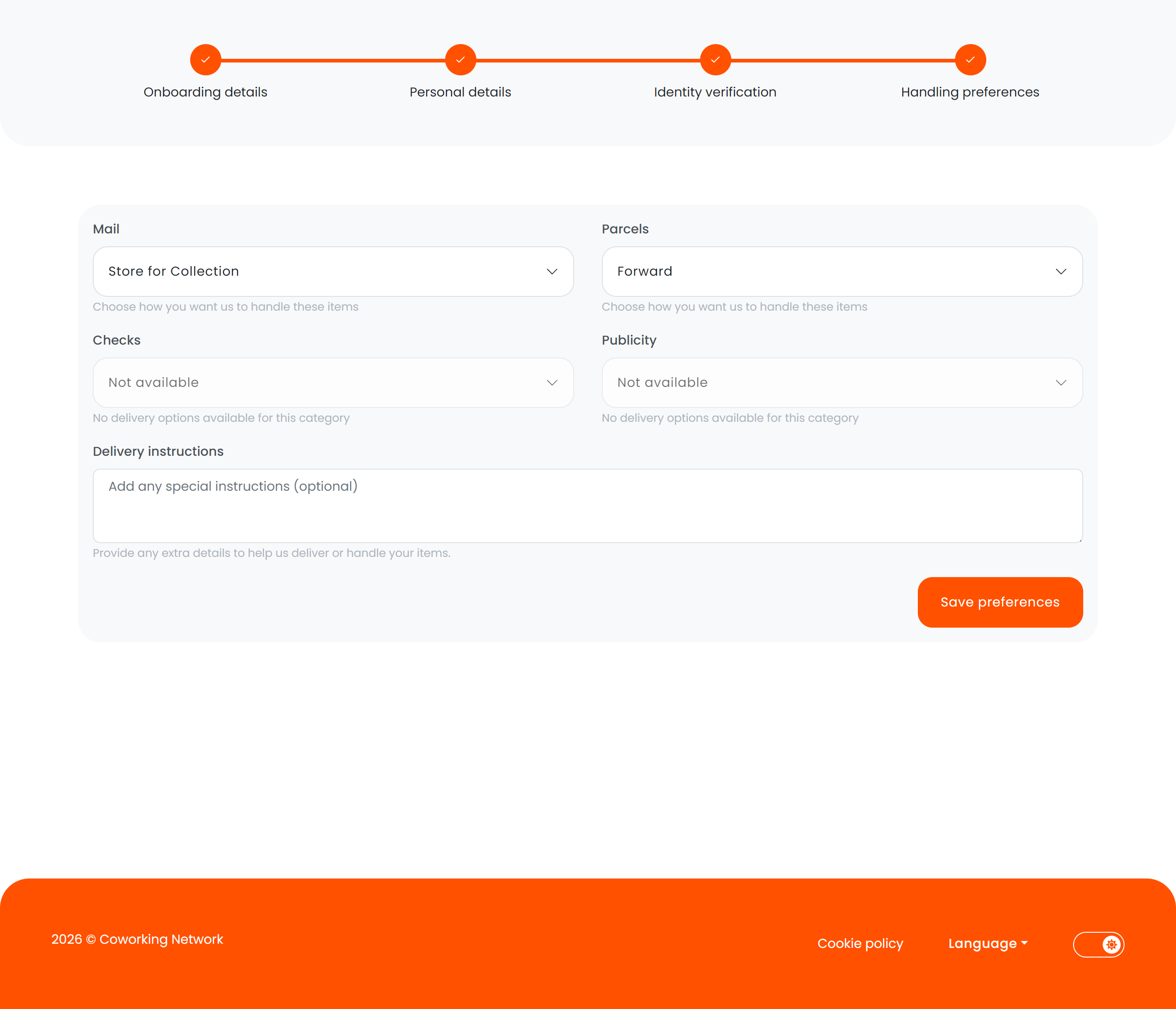
 ### Step 5 — Mail preferences
* Delivery handling instructions
* Forwarding preferences
* Notification settings for incoming mail
### Step 5 — Mail preferences
* Delivery handling instructions
* Forwarding preferences
* Notification settings for incoming mail
 ### Step 6 — Completion
* Confirmation that onboarding is complete
* Links to the dashboard or next steps
### Step 6 — Completion
* Confirmation that onboarding is complete
* Links to the dashboard or next steps
 ## State detection
The onboarding flow tracks completion status through metadata flags:
| Flag | Effect |
| ---------------------------- | --------------------------------------------------------------------------------------------------------------------------------- |
| `RequiresAmlChecks` | Controls whether the AML screening step appears |
| `AmlChecksStatus` | Tracks the current AML outcome (`NotStarted`, `Pending`, `Clear`, `PotentialMatch`, `ConfirmedMatch`, `Error`, `ManuallyCleared`) |
| `RequiresIdentityChecks` | Controls whether the identity verification step appears |
| `HasStartedIdentityChecks` | Tracks whether identity checks have been triggered |
| `HasSubmittedIdentityChecks` | Detects whether identity documents have been submitted |
| `HasSubmittedForm` | Detects whether the member has already completed onboarding |
| `ContactIsMissingDetails` | Prevents proceeding if director information is incomplete |
## Automatic redirect logic
When a member returns to the onboarding flow, the system determines which step to show:
1. Missing company details → **Company details** step
2. AML required but not started → **Personal details** (to trigger AML)
3. AML in progress or under review → **AML screening** step
4. AML passed, identity not started → **Personal details** (to trigger identity verification)
5. Identity started but not completed → **Identity verification** step
6. Preferences not set → **Mail preferences** step
Virtual office onboarding is separate from the standard member registration flow. It is specifically designed for services that require additional
compliance steps like AML screening, identity verification, and mail handling setup.
## State detection
The onboarding flow tracks completion status through metadata flags:
| Flag | Effect |
| ---------------------------- | --------------------------------------------------------------------------------------------------------------------------------- |
| `RequiresAmlChecks` | Controls whether the AML screening step appears |
| `AmlChecksStatus` | Tracks the current AML outcome (`NotStarted`, `Pending`, `Clear`, `PotentialMatch`, `ConfirmedMatch`, `Error`, `ManuallyCleared`) |
| `RequiresIdentityChecks` | Controls whether the identity verification step appears |
| `HasStartedIdentityChecks` | Tracks whether identity checks have been triggered |
| `HasSubmittedIdentityChecks` | Detects whether identity documents have been submitted |
| `HasSubmittedForm` | Detects whether the member has already completed onboarding |
| `ContactIsMissingDetails` | Prevents proceeding if director information is incomplete |
## Automatic redirect logic
When a member returns to the onboarding flow, the system determines which step to show:
1. Missing company details → **Company details** step
2. AML required but not started → **Personal details** (to trigger AML)
3. AML in progress or under review → **AML screening** step
4. AML passed, identity not started → **Personal details** (to trigger identity verification)
5. Identity started but not completed → **Identity verification** step
6. Preferences not set → **Mail preferences** step
Virtual office onboarding is separate from the standard member registration flow. It is specifically designed for services that require additional
compliance steps like AML screening, identity verification, and mail handling setup.