> ## Documentation Index
> Fetch the complete documentation index at: https://learn.nexudus.com/llms.txt
> Use this file to discover all available pages before exploring further.
# AI Agents
> An overview of AI capabilities in the Nexudus Dashboard — from conversational AI in the Members Portal to proactive agents that help you run your space smarter.
## Overview
AI Agents is currently in **beta**. OpenAI is the current subprocessor for AI models. Access is free of charge during the Beta phase, but pricing may change in the future.
Nexudus includes two distinct AI-powered features that work together to improve both your members' experience and your operational efficiency:
* **Conversational AI** — A customer-facing AI assistant available in the [Members Portal](/member-portal/ai/overview) that answers questions about plans, bookings, events, and your space.
* **Proactive AI Agents** — An operator-facing intelligence layer in the Dashboard that monitors patterns in your space and automatically proposes actions for your review.
This section covers the **Proactive AI Agents** feature — the system that watches your bookings, invoices, contracts, support tickets, and member engagement, then suggests when and how to reach out.
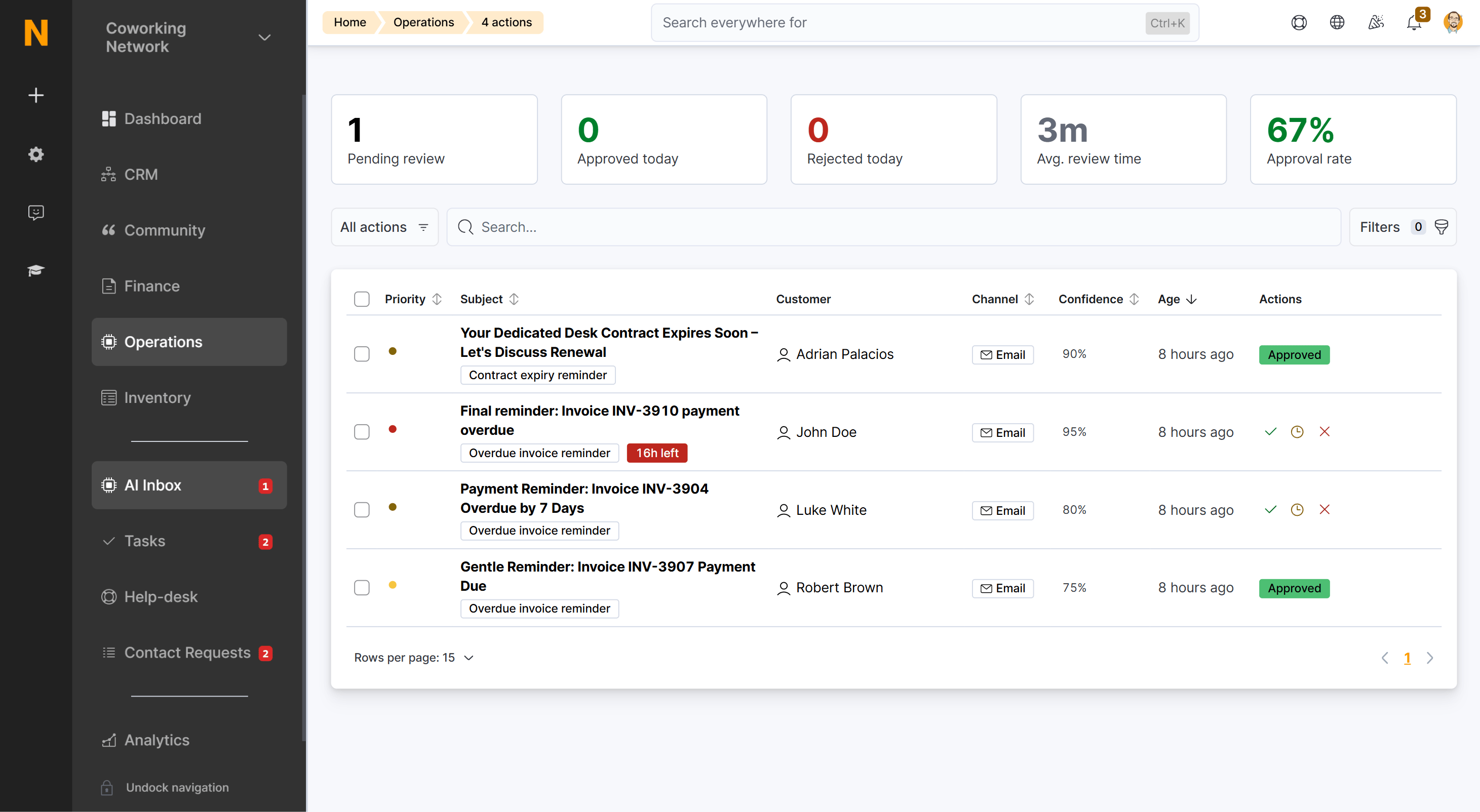 ## What Proactive AI Agents Do
Proactive AI Agents are automated monitoring rules that watch for specific situations in your coworking space — like an overdue invoice, a contract approaching expiry, or a member who hasn't checked in for two weeks — and then propose the right action at the right time.
Each agent works through the same four-step cycle:
1. **Monitor** — The agent continuously watches for patterns defined in its criteria (e.g., invoices past due date, contracts within 30 days of expiry).
2. **Evaluate** — When a pattern is detected, the agent calculates a confidence score based on how strongly the situation matches the criteria.
3. **Propose** — A proposed action appears in your **AI Inbox** with a suggested message or note. You review it and decide whether to approve, edit, or reject.
4. **Execute** — Once approved, the action is sent through the configured channel (email, WhatsApp, voice call, or internal note). If auto-execute is enabled, high-confidence actions are sent automatically. When the action is an email, WhatsApp, or voice message, the customer can reply or respond — starting a two-way conversation that appears in [AI Conversations](/platform/ai/ai-conversations).
How proactive agents work and access the configuration interface.
Detailed reference for all available agents and their settings.
Step-by-step guide to enabling and customizing agents.
Review and approve proposed actions before sending.
## Agent Categories
Agents are organized into categories that reflect the area of your business they monitor:
| Category | What It Watches | Example Agent |
| -------------- | --------------------------------- | ------------------------------------------- |
| **Billing** | Invoices, contracts, payments | Due Invoice Reminders, Contract Renewal |
| **Sales** | Leads, tours, inquiries | Lead Follow-up, Tour Reminders |
| **Engagement** | Member activity and onboarding | Onboarding Nudges, Booking No-Show |
| **Retention** | Declining usage and churn signals | At-Risk Member Detection, Cancellation Risk |
| **Support** | Help desk tickets and patterns | Support Pattern Detection |
| **Revenue** | Upsell and upgrade opportunities | Upsell Opportunities |
| **Knowledge** | FAQ gaps and content suggestions | FAQ Gap Detection |
Some agents are available now; others are marked as coming soon. The full list is on the [Proactive Agents](/platform/ai/proactive-agents) page.
## How It All Connects
The proactive agents system sits alongside the conversational AI assistant, and the two are connected bidirectionally:
* **Conversational AI** handles real-time customer questions in the Members Portal.
* **Proactive Agents** use the same conversation data (along with booking, invoice, and contract data) to detect patterns like unanswered questions or dormant leads.
* When a proactive agent identifies an opportunity, it proposes an action through the [AI Inbox](/platform/ai/inbox) for your review.
* Once an email, WhatsApp, or voice action is sent, the customer can reply — starting a two-way conversation that appears in [AI Conversations](/platform/ai/ai-conversations).
* Replies from customers are handled by the same conversational AI, and the conversation stays linked to the original proposed action so you can see the full context.
**Email, WhatsApp, and Voice channels require prior configuration.** Proactive agents can send actions via Email, WhatsApp, or Voice only if those channels are already set up in your space:
* **Email** — requires the [email channel](/member-portal/ai/setup-email) to be enabled and email forwarding configured.
* **WhatsApp** — requires the [WhatsApp channel](/member-portal/ai/setup-whatsapp) to be enabled with Twilio credentials and WhatsApp Business API configured.
* **Voice** — requires the [voice channel](/member-portal/ai/setup-voice) to be enabled with ElevenLabs and Twilio credentials configured.
If a channel is not configured, actions will only be delivered as **Internal notes** within the Dashboard. Chat is the only channel that works immediately — no additional setup required.
For more on the conversational AI, see the [Members Portal AI documentation](/member-portal/ai/overview).
## Key Concepts
| Term | Meaning |
| ----------------------- | ------------------------------------------------------------------------------------------------------------------------------------------------------------------------------------------------------------------ |
| **Agent** | A monitoring rule that watches for specific patterns in your space data. Each agent focuses on one type of situation (e.g., overdue invoices). |
| **Criteria** | The conditions that trigger an agent. For example, "invoice is 7+ days overdue" is the criteria for the Due Invoice Reminders agent. |
| **Confidence Score** | A percentage (0–100%) that represents how strongly the detected situation matches the agent's criteria. Higher scores mean the AI is more certain the action is appropriate. |
| **Proposed Action** | An item in your AI Inbox created by an agent. It includes a suggested message, the customer it targets, and the channel to use. |
| **Auto-Execute** | When enabled, actions meeting the minimum confidence threshold are sent automatically without manual review. |
| **Cooldown** | A time period (in hours) that prevents the same agent from acting on the same customer repeatedly. For example, a 48-hour cooldown means the agent won't propose another action for that customer within 48 hours. |
| **Channel** | The communication method used to deliver the action — Email, WhatsApp, Voice, or Internal note. |
| **Max Actions Per Day** | The upper limit on how many actions an agent can propose across all customers in a single day. |
| **AI Conversations** | Two-way conversations that start when a customer replies to an email, WhatsApp, or voice action from a proactive agent. [View AI Conversations](/platform/ai/ai-conversations). |
| **AI Inbox** | The central place to review, approve, edit, or reject proposed actions before they're sent. [View AI Inbox](/platform/ai/inbox). |
Learn about all available agents and how to access the configuration page.
Understand how to review, approve, and manage proposed actions.
Step-by-step guide to enabling agents and customizing their behavior.
## What Proactive AI Agents Do
Proactive AI Agents are automated monitoring rules that watch for specific situations in your coworking space — like an overdue invoice, a contract approaching expiry, or a member who hasn't checked in for two weeks — and then propose the right action at the right time.
Each agent works through the same four-step cycle:
1. **Monitor** — The agent continuously watches for patterns defined in its criteria (e.g., invoices past due date, contracts within 30 days of expiry).
2. **Evaluate** — When a pattern is detected, the agent calculates a confidence score based on how strongly the situation matches the criteria.
3. **Propose** — A proposed action appears in your **AI Inbox** with a suggested message or note. You review it and decide whether to approve, edit, or reject.
4. **Execute** — Once approved, the action is sent through the configured channel (email, WhatsApp, voice call, or internal note). If auto-execute is enabled, high-confidence actions are sent automatically. When the action is an email, WhatsApp, or voice message, the customer can reply or respond — starting a two-way conversation that appears in [AI Conversations](/platform/ai/ai-conversations).
How proactive agents work and access the configuration interface.
Detailed reference for all available agents and their settings.
Step-by-step guide to enabling and customizing agents.
Review and approve proposed actions before sending.
## Agent Categories
Agents are organized into categories that reflect the area of your business they monitor:
| Category | What It Watches | Example Agent |
| -------------- | --------------------------------- | ------------------------------------------- |
| **Billing** | Invoices, contracts, payments | Due Invoice Reminders, Contract Renewal |
| **Sales** | Leads, tours, inquiries | Lead Follow-up, Tour Reminders |
| **Engagement** | Member activity and onboarding | Onboarding Nudges, Booking No-Show |
| **Retention** | Declining usage and churn signals | At-Risk Member Detection, Cancellation Risk |
| **Support** | Help desk tickets and patterns | Support Pattern Detection |
| **Revenue** | Upsell and upgrade opportunities | Upsell Opportunities |
| **Knowledge** | FAQ gaps and content suggestions | FAQ Gap Detection |
Some agents are available now; others are marked as coming soon. The full list is on the [Proactive Agents](/platform/ai/proactive-agents) page.
## How It All Connects
The proactive agents system sits alongside the conversational AI assistant, and the two are connected bidirectionally:
* **Conversational AI** handles real-time customer questions in the Members Portal.
* **Proactive Agents** use the same conversation data (along with booking, invoice, and contract data) to detect patterns like unanswered questions or dormant leads.
* When a proactive agent identifies an opportunity, it proposes an action through the [AI Inbox](/platform/ai/inbox) for your review.
* Once an email, WhatsApp, or voice action is sent, the customer can reply — starting a two-way conversation that appears in [AI Conversations](/platform/ai/ai-conversations).
* Replies from customers are handled by the same conversational AI, and the conversation stays linked to the original proposed action so you can see the full context.
**Email, WhatsApp, and Voice channels require prior configuration.** Proactive agents can send actions via Email, WhatsApp, or Voice only if those channels are already set up in your space:
* **Email** — requires the [email channel](/member-portal/ai/setup-email) to be enabled and email forwarding configured.
* **WhatsApp** — requires the [WhatsApp channel](/member-portal/ai/setup-whatsapp) to be enabled with Twilio credentials and WhatsApp Business API configured.
* **Voice** — requires the [voice channel](/member-portal/ai/setup-voice) to be enabled with ElevenLabs and Twilio credentials configured.
If a channel is not configured, actions will only be delivered as **Internal notes** within the Dashboard. Chat is the only channel that works immediately — no additional setup required.
For more on the conversational AI, see the [Members Portal AI documentation](/member-portal/ai/overview).
## Key Concepts
| Term | Meaning |
| ----------------------- | ------------------------------------------------------------------------------------------------------------------------------------------------------------------------------------------------------------------ |
| **Agent** | A monitoring rule that watches for specific patterns in your space data. Each agent focuses on one type of situation (e.g., overdue invoices). |
| **Criteria** | The conditions that trigger an agent. For example, "invoice is 7+ days overdue" is the criteria for the Due Invoice Reminders agent. |
| **Confidence Score** | A percentage (0–100%) that represents how strongly the detected situation matches the agent's criteria. Higher scores mean the AI is more certain the action is appropriate. |
| **Proposed Action** | An item in your AI Inbox created by an agent. It includes a suggested message, the customer it targets, and the channel to use. |
| **Auto-Execute** | When enabled, actions meeting the minimum confidence threshold are sent automatically without manual review. |
| **Cooldown** | A time period (in hours) that prevents the same agent from acting on the same customer repeatedly. For example, a 48-hour cooldown means the agent won't propose another action for that customer within 48 hours. |
| **Channel** | The communication method used to deliver the action — Email, WhatsApp, Voice, or Internal note. |
| **Max Actions Per Day** | The upper limit on how many actions an agent can propose across all customers in a single day. |
| **AI Conversations** | Two-way conversations that start when a customer replies to an email, WhatsApp, or voice action from a proactive agent. [View AI Conversations](/platform/ai/ai-conversations). |
| **AI Inbox** | The central place to review, approve, edit, or reject proposed actions before they're sent. [View AI Inbox](/platform/ai/inbox). |
Learn about all available agents and how to access the configuration page.
Understand how to review, approve, and manage proposed actions.
Step-by-step guide to enabling agents and customizing their behavior.