> ## Documentation Index
> Fetch the complete documentation index at: https://learn.nexudus.com/llms.txt
> Use this file to discover all available pages before exploring further.
# Features and add-ons
> Show what a resource offers, sell products with its bookings, and set up units, combined rooms, booking check-in, and integrations.
## Overview
Beyond its details and prices, each resource has tabs for the extras that make it easier to choose and book: the **Features** customers filter by, **Products** they can add to a booking, the **Units** inside it, and **Integrations** with Zoom, NexBoard and calendars.
## Features
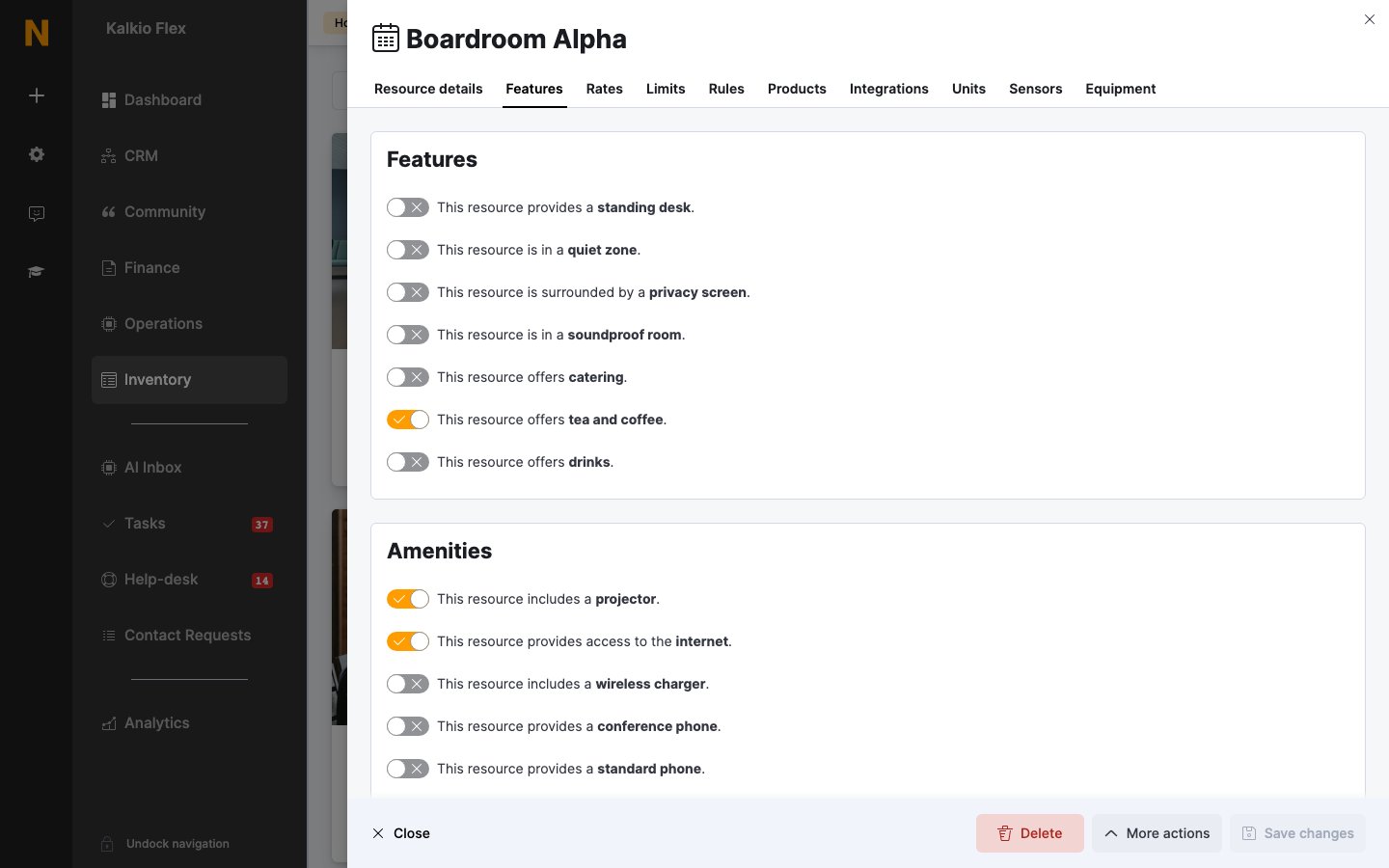
The **Features** tab lists what the resource offers. Everything you turn on is shown as an icon when customers book, and customers can filter resources by feature.
 | Section | Options |
| - | - |
| **Features** | Standing desk, quiet zone, privacy screen, soundproof room, catering, tea and coffee, drinks |
| **Amenities** | Projector, internet, wireless charger, conference phone, standard phone, whiteboard, flip chart, desktop monitor, large display, dual display screen, display screen, video conferencing, wireless presentation, PA system, secure storage |
| **Security** | Security lock, CCTV, voice recorder |
| **Environment** | Air conditioning, heating, natural light |
Turn on the features customers care about most. Too many icons make the booking form harder to scan.
## Sell products with bookings
Link products to a resource to offer them as add-ons when customers book it, such as catering, AV equipment or room setup. Admins can add the same products to bookings from the dashboard.
| Section | Options |
| - | - |
| **Features** | Standing desk, quiet zone, privacy screen, soundproof room, catering, tea and coffee, drinks |
| **Amenities** | Projector, internet, wireless charger, conference phone, standard phone, whiteboard, flip chart, desktop monitor, large display, dual display screen, display screen, video conferencing, wireless presentation, PA system, secure storage |
| **Security** | Security lock, CCTV, voice recorder |
| **Environment** | Air conditioning, heating, natural light |
Turn on the features customers care about most. Too many icons make the booking form harder to scan.
## Sell products with bookings
Link products to a resource to offer them as add-ons when customers book it, such as catering, AV equipment or room setup. Admins can add the same products to bookings from the dashboard.
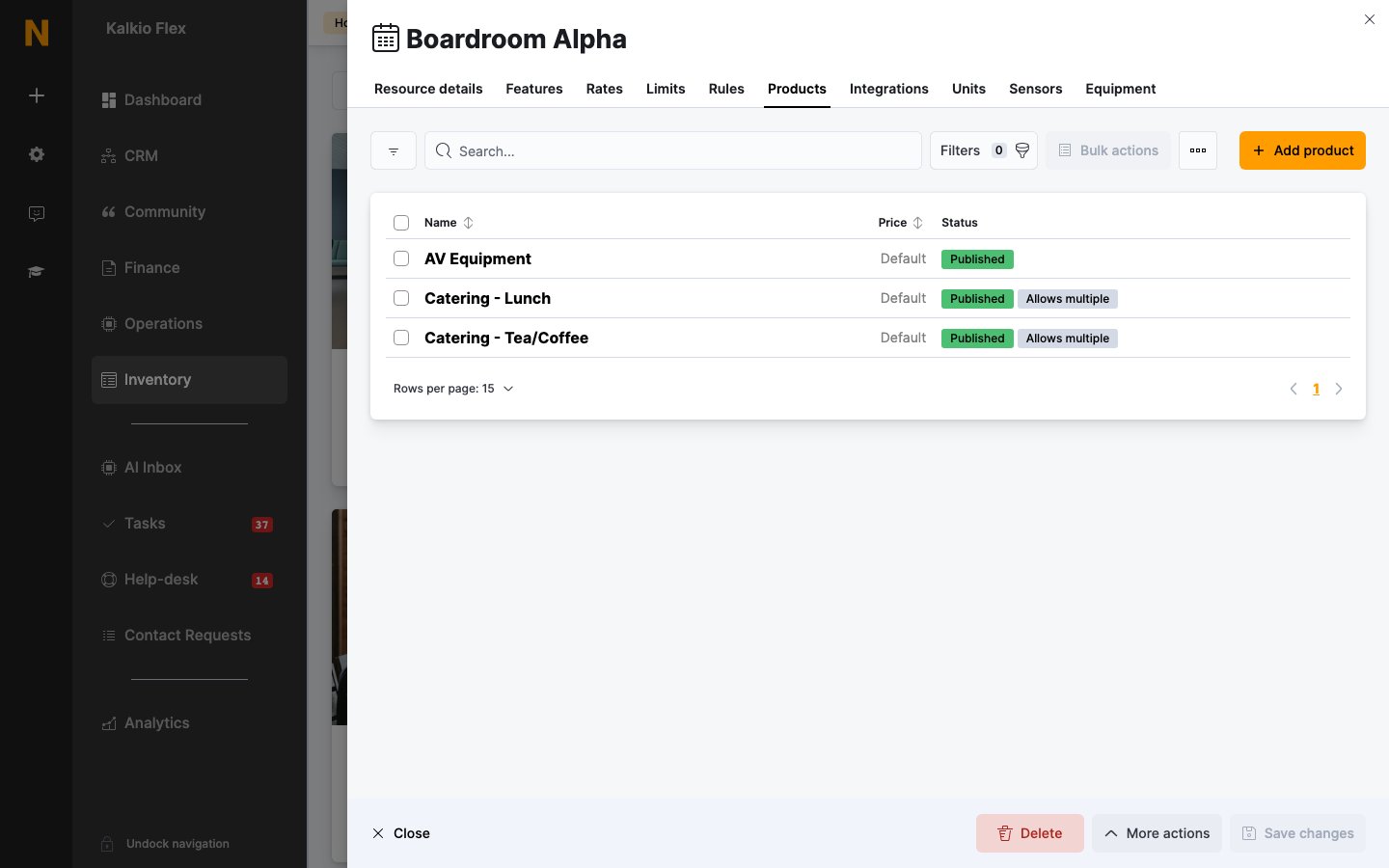 **To one resource:** on the resource's **Products** tab, select **Add product** and choose the **Product**. Optionally set a **Product price** for bookings of this resource — otherwise the product's own price is used (shown as **Default**). Then decide whether to:
* **Let customers buy this product as part of the bookings they request online or via the app**
* **Let customers request more than one item of this product when placing a booking** — shown as **Allows multiple** in the list
* **Charge this product based on the length of the booking it is added to** — works best with hourly rates
**To many resources:** go to **Inventory → Products**, tick the products, select **Assign to resources** from the bulk actions menu and choose the resources. Use **Remove from resources** the same way to unlink them.
Create the products first. See [Products](/platform/billing/products).
## Units
The **Units** tab lists the individual units inside a resource, such as desks in a hot-desk bank or bays in a car park. Units come from your [floor plans](/platform/billing/floor-plans), so customers can pick a specific desk or bay.
Adding units overrides **Simultaneous bookings** on the Limits tab: the resource can then be booked once at a time for each unit.
## Combined resources
Combined resources let you sell spaces that can be joined, such as two meeting rooms with a folding wall. Create three resources — *Room 1*, *Room 2* and *Room 1+2* — then on **Room 1+2** go to **Limits → Combined resources** and select the rooms it locks under **This resource locks other resources when booked**. Booking one blocks the others at the same time.
The combined resource has its own prices; Nexudus doesn't add up the prices of the rooms it combines. If a locked resource has units, all its units are blocked.
## Booking check-in
You can require customers to check in to their bookings. Go to **Settings → Features → Bookings and calendar settings** and turn on **Require attendees to check in using NexBoard and cancel bookings if they don't do so in the first 15 minutes of a booking**. Bookings that haven't been invoiced are cancelled if nobody checks in.
Customers check in on the NexBoard screen beside the room. Admins can start a booking for a customer from the booking itself.
Checking in to a booking is separate from checking in to your location. See [Check-ins](/platform/operations/check-ins).
## Integrations
The **Integrations** tab connects the resource to other services:
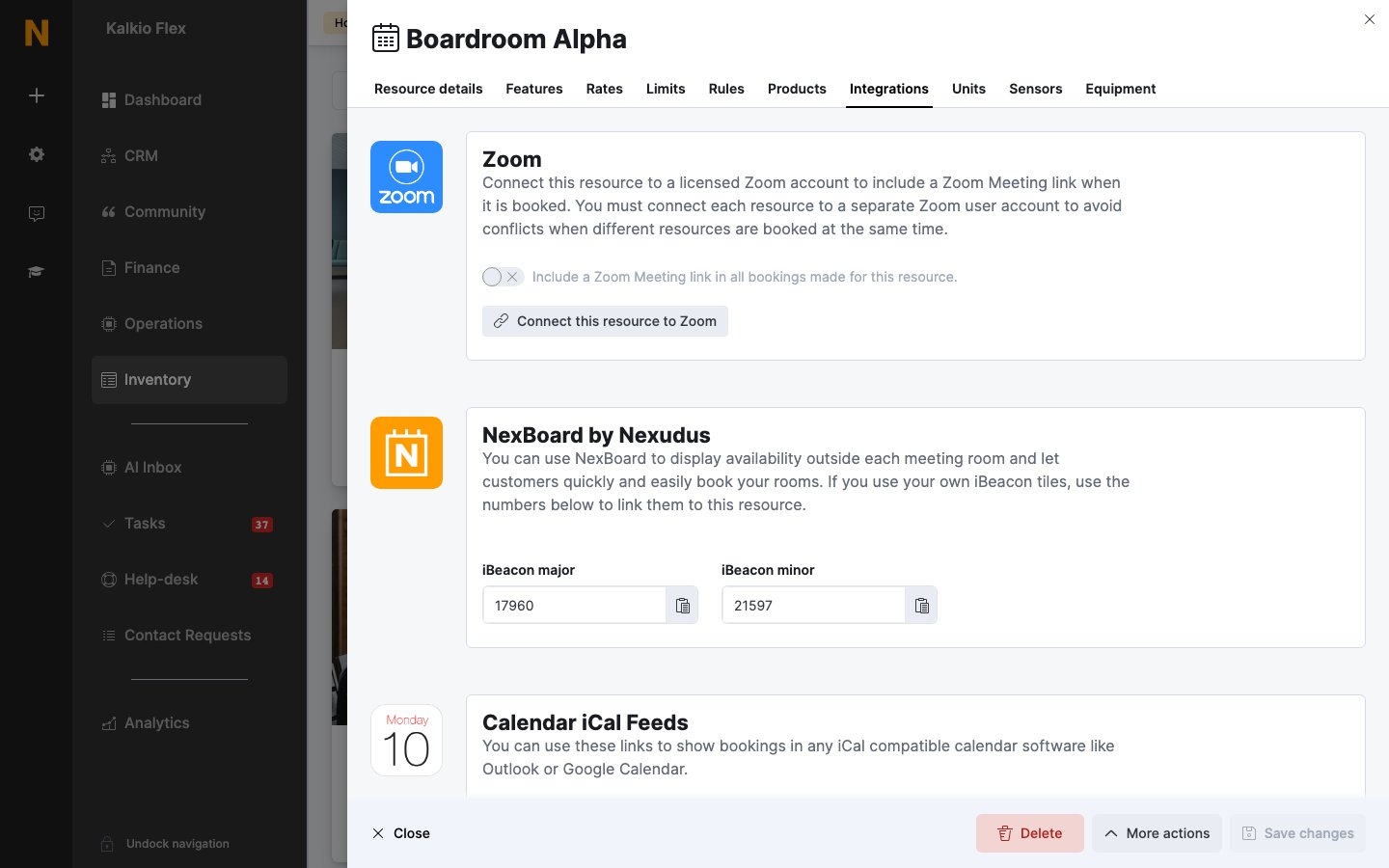
* **Zoom** — **Connect this resource to Zoom** and turn on **Include a Zoom Meeting link in all bookings made for this resource.** Each booking then gets a meeting link in its confirmation email. Connect each resource to a separate Zoom user, so simultaneous bookings don't clash.
* **NexBoard by Nexudus** — the **iBeacon major** and **iBeacon minor** numbers that link NexBoard screens and iBeacon tiles to this room.
* **Calendar iCal Feeds** — feed links you can subscribe to in Outlook or Google Calendar: **This resource** or **All resources**, **with** or **without member details**.
**To one resource:** on the resource's **Products** tab, select **Add product** and choose the **Product**. Optionally set a **Product price** for bookings of this resource — otherwise the product's own price is used (shown as **Default**). Then decide whether to:
* **Let customers buy this product as part of the bookings they request online or via the app**
* **Let customers request more than one item of this product when placing a booking** — shown as **Allows multiple** in the list
* **Charge this product based on the length of the booking it is added to** — works best with hourly rates
**To many resources:** go to **Inventory → Products**, tick the products, select **Assign to resources** from the bulk actions menu and choose the resources. Use **Remove from resources** the same way to unlink them.
Create the products first. See [Products](/platform/billing/products).
## Units
The **Units** tab lists the individual units inside a resource, such as desks in a hot-desk bank or bays in a car park. Units come from your [floor plans](/platform/billing/floor-plans), so customers can pick a specific desk or bay.
Adding units overrides **Simultaneous bookings** on the Limits tab: the resource can then be booked once at a time for each unit.
## Combined resources
Combined resources let you sell spaces that can be joined, such as two meeting rooms with a folding wall. Create three resources — *Room 1*, *Room 2* and *Room 1+2* — then on **Room 1+2** go to **Limits → Combined resources** and select the rooms it locks under **This resource locks other resources when booked**. Booking one blocks the others at the same time.
The combined resource has its own prices; Nexudus doesn't add up the prices of the rooms it combines. If a locked resource has units, all its units are blocked.
## Booking check-in
You can require customers to check in to their bookings. Go to **Settings → Features → Bookings and calendar settings** and turn on **Require attendees to check in using NexBoard and cancel bookings if they don't do so in the first 15 minutes of a booking**. Bookings that haven't been invoiced are cancelled if nobody checks in.
Customers check in on the NexBoard screen beside the room. Admins can start a booking for a customer from the booking itself.
Checking in to a booking is separate from checking in to your location. See [Check-ins](/platform/operations/check-ins).
## Integrations
The **Integrations** tab connects the resource to other services:
* **Zoom** — **Connect this resource to Zoom** and turn on **Include a Zoom Meeting link in all bookings made for this resource.** Each booking then gets a meeting link in its confirmation email. Connect each resource to a separate Zoom user, so simultaneous bookings don't clash.
* **NexBoard by Nexudus** — the **iBeacon major** and **iBeacon minor** numbers that link NexBoard screens and iBeacon tiles to this room.
* **Calendar iCal Feeds** — feed links you can subscribe to in Outlook or Google Calendar: **This resource** or **All resources**, **with** or **without member details**.
 The **Sensors** tab links IoT sensors to the resource, and the **Equipment** tab lists physical items assigned to it. See [Sensors](/platform/access-control/sensors) and [Equipment](/platform/billing/equipment).
## Related
* [Resources](/platform/billing/resources) — setting up resources
* [Products](/platform/billing/products) — creating the products you sell with bookings
* [Floor plans](/platform/billing/floor-plans) — units and desks
This documentation is built and hosted on [Mintlify](https://mintlify.com), a developer documentation platform.
The **Sensors** tab links IoT sensors to the resource, and the **Equipment** tab lists physical items assigned to it. See [Sensors](/platform/access-control/sensors) and [Equipment](/platform/billing/equipment).
## Related
* [Resources](/platform/billing/resources) — setting up resources
* [Products](/platform/billing/products) — creating the products you sell with bookings
* [Floor plans](/platform/billing/floor-plans) — units and desks
This documentation is built and hosted on [Mintlify](https://mintlify.com), a developer documentation platform.