> ## Documentation Index
> Fetch the complete documentation index at: https://learn.nexudus.com/llms.txt
> Use this file to discover all available pages before exploring further.
# Rates
> Set what bookings cost — hourly, daily, and per-use rates, price caps, fixed costs, and rates limited by customer, time, or booking length.
## Overview
**Rates** set what customers pay to book your resources. Rates belong to [resource types](/platform/billing/resource-types), not individual resources, so every resource of a type shares the same rates. A type can have several rates — for example an hourly rate and a day rate, or a cheaper rate for members.
## How to access
Go to **Inventory → Resources → Prices** to see every rate, or open a resource and go to its **Rates** tab to see the rates for its type. Adding a rate from a resource adds it to that resource's type.
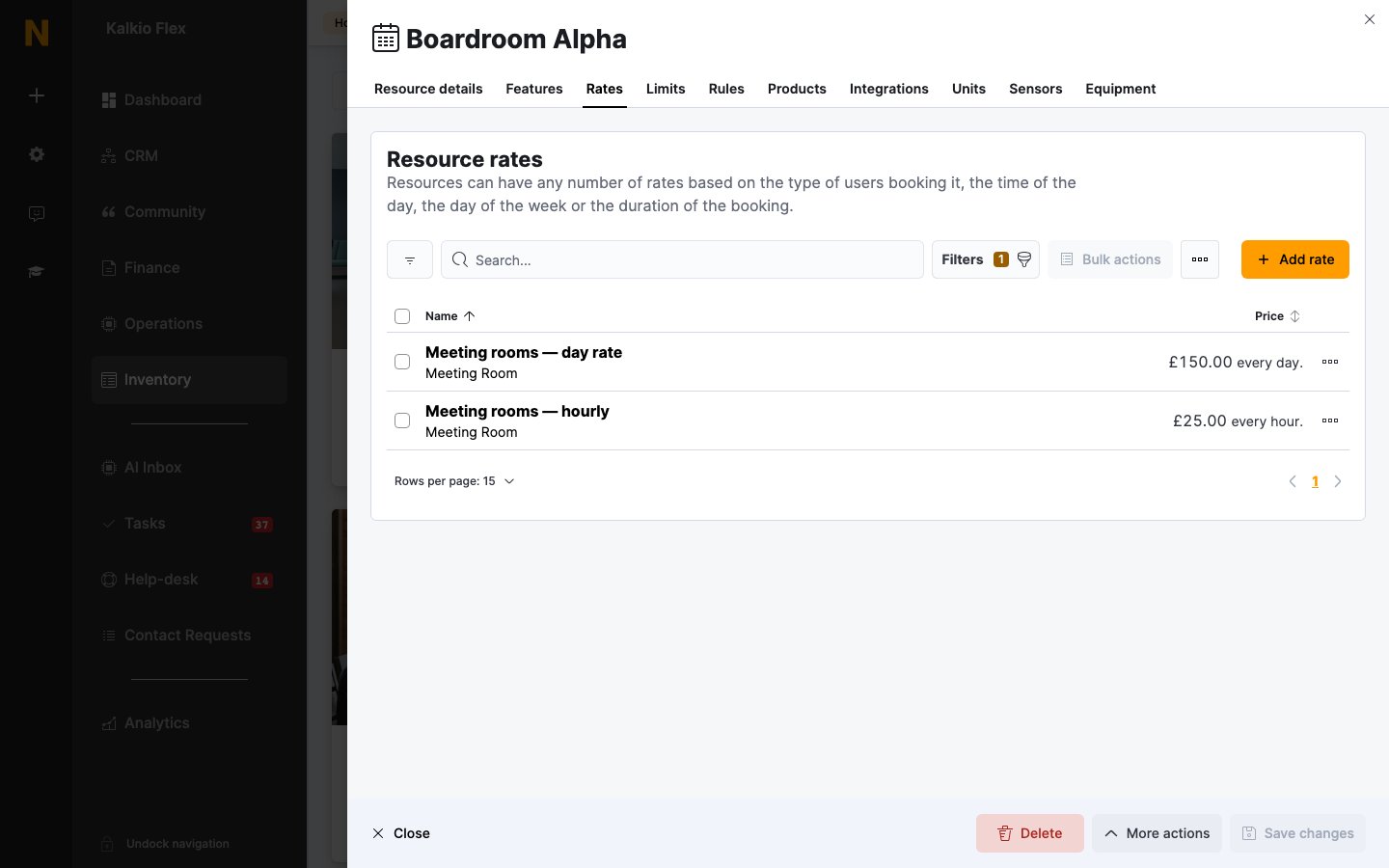
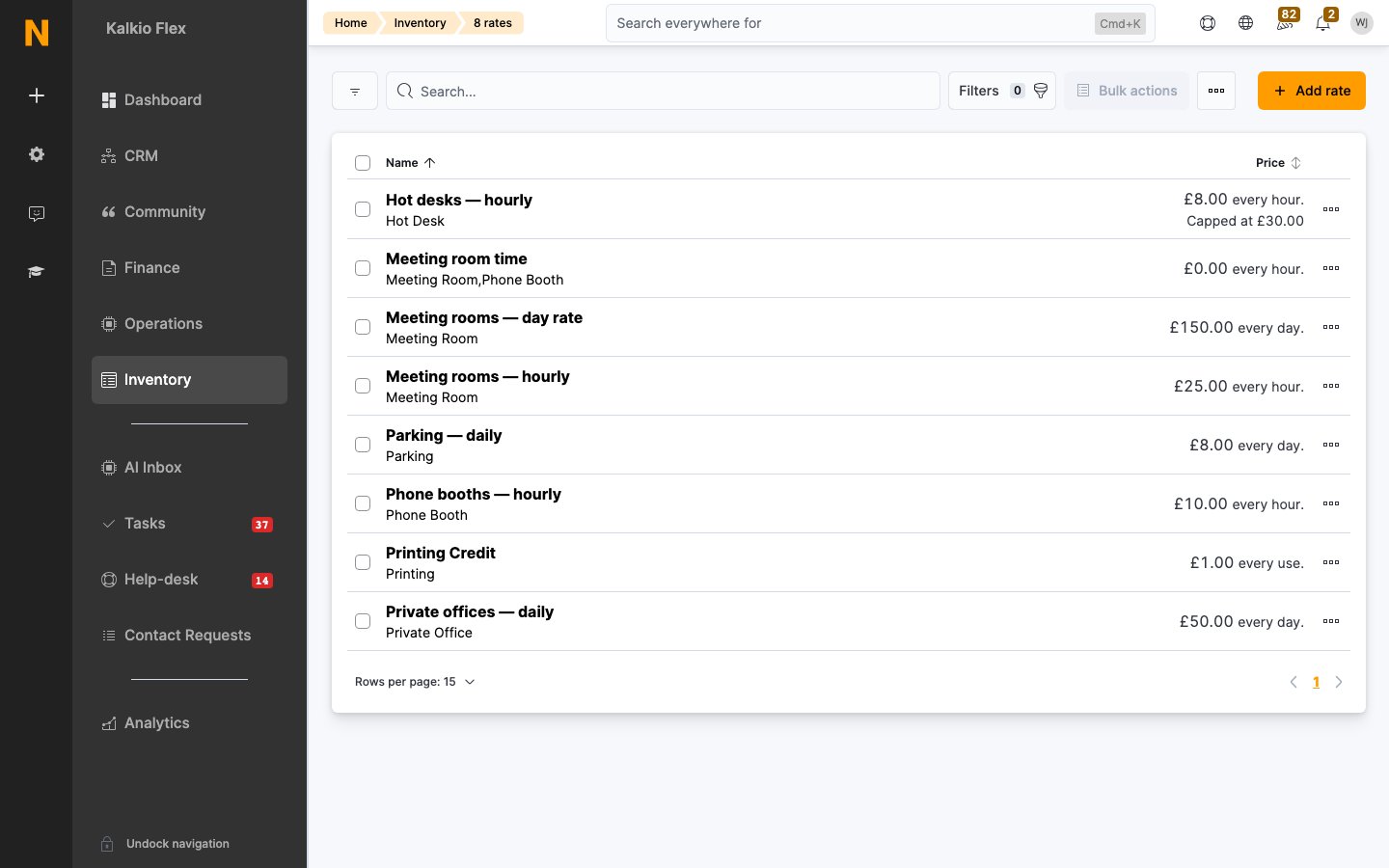 Each row shows the rate's **Name**, the resource types it applies to, and its **Price** and charge period, plus any cap.
[Time credit](/platform/billing/credits/time-credit) and [printing credit](/platform/billing/credits/printing-credit) types are also listed here, because they're set up the same way. They don't charge for bookings.
## Creating a rate
Select **Add rate**. A rate has five tabs: **Rate details**, **Advanced**, **Credits**, **Limits**, and **Dynamic pricing**.
### Rate details
Each row shows the rate's **Name**, the resource types it applies to, and its **Price** and charge period, plus any cap.
[Time credit](/platform/billing/credits/time-credit) and [printing credit](/platform/billing/credits/printing-credit) types are also listed here, because they're set up the same way. They don't charge for bookings.
## Creating a rate
Select **Add rate**. A rate has five tabs: **Rate details**, **Advanced**, **Credits**, **Limits**, and **Dynamic pricing**.
### Rate details
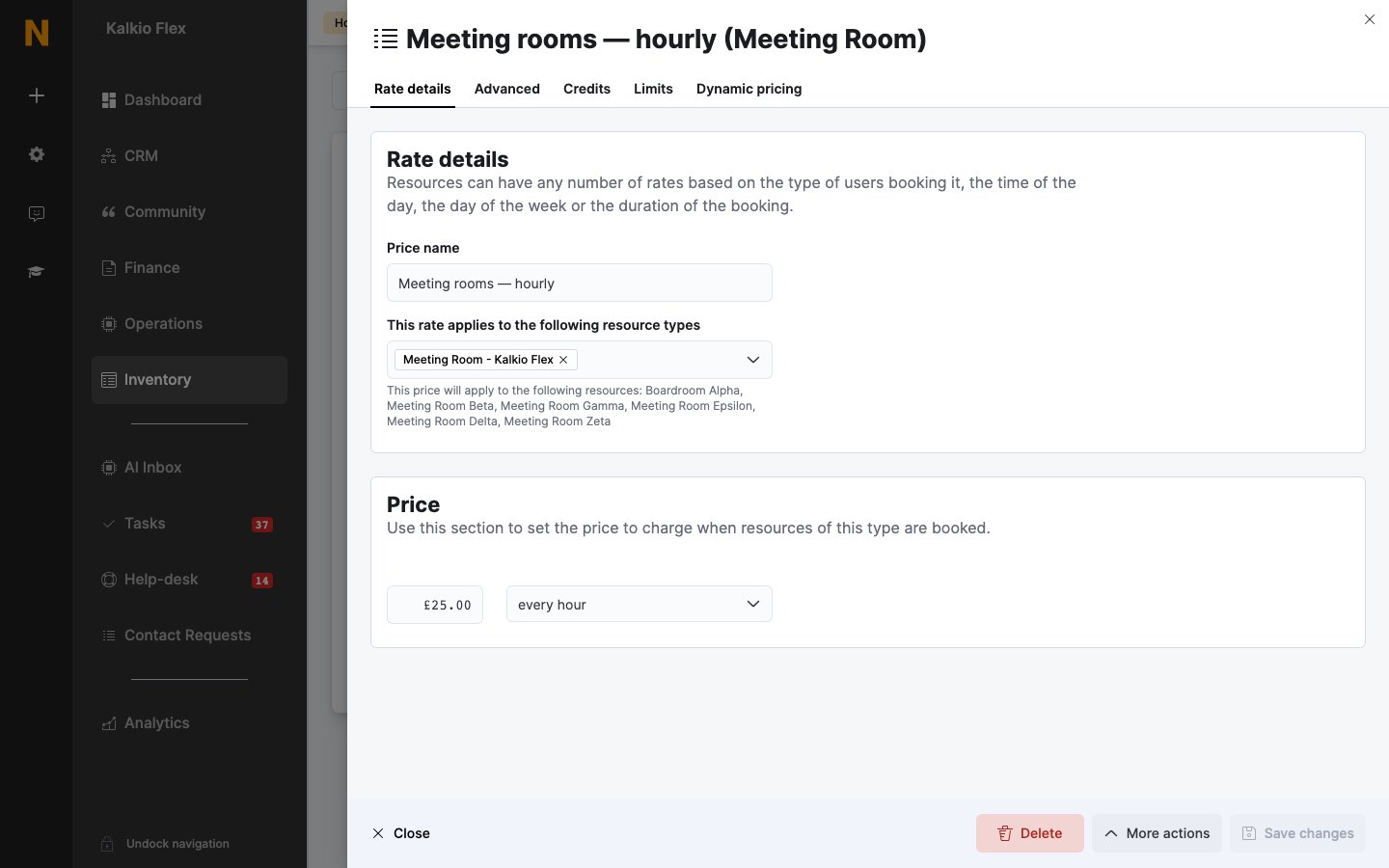 | Field | Description |
| - | - |
| **Price name** | A clear name for the rate, for example *Meeting rooms — hourly*. Customers see it when they book. |
| **This rate applies to the following resource types** | The resource types that use this rate. The text underneath lists the resources this covers. |
| **Price** | The amount charged, and the **charge period** it's charged for: **every hour**, **every day**, **every week**, **every calendar month**, **every 4 weeks month**, or **every use**. |
| **Use per-night pricing.** | Shown for daily and weekly rates. Charges by the number of nights the resource is booked — for coliving and other overnight stays. |
Below these, set the rate's tax rate and financial account, as for [products](/platform/billing/products#financial-details).
### Advanced
| Field | Description |
| - | - |
| **Price name** | A clear name for the rate, for example *Meeting rooms — hourly*. Customers see it when they book. |
| **This rate applies to the following resource types** | The resource types that use this rate. The text underneath lists the resources this covers. |
| **Price** | The amount charged, and the **charge period** it's charged for: **every hour**, **every day**, **every week**, **every calendar month**, **every 4 weeks month**, or **every use**. |
| **Use per-night pricing.** | Shown for daily and weekly rates. Charges by the number of nights the resource is booked — for coliving and other overnight stays. |
Below these, set the rate's tax rate and financial account, as for [products](/platform/billing/products#financial-details).
### Advanced
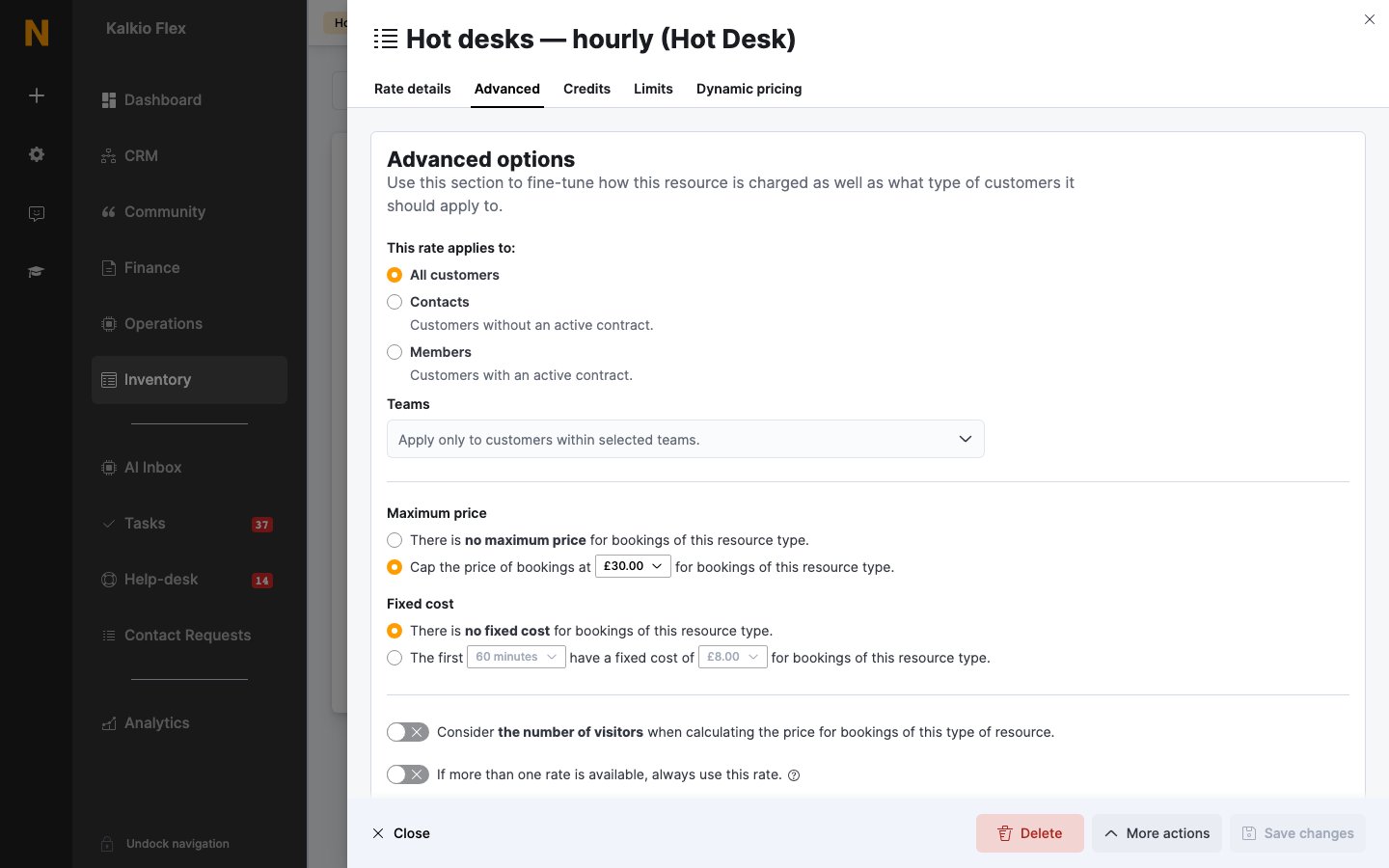 | Field | Description |
| - | - |
| **This rate applies to:** | **All customers**, **Contacts** (customers without an active contract), or **Members** (customers with an active contract), optionally only on certain plans. Under **Teams**, you can also limit the rate to customers in certain teams. |
| **Maximum price** | **Cap the price of bookings at** an amount. A booking never costs more than this with this rate. |
| **Fixed cost** | **The first** part of a booking **have a fixed cost of** an amount — for example the first 60 minutes cost £10, and the rest is charged at the normal price. |
| **Consider the number of visitors when calculating the price for bookings of this type of resource.** | Charges for each guest as well as the customer. A £10/hour room booked with 3 guests costs £40/hour. |
| **If more than one rate is available, always use this rate.** | Uses this rate in preference to others with the same charge period, instead of the cheapest. |
| **Make this rate available to Marketplace applications and public API.** | Lets Marketplace apps and the public API use this rate. |
### Credits
If customers pay with [money credit](/platform/billing/credits/money-credit), choose whether they're charged the regular rate in credits (1 credit = 1 unit of your currency) or a different number of credits per charge period — for example 20 credits per hour.
### Limits
| Field | Description |
| - | - |
| **This rate applies to:** | **All customers**, **Contacts** (customers without an active contract), or **Members** (customers with an active contract), optionally only on certain plans. Under **Teams**, you can also limit the rate to customers in certain teams. |
| **Maximum price** | **Cap the price of bookings at** an amount. A booking never costs more than this with this rate. |
| **Fixed cost** | **The first** part of a booking **have a fixed cost of** an amount — for example the first 60 minutes cost £10, and the rest is charged at the normal price. |
| **Consider the number of visitors when calculating the price for bookings of this type of resource.** | Charges for each guest as well as the customer. A £10/hour room booked with 3 guests costs £40/hour. |
| **If more than one rate is available, always use this rate.** | Uses this rate in preference to others with the same charge period, instead of the cheapest. |
| **Make this rate available to Marketplace applications and public API.** | Lets Marketplace apps and the public API use this rate. |
### Credits
If customers pay with [money credit](/platform/billing/credits/money-credit), choose whether they're charged the regular rate in credits (1 credit = 1 unit of your currency) or a different number of credits per charge period — for example 20 credits per hour.
### Limits
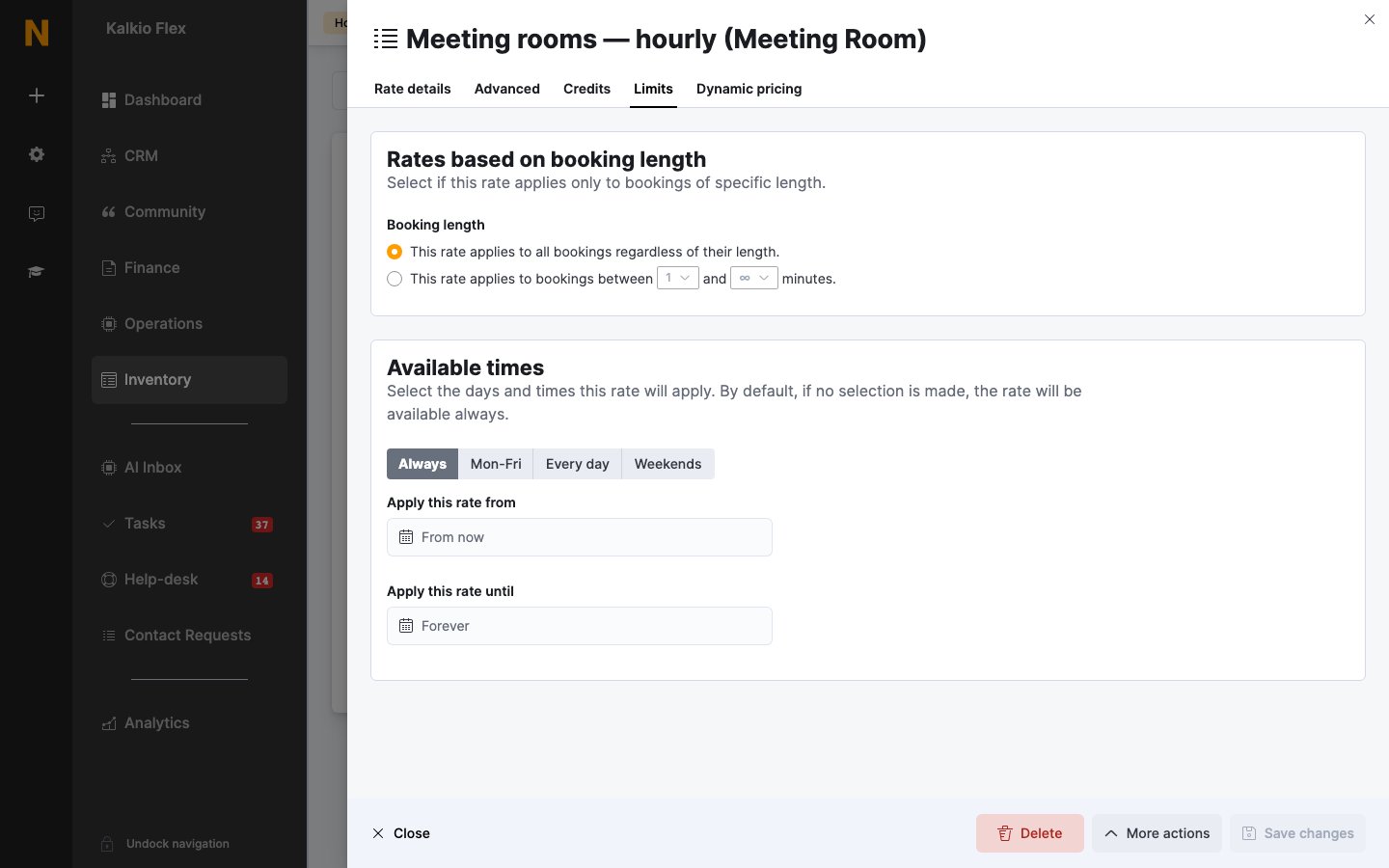 | Field | Description |
| - | - |
| **Booking length** | **This rate applies to all bookings regardless of their length.**, or only to bookings between two lengths. The unit follows the charge period — minutes for an hourly rate. |
| **Available times** | The days and times the rate applies, for example weekday evenings for an off-peak rate. If you don't select any, the rate always applies. |
| **Apply this rate from** / **Apply this rate until** | The dates the rate applies between — for example for seasonal prices. Leave them as **From now** and **Forever** to apply the rate indefinitely. |
### Dynamic pricing
Adjusts the rate's price by a percentage when demand is high, average or low, and for last-minute bookings. Select **Get started** on the tab to set it up. See [Dynamic pricing](/platform/operations/bookings/pricing-and-credit#dynamic-pricing).
## How Nexudus chooses a rate
When a resource is booked, Nexudus finds every rate for its type that applies to the customer, the booking's times, and its length. It then:
1. Works out the booking's price once for **each charge period** you have rates for — hourly, daily and so on — and charges the **cheapest**.
2. Within a charge period, prices the booking in steps. Hourly rates are applied in 15-minute steps, so a booking that runs from peak into off-peak hours can use a different rate for each part. At each step, a rate set to **always use** wins; otherwise the cheapest applies.
3. Applies any **Fixed cost**, dynamic pricing, and **Maximum price** set on the rate.
Bookings of 24 hours or more can't use hourly rates, so give types that can be booked for longer a daily, weekly or monthly rate. For the complete order — including credit, discounts and products — see [Booking pricing and credit](/platform/operations/bookings/pricing-and-credit#how-the-price-is-worked-out).
If no rate covers the customer, resource and times, the booking can't be priced and customers can't book it. Make sure every resource type has a rate that applies to everyone who can book it.
## Common setups
### Hourly, capped at a day rate
Customers pay by the hour for short bookings, but never more than your day rate. Either:
* Give the hourly rate a **Maximum price** — for example £25 an hour, capped at £150. Bookings of 6 hours or more cost £150.
* Or add a separate rate charged **every day** at £150. Because Nexudus charges the cheaper of the hourly and daily price, a 7-hour booking costs £150 rather than £175.
The example meeting rooms below use the second approach, so the day rate is visible to customers.
| Field | Description |
| - | - |
| **Booking length** | **This rate applies to all bookings regardless of their length.**, or only to bookings between two lengths. The unit follows the charge period — minutes for an hourly rate. |
| **Available times** | The days and times the rate applies, for example weekday evenings for an off-peak rate. If you don't select any, the rate always applies. |
| **Apply this rate from** / **Apply this rate until** | The dates the rate applies between — for example for seasonal prices. Leave them as **From now** and **Forever** to apply the rate indefinitely. |
### Dynamic pricing
Adjusts the rate's price by a percentage when demand is high, average or low, and for last-minute bookings. Select **Get started** on the tab to set it up. See [Dynamic pricing](/platform/operations/bookings/pricing-and-credit#dynamic-pricing).
## How Nexudus chooses a rate
When a resource is booked, Nexudus finds every rate for its type that applies to the customer, the booking's times, and its length. It then:
1. Works out the booking's price once for **each charge period** you have rates for — hourly, daily and so on — and charges the **cheapest**.
2. Within a charge period, prices the booking in steps. Hourly rates are applied in 15-minute steps, so a booking that runs from peak into off-peak hours can use a different rate for each part. At each step, a rate set to **always use** wins; otherwise the cheapest applies.
3. Applies any **Fixed cost**, dynamic pricing, and **Maximum price** set on the rate.
Bookings of 24 hours or more can't use hourly rates, so give types that can be booked for longer a daily, weekly or monthly rate. For the complete order — including credit, discounts and products — see [Booking pricing and credit](/platform/operations/bookings/pricing-and-credit#how-the-price-is-worked-out).
If no rate covers the customer, resource and times, the booking can't be priced and customers can't book it. Make sure every resource type has a rate that applies to everyone who can book it.
## Common setups
### Hourly, capped at a day rate
Customers pay by the hour for short bookings, but never more than your day rate. Either:
* Give the hourly rate a **Maximum price** — for example £25 an hour, capped at £150. Bookings of 6 hours or more cost £150.
* Or add a separate rate charged **every day** at £150. Because Nexudus charges the cheaper of the hourly and daily price, a 7-hour booking costs £150 rather than £175.
The example meeting rooms below use the second approach, so the day rate is visible to customers.
 ### Members pay less
Create a second rate for the same type with a lower price and, on the **Advanced** tab, set **This rate applies to:** to **Members** — on all plans or chosen ones. Because Nexudus uses the cheapest rate that applies, members automatically pay the lower price.
### Off-peak and weekend prices
Create a rate with a lower price and, on the **Limits** tab, set its **Available times** to evenings or weekends. Hourly bookings that run into those times are charged the off-peak price for that part.
### Seasonal prices
Create a rate with **Apply this rate from** and **Apply this rate until** set to the season's dates. Outside those dates, your normal rates apply.
## Related
* [Resource types](/platform/billing/resource-types) — the groups rates apply to
* [Booking pricing and credit](/platform/operations/bookings/pricing-and-credit) — how a booking's price is worked out
* [Credits](/platform/billing/credits) — time and money credit customers spend on bookings
* [Discount codes](/platform/billing/discount-codes) — promotional discounts on bookings
This documentation is built and hosted on [Mintlify](https://mintlify.com), a developer documentation platform.
### Members pay less
Create a second rate for the same type with a lower price and, on the **Advanced** tab, set **This rate applies to:** to **Members** — on all plans or chosen ones. Because Nexudus uses the cheapest rate that applies, members automatically pay the lower price.
### Off-peak and weekend prices
Create a rate with a lower price and, on the **Limits** tab, set its **Available times** to evenings or weekends. Hourly bookings that run into those times are charged the off-peak price for that part.
### Seasonal prices
Create a rate with **Apply this rate from** and **Apply this rate until** set to the season's dates. Outside those dates, your normal rates apply.
## Related
* [Resource types](/platform/billing/resource-types) — the groups rates apply to
* [Booking pricing and credit](/platform/operations/bookings/pricing-and-credit) — how a booking's price is worked out
* [Credits](/platform/billing/credits) — time and money credit customers spend on bookings
* [Discount codes](/platform/billing/discount-codes) — promotional discounts on bookings
This documentation is built and hosted on [Mintlify](https://mintlify.com), a developer documentation platform.