> ## Documentation Index
> Fetch the complete documentation index at: https://learn.nexudus.com/llms.txt
> Use this file to discover all available pages before exploring further.
# Availability and check-in rules
> Control where, when, and by whom a pass can be used, and how Nexudus chooses which pass to use when a customer checks in.
## Overview
A pass's **Availability** tab decides where it can be used, which customers can use it, and at what times. Together with its **Use priority**, these settings decide which of a customer's passes is used when they check in — and whether they can check in at all.
## How to access
Open a pass from **Inventory → Passes** and go to the **Availability** tab.
 ## Locations
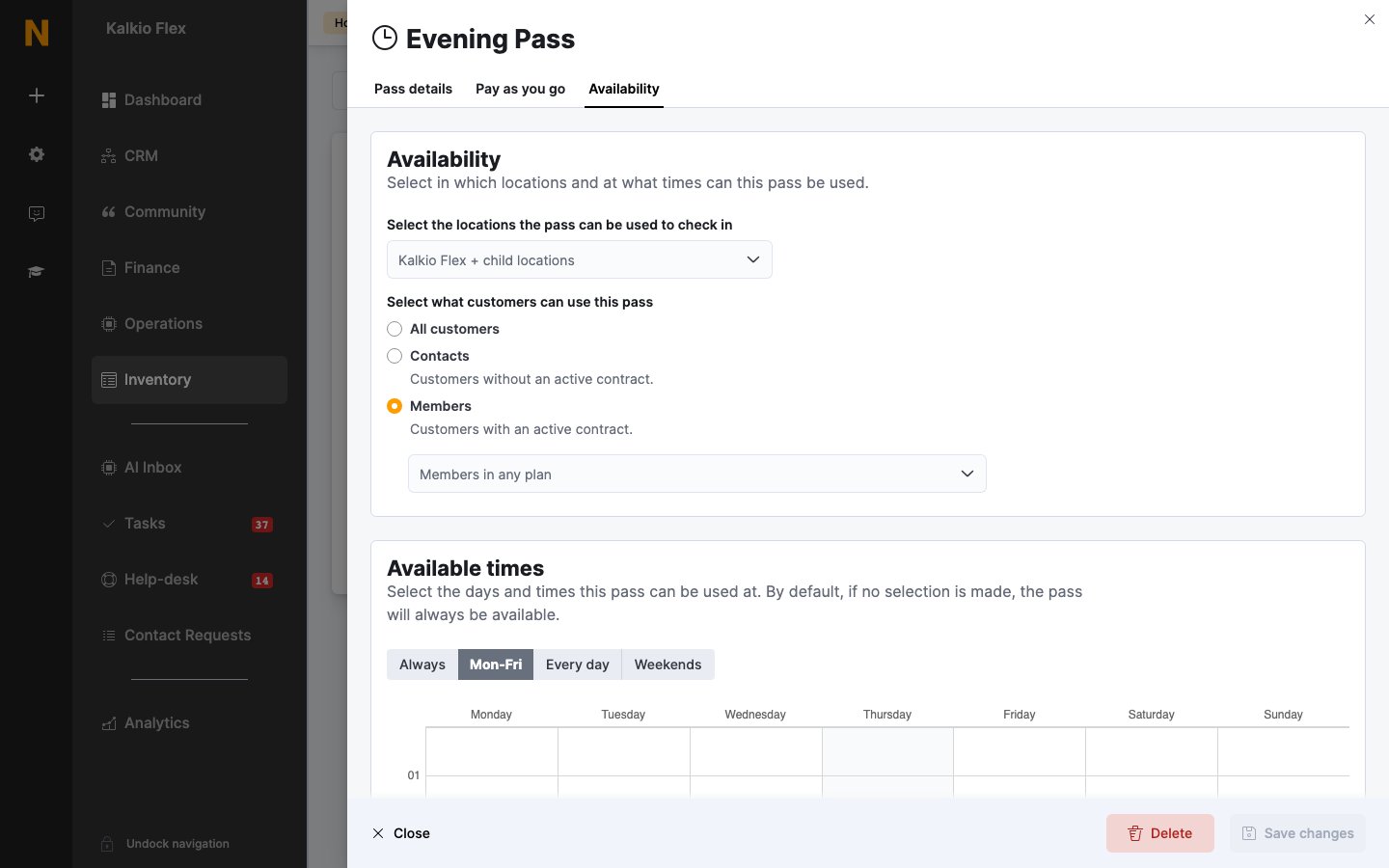
Under **Select the locations the pass can be used to check in**, leave the field empty to allow the pass at its own location and every location below it in your network — shown as *\ + child locations*. Select specific locations to allow it only there.
If the pass's location belongs to a network, a callout offers **Make pass available across \**. This moves the pass to the network location so it can be used at every location in the network.
| Pass belongs to | Locations selected | Valid at |
| - | - | - |
| London (network) | None | London and every location under it |
| London (network) | London East | London East only |
| London East | None | London East only |
## Customers
Under **Select what customers can use this pass**, choose:
* **All customers** — anyone holding the pass.
* **Contacts** — customers without an active contract.
* **Members** — customers with an active contract. Optionally pick plans, so only members on those plans can use it.
A customer can hold a pass they're not allowed to use — for example a members-only pass after their contract ends. It simply won't be valid when they check in.
## Available times
By default, a pass can be used at any time. To limit it, choose **Mon-Fri**, **Every day**, or **Weekends** and draw the times on the weekly grid, or **Always** to clear the limits.
## Locations
Under **Select the locations the pass can be used to check in**, leave the field empty to allow the pass at its own location and every location below it in your network — shown as *\ + child locations*. Select specific locations to allow it only there.
If the pass's location belongs to a network, a callout offers **Make pass available across \**. This moves the pass to the network location so it can be used at every location in the network.
| Pass belongs to | Locations selected | Valid at |
| - | - | - |
| London (network) | None | London and every location under it |
| London (network) | London East | London East only |
| London East | None | London East only |
## Customers
Under **Select what customers can use this pass**, choose:
* **All customers** — anyone holding the pass.
* **Contacts** — customers without an active contract.
* **Members** — customers with an active contract. Optionally pick plans, so only members on those plans can use it.
A customer can hold a pass they're not allowed to use — for example a members-only pass after their contract ends. It simply won't be valid when they check in.
## Available times
By default, a pass can be used at any time. To limit it, choose **Mon-Fri**, **Every day**, or **Weekends** and draw the times on the weekly grid, or **Always** to clear the limits.
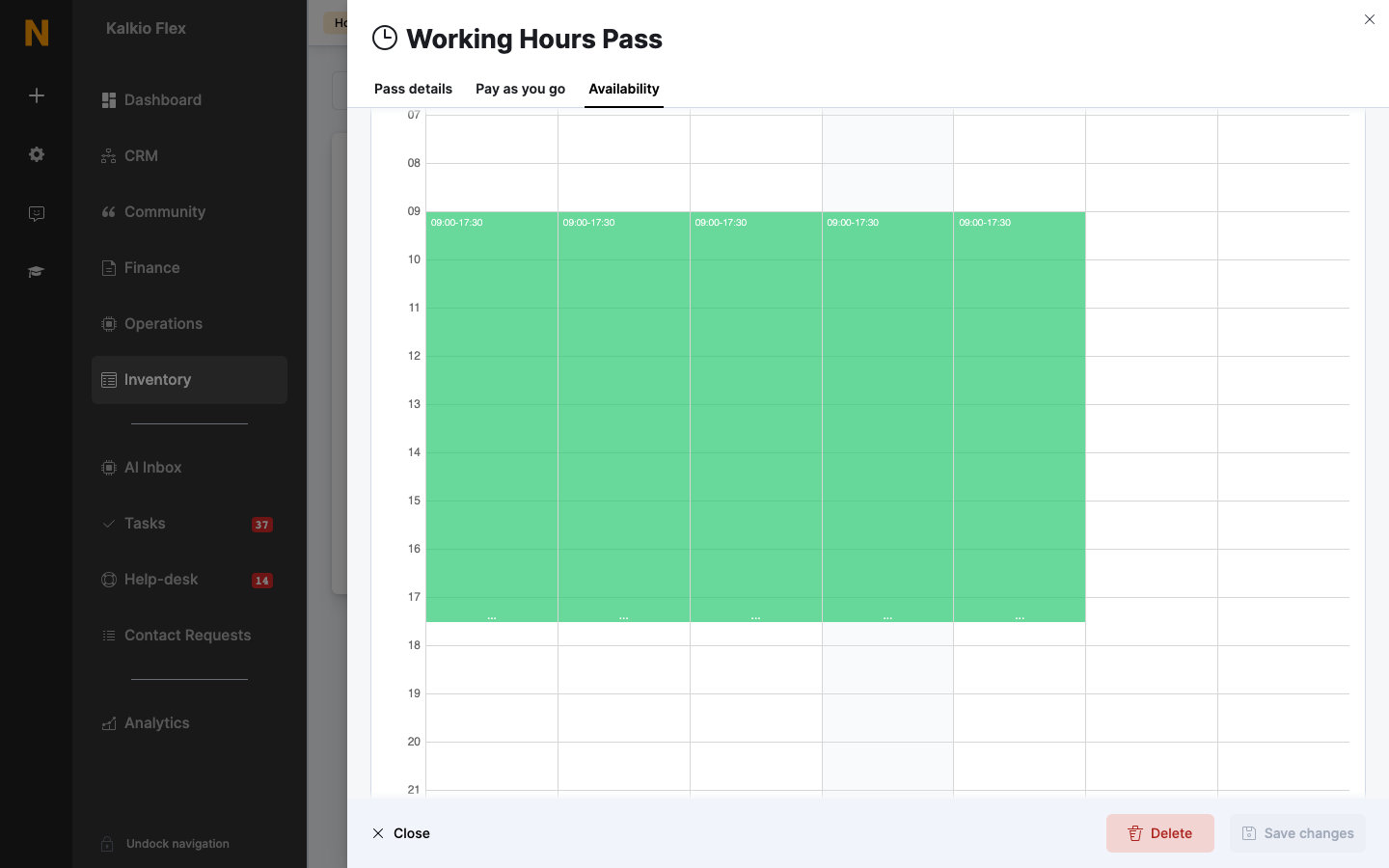 A pass is only valid if the check-in starts — and, when known, ends — inside its available times. If a customer is still checked in when the pass's time runs out, they're checked out automatically and Nexudus tries to check them back in with another valid pass. See [Automatic check-out](/platform/operations/check-ins#automatic-check-out).
## Which pass is used
When a customer checks in, Nexudus looks for a pass that's valid at that location, for that customer, at that time, and that still has time left or hasn't been used. A day pass already used earlier the same day can be used again.
If several passes are valid, the one with the highest **Use priority** (set on the **Pass details** tab) is used first. Between passes with the same priority, Nexudus prefers a pass already used today, then passes limited to particular locations or plans, then the cheapest. See [How a pass is chosen](/platform/operations/check-ins#how-a-pass-is-chosen) for the full order.
If no pass is valid, the check-in fails — unless [pay as you go](/platform/billing/time-passes/pay-as-you-go) is set up, in which case a pay-as-you-go pass is used.
Give pay-as-you-go passes **Low** priority and passes from plans **Normal** or **High**, so customers always use what they've already paid for before being charged extra.
### Day passes and time-based passes at check-in
* **Day pass** — marked as used when the customer checks in. They can check in and out as often as they like until the daily cut-off time set in **Settings → Features → Check-in settings**.
* **Time-based pass** — the time spent checked in is taken off the pass when the customer checks out. Check-in and check-out times are rounded to the nearest 15 minutes. If the pass runs out while they're on site, they're checked out and Nexudus tries another pass.
## Related
* [Passes](/platform/billing/time-passes) — creating and managing passes
* [Pay as you go](/platform/billing/time-passes/pay-as-you-go) — charging customers without a pass
* [Check-ins](/platform/operations/check-ins) — failed check-ins, plan limits, and automatic check-out
This documentation is built and hosted on [Mintlify](https://mintlify.com), a developer documentation platform.
A pass is only valid if the check-in starts — and, when known, ends — inside its available times. If a customer is still checked in when the pass's time runs out, they're checked out automatically and Nexudus tries to check them back in with another valid pass. See [Automatic check-out](/platform/operations/check-ins#automatic-check-out).
## Which pass is used
When a customer checks in, Nexudus looks for a pass that's valid at that location, for that customer, at that time, and that still has time left or hasn't been used. A day pass already used earlier the same day can be used again.
If several passes are valid, the one with the highest **Use priority** (set on the **Pass details** tab) is used first. Between passes with the same priority, Nexudus prefers a pass already used today, then passes limited to particular locations or plans, then the cheapest. See [How a pass is chosen](/platform/operations/check-ins#how-a-pass-is-chosen) for the full order.
If no pass is valid, the check-in fails — unless [pay as you go](/platform/billing/time-passes/pay-as-you-go) is set up, in which case a pay-as-you-go pass is used.
Give pay-as-you-go passes **Low** priority and passes from plans **Normal** or **High**, so customers always use what they've already paid for before being charged extra.
### Day passes and time-based passes at check-in
* **Day pass** — marked as used when the customer checks in. They can check in and out as often as they like until the daily cut-off time set in **Settings → Features → Check-in settings**.
* **Time-based pass** — the time spent checked in is taken off the pass when the customer checks out. Check-in and check-out times are rounded to the nearest 15 minutes. If the pass runs out while they're on site, they're checked out and Nexudus tries another pass.
## Related
* [Passes](/platform/billing/time-passes) — creating and managing passes
* [Pay as you go](/platform/billing/time-passes/pay-as-you-go) — charging customers without a pass
* [Check-ins](/platform/operations/check-ins) — failed check-ins, plan limits, and automatic check-out
This documentation is built and hosted on [Mintlify](https://mintlify.com), a developer documentation platform.