> ## Documentation Index
> Fetch the complete documentation index at: https://learn.nexudus.com/llms.txt
> Use this file to discover all available pages before exploring further.
# Event tickets
> How to add tickets to events, price them, set availability, and control capacity and wait lists.
## Overview
**Tickets** are how customers register for your [events](/platform/content/events). Each event can have multiple ticket types, each with its own name, price, and availability window. Tickets can be **paid** or **free** (zero price) — even free events should carry a zero-cost ticket so attendance is tracked and guests receive confirmation emails.
## How to access
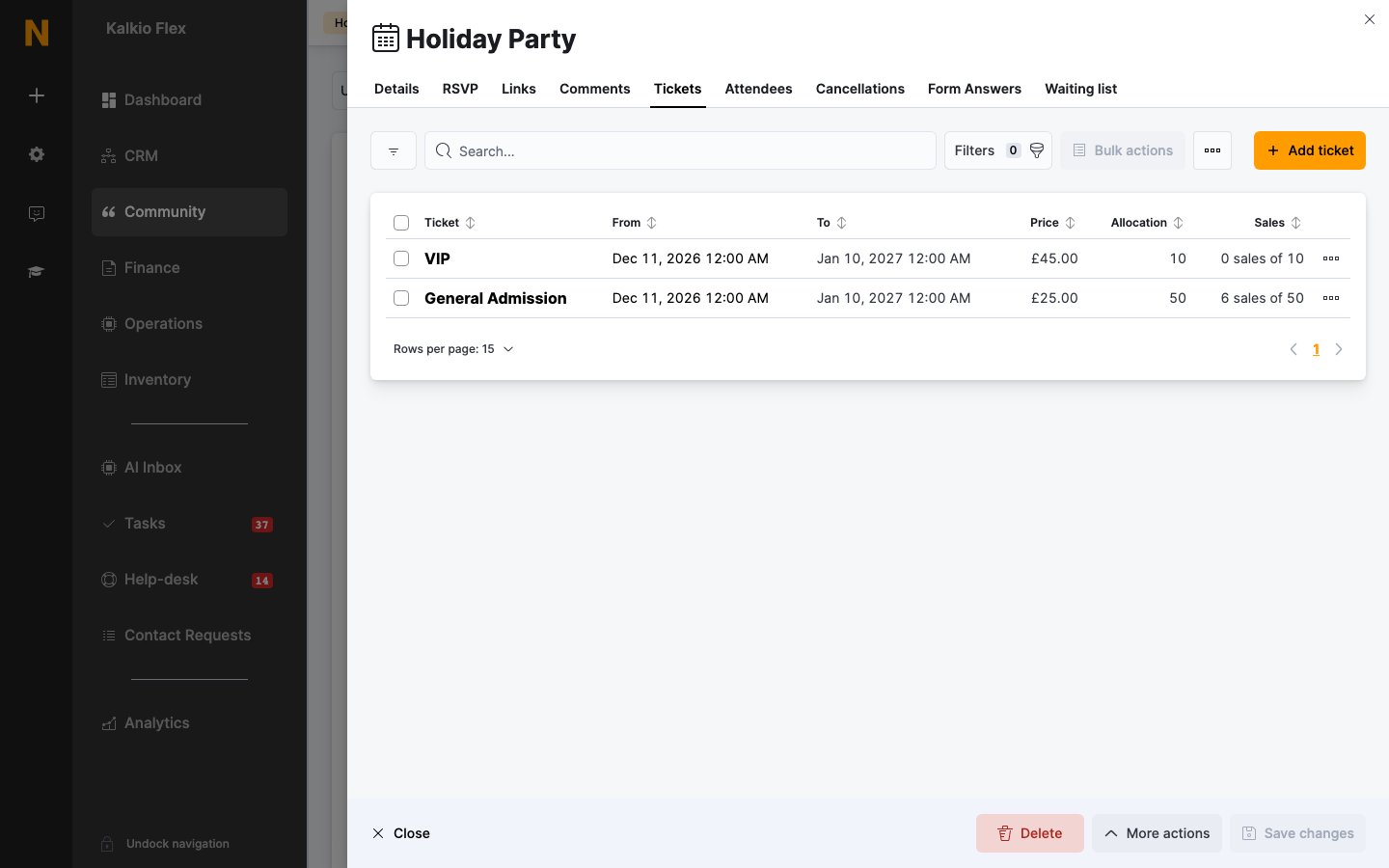
Open an event from **Community → Events** and go to the **Tickets** tab. Each row shows the **Ticket** name, its **From** / **To** availability dates, **Price**, **Allocation** (or **Unlimited**), and **Sales** — for example *4 sales of 50* — plus badges when the ticket is restricted to certain customers. Use the **Add ticket** button to create one.
Tickets only appear once the event has been saved.
 ## Adding a ticket
Click **Add ticket**, then set the **Ticket name**, an optional **Ticket description** (shown with the ticket on the portal and app), and **Ticket notes** (included in the confirmation message sent to anyone getting this ticket). Use **The position to display this ticket at** to order tickets when an event has several.
Set a **Unit price** — or leave it at **0** for a free ticket. Assign a **Tax** rate and **Financial account** where your invoicing settings require them. For each paid ticket sold, a small fixed fee plus 1% of the ticket price is added to your Nexudus monthly bill (the exact amount is shown in the **Heads up!** callout). Free tickets aren't charged.
On the **Availability** tab, set the ticket's **Event capacity** (leave it unlimited to sell up to the event's overall capacity), **Tickets per attendee**, who **This ticket is available to:**, and the **Available from / to dates**. New tickets default to being on sale from the event's publish date until it starts.
Back on the **Details** tab, tick **Let customers buy this ticket from the portal and the app.** and save. Leave it unticked for tickets you only assign manually.
### Free events
Free events should still carry a **zero-cost ticket** rather than having none at all — every registrant then holds a ticket you can count, and guests receive a confirmation email. Simply set the ticket's unit price to **0**.
### Capacity and wait list
Each ticket can cap how many units are available and how many a single customer can buy, within the event's overall capacity set on the **RSVP** tab. Open a ticket to see its own **Attendees** and **Cancellations** tabs. When tickets sell out, customers can join the event's **wait list** (if enabled in the event's publishing settings) and are notified as spots free up. See [Event attendees](/platform/content/events/attendees) for managing the waiting list.
## RSVP options
The event's **RSVP** tab controls overall capacity and sign-up behaviour:
* **Event capacity** — limit the event to a number of attendees, or leave it unlimited.
* **Ask customers buying a ticket for this event to provide their postal address.**
* **List attendee details on the events page.** — shows attendees with a public profile on the portal.
* **Tickets notes** — extra notes sent to customers signing up.
The postal address and attendee list options aren't shown for locations using Members Portal V5.
## Related
* [Events](/platform/content/events) — creating and publishing events
* [Event attendees](/platform/content/events/attendees) — registrations, cancellations, and the waiting list
* [Event checkout](/member-portal/checkout/event-checkout) — the ticket purchase flow
* [Events and ticketing settings](/operators/portal-configuration/features/events) — module and checkout configuration
This documentation is built and hosted on [Mintlify](https://mintlify.com), a developer documentation platform.
## Adding a ticket
Click **Add ticket**, then set the **Ticket name**, an optional **Ticket description** (shown with the ticket on the portal and app), and **Ticket notes** (included in the confirmation message sent to anyone getting this ticket). Use **The position to display this ticket at** to order tickets when an event has several.
Set a **Unit price** — or leave it at **0** for a free ticket. Assign a **Tax** rate and **Financial account** where your invoicing settings require them. For each paid ticket sold, a small fixed fee plus 1% of the ticket price is added to your Nexudus monthly bill (the exact amount is shown in the **Heads up!** callout). Free tickets aren't charged.
On the **Availability** tab, set the ticket's **Event capacity** (leave it unlimited to sell up to the event's overall capacity), **Tickets per attendee**, who **This ticket is available to:**, and the **Available from / to dates**. New tickets default to being on sale from the event's publish date until it starts.
Back on the **Details** tab, tick **Let customers buy this ticket from the portal and the app.** and save. Leave it unticked for tickets you only assign manually.
### Free events
Free events should still carry a **zero-cost ticket** rather than having none at all — every registrant then holds a ticket you can count, and guests receive a confirmation email. Simply set the ticket's unit price to **0**.
### Capacity and wait list
Each ticket can cap how many units are available and how many a single customer can buy, within the event's overall capacity set on the **RSVP** tab. Open a ticket to see its own **Attendees** and **Cancellations** tabs. When tickets sell out, customers can join the event's **wait list** (if enabled in the event's publishing settings) and are notified as spots free up. See [Event attendees](/platform/content/events/attendees) for managing the waiting list.
## RSVP options
The event's **RSVP** tab controls overall capacity and sign-up behaviour:
* **Event capacity** — limit the event to a number of attendees, or leave it unlimited.
* **Ask customers buying a ticket for this event to provide their postal address.**
* **List attendee details on the events page.** — shows attendees with a public profile on the portal.
* **Tickets notes** — extra notes sent to customers signing up.
The postal address and attendee list options aren't shown for locations using Members Portal V5.
## Related
* [Events](/platform/content/events) — creating and publishing events
* [Event attendees](/platform/content/events/attendees) — registrations, cancellations, and the waiting list
* [Event checkout](/member-portal/checkout/event-checkout) — the ticket purchase flow
* [Events and ticketing settings](/operators/portal-configuration/features/events) — module and checkout configuration
This documentation is built and hosted on [Mintlify](https://mintlify.com), a developer documentation platform.