> ## Documentation Index
> Fetch the complete documentation index at: https://learn.nexudus.com/llms.txt
> Use this file to discover all available pages before exploring further.
# Tax Rates
> Turn on tax for your invoices, set up standard, reduced and exempt tax rates, and give customers their own tax treatment.
## Overview
**Tax rates** decide how much tax is added to each line on an invoice, such as a 20% standard rate, a 5% reduced rate, or 0% for exempt customers. You create your rates once, then assign them to everything you sell in the [chart of accounts](/platform/finance/chart-of-accounts).
## How to access
Go to **Settings → Billing and payments → Invoices and tax** and open the **Tax** tab.
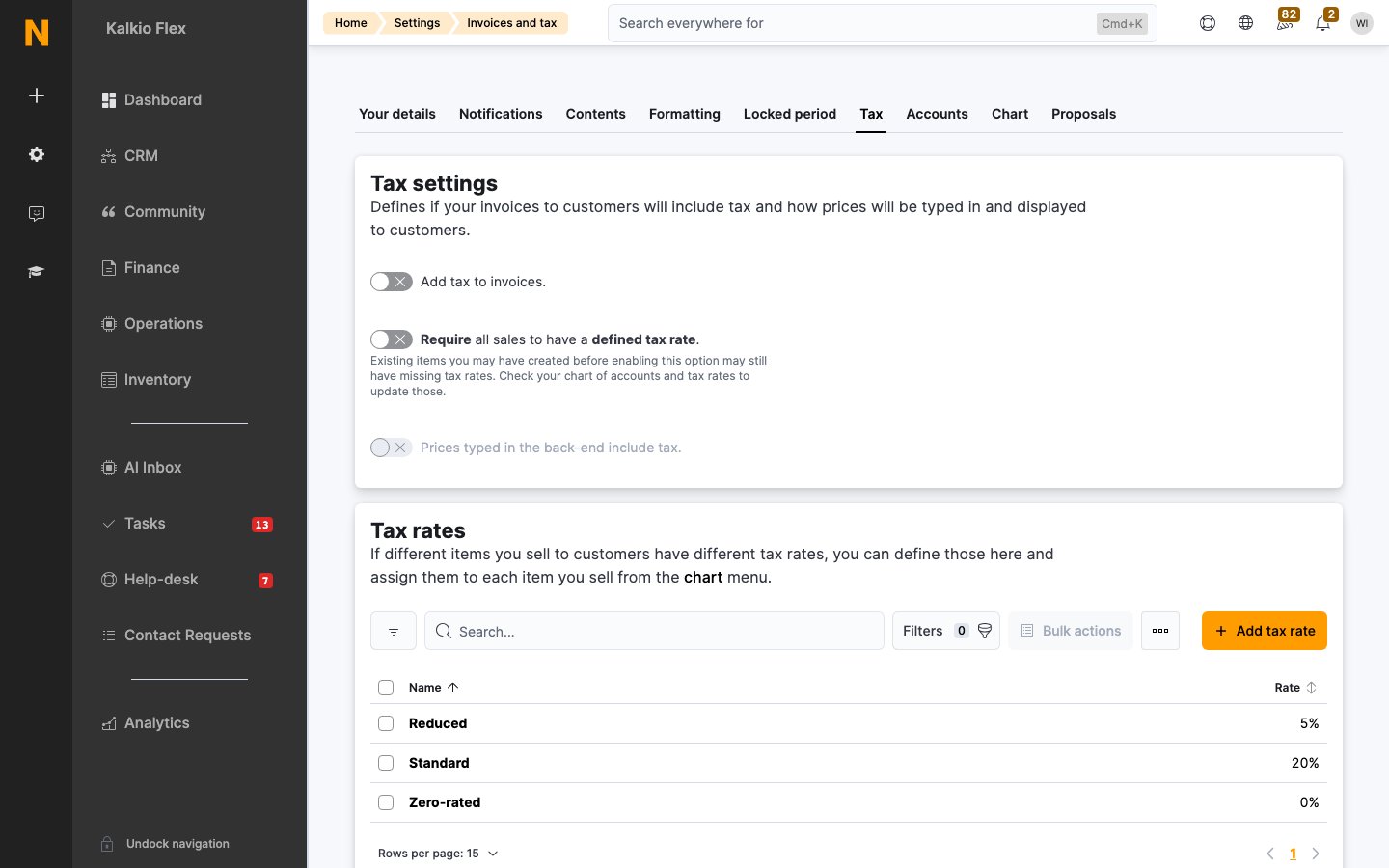 ## Tax settings
| Setting | What it does |
| - | - |
| **Add tax to invoices** | Turns tax on for your invoices. While it's off, invoices carry no tax. |
| **Require all sales to have a defined tax rate** | Stops you selling anything that doesn't have a tax rate assigned. Items created before you turn this on may still be missing one, so check the [chart of accounts](/platform/finance/chart-of-accounts). |
| **Prices typed in the back-end include tax** | Treats the prices you enter for plans, products and so on as tax-inclusive. |
| **Display prices including tax** | Shows tax-inclusive prices in the Members Portal, the app and emails to customers. |
| **Default tax rate** | The rate used for anything sold without its own tax rate |
The display options and default tax rate appear once **Add tax to invoices** is on.
## Add a tax rate
1. On the **Tax** tab, under **Tax rates**, select **Add tax rate**.
2. Enter a **Name**, such as "Standard" or "VAT", and the **Rate** as a percentage.
3. Save.
Then assign the rate to the items it applies to in the [chart of accounts](/platform/finance/chart-of-accounts).
If you use an accounting integration, such as Xero or QuickBooks Online, give each tax rate exactly the same name and rate as the matching rate in your accounting system. Otherwise invoices won't transfer.
## Standard, reduced and exempt rates
Each item you sell can have up to three tax rates:
* **Tax**: the standard rate, used for most customers.
* **Reduced Tax**: used for customers whose **Tax type** is **Reduced**.
* **Exempt Tax**: used for customers whose **Tax type** is **Exempt**, such as charities.
Set a customer's **Tax type** on their record, under **Account → Contact and billing**, in **Personal billing settings**.
## Personal tax rates
To charge one customer a specific rate on everything they buy, enter it as their **Personal tax rate** in the same section of their record.
A personal tax rate overrides every other rate, including the rates set on individual items.
## Which rate is used
When Nexudus invoices an item, it uses the first of these that applies:
1. No tax, if **Add tax to invoices** is off.
2. The customer's **Personal tax rate**.
3. The item's **Reduced Tax** or **Exempt Tax** rate, if the customer's **Tax type** is **Reduced** or **Exempt** and the item has that rate.
4. The item's **Tax** rate.
5. Your **Default tax rate**.
## Change or delete tax rates
Changing a tax rate, the default rate or a customer's tax settings only affects future invoices. To change the tax on an invoice that's already been issued but isn't paid yet, open the invoice, edit each line, and choose a different **Tax Rate**. Paid invoices can't be changed. See [Invoices](/platform/finance/invoices).
You can't delete a tax rate while items still use it. Remove it from those items in the [chart of accounts](/platform/finance/chart-of-accounts) first.
## Related
* [Chart of accounts](/platform/finance/chart-of-accounts): assign tax rates to everything you sell
* [Financial accounts](/platform/finance/financial-accounts): the income categories on each invoice line
* [Invoices](/platform/finance/invoices): where tax rates appear
This documentation is built and hosted on [Mintlify](https://mintlify.com), a developer documentation platform.
## Tax settings
| Setting | What it does |
| - | - |
| **Add tax to invoices** | Turns tax on for your invoices. While it's off, invoices carry no tax. |
| **Require all sales to have a defined tax rate** | Stops you selling anything that doesn't have a tax rate assigned. Items created before you turn this on may still be missing one, so check the [chart of accounts](/platform/finance/chart-of-accounts). |
| **Prices typed in the back-end include tax** | Treats the prices you enter for plans, products and so on as tax-inclusive. |
| **Display prices including tax** | Shows tax-inclusive prices in the Members Portal, the app and emails to customers. |
| **Default tax rate** | The rate used for anything sold without its own tax rate |
The display options and default tax rate appear once **Add tax to invoices** is on.
## Add a tax rate
1. On the **Tax** tab, under **Tax rates**, select **Add tax rate**.
2. Enter a **Name**, such as "Standard" or "VAT", and the **Rate** as a percentage.
3. Save.
Then assign the rate to the items it applies to in the [chart of accounts](/platform/finance/chart-of-accounts).
If you use an accounting integration, such as Xero or QuickBooks Online, give each tax rate exactly the same name and rate as the matching rate in your accounting system. Otherwise invoices won't transfer.
## Standard, reduced and exempt rates
Each item you sell can have up to three tax rates:
* **Tax**: the standard rate, used for most customers.
* **Reduced Tax**: used for customers whose **Tax type** is **Reduced**.
* **Exempt Tax**: used for customers whose **Tax type** is **Exempt**, such as charities.
Set a customer's **Tax type** on their record, under **Account → Contact and billing**, in **Personal billing settings**.
## Personal tax rates
To charge one customer a specific rate on everything they buy, enter it as their **Personal tax rate** in the same section of their record.
A personal tax rate overrides every other rate, including the rates set on individual items.
## Which rate is used
When Nexudus invoices an item, it uses the first of these that applies:
1. No tax, if **Add tax to invoices** is off.
2. The customer's **Personal tax rate**.
3. The item's **Reduced Tax** or **Exempt Tax** rate, if the customer's **Tax type** is **Reduced** or **Exempt** and the item has that rate.
4. The item's **Tax** rate.
5. Your **Default tax rate**.
## Change or delete tax rates
Changing a tax rate, the default rate or a customer's tax settings only affects future invoices. To change the tax on an invoice that's already been issued but isn't paid yet, open the invoice, edit each line, and choose a different **Tax Rate**. Paid invoices can't be changed. See [Invoices](/platform/finance/invoices).
You can't delete a tax rate while items still use it. Remove it from those items in the [chart of accounts](/platform/finance/chart-of-accounts) first.
## Related
* [Chart of accounts](/platform/finance/chart-of-accounts): assign tax rates to everything you sell
* [Financial accounts](/platform/finance/financial-accounts): the income categories on each invoice line
* [Invoices](/platform/finance/invoices): where tax rates appear
This documentation is built and hosted on [Mintlify](https://mintlify.com), a developer documentation platform.