> ## Documentation Index
> Fetch the complete documentation index at: https://learn.nexudus.com/llms.txt
> Use this file to discover all available pages before exploring further.
# Customer Profile Reference
> Reference for every tab and section of a customer record in Nexudus, from account details and access rights to payments, benefits, CRM and ledger.
## Overview
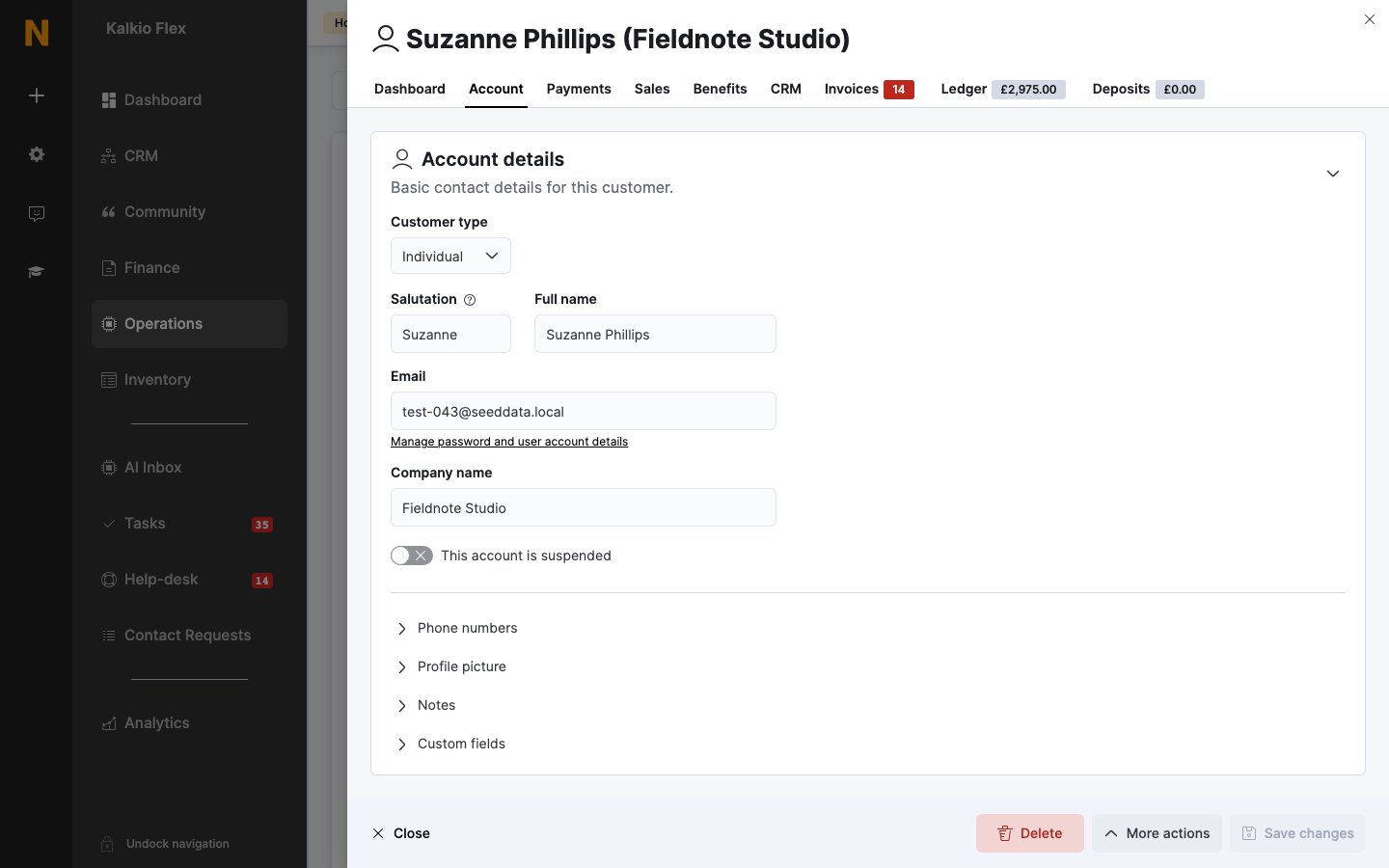
Every customer record is organised into tabs, and the **Account** tab is split into sections. This page describes what each one holds. The tabs you see depend on the modules turned on for your location and on your admin role.
## How to access
Go to **Operations → Members & contacts** and select a customer.
 ## Dashboard tab
A summary of the customer's activity:
* Figures such as total revenue, total sales, unpaid invoices and money credit.
* Charts of revenue, booked time and hours on site for the customer and their team, and how their spending splits between plans, bookings and other items.
* **Plan changes**, such as joining, upgrading, downgrading or cancelling a plan.
* **Recent events**, such as check-ins, booking requests, invoices, payments and help-desk messages.
## Account tab
### Account details
| Field | Description |
| - | - |
| **Customer type** | **Individual** or **Company**. |
| **Salutation** | How to address an individual in emails, for example their first name or "Dr. Raymond". It's filled in from the first name. |
| **Full name** | For an individual, their full name. For a company, this is **Primary contact**, the person you deal with. |
| **Company name** | For a company, its name. For an individual, the company they work for. |
| **Email** | Used to sign in, if the customer has portal access, and for invoices and notifications. Select **Manage password and user account details** to open their user account. |
| **This account is suspended** | Suspends the account. See [Suspend, archive and delete customers](/platform/operations/members/suspend-archive-delete). |
| **Phone numbers** | **Phone** and **Cell / Mobile**. |
| **Profile picture** | Their photo. For a company, this is **Company logo**. |
| **Notes** | **Internal notes** about the customer. Customers can't see them. |
If a customer was registered without a valid email address, you see a warning instead of the **Email** field. Select **Assign email** to add one. You need to add an email before you can give them portal access or send them anything.
### Locations
| Field | Description |
| - | - |
| **Home location** | Used to organise your customers. If you've turned off invoice split, the customer is invoiced from this location. |
| **Registered with** | Every location this customer can use. Customers are registered with any location they use through your portal or app. |
### Teams
The teams the customer belongs to. See [Teams](/platform/operations/teams).
### Contact and billing
| Section | What it holds |
| - | - |
| **Address** | **Country**, **Address**, **State / Province / Region**, **City** and **Zip / Postcode**. Search for an address to fill them in. |
| **Billing details** | **Tax/VAT Number**, **Billing / Trading name** and **Billing email**. Turn on **Use different billing address** if invoices should show another address. |
| **Billing address** | The address shown on invoices, if it's different. |
| **eInvoicing information** | Details used for e-invoicing, where it's turned on. |
| **Personal billing settings** | **Personal tax rate**, **Tax type**, **Default purchase order (PO) number** and the invoice **Due date** for this customer. |
| **Invoice split options** | Tick **Override invoice split settings** to choose, for this customer only, whether to create an invoice per contract, and which items (bookings, products, passes, event tickets and charges) go on a separate invoice. |
### Custom fields
Any [custom fields](/platform/crm/custom-fields) you've added for customers, in their own sections.
### Professional profile
What the customer does, shown in the Members Portal directory if you publish it:
| Field | Description |
| - | - |
| **Company name**, **Position / role**, **Industry / Sector** | Their work details. |
| **Professional profile** | A short bio. |
| **Publish this profile in the members directory** | Shows the customer in the member directory. |
| **Skills / industries** | Tags other members can search for. |
| **Website** and social networks | LinkedIn, X (Twitter), Instagram, GitHub and other profiles. |
If you've connected OpenAI, select **Generate professional profile using OpenAI** to draft the bio and tags from the customer's details. The profile isn't published until you tick the publish option.
### Attendance
The days the customer is expected on site, from Monday to Sunday. Use the buttons to fill in the whole week, such as **Fully on-site**, **Fully remote (home)**, **Fully remote (abroad)** or **Not working**. It's used for occupancy planning and reporting.
### Demographics
**Gender** and **Date of birth**. The date of birth is used for birthday messages.
### Identifiers
| Field | Description |
| - | - |
| **Tag** | Labels to group customers. A customer can have several. |
| **Unique reference number** | Your own reference for this customer. |
| **Show message when this customer checks in** | Shows a message to staff whenever this customer checks in. |
| **Alert message** | The message to show. |
### Notifications
Which emails the customer gets:
* **Send new invoices automatically by email**
* **Send payment receipts automatically by email**
* **Send a notification by email on failed payment attempts**
* **Notify this customer when a delivery is received for any member of their teams**
* **Send an email notification about new deliveries to this email address**, to send delivery notifications to another address.
### Access rights
What the customer can do in the portal and on site:
| Permission | What it controls |
| - | - |
| **This customer can connect to your IT network** | Whether they can use your Wi-Fi or network. |
| **This customer can make bookings** | Whether they can book resources in the portal and app. |
| **This customer can book for their team members** | Whether they can book for others in their team. Needs **can make bookings**. |
| **This customer can purchase products** | Whether they can buy products. |
| **This customer can purchase events** | Whether they can buy event tickets. |
| **This customer can post community messages** | Whether they can take part in discussions. |
| **This customer can access team invoices** | Whether they can see the invoices of their team's paying member. |
Access details:
| Field | Description |
| - | - |
| **Internet access, check-in and printing pin-code** | The customer's PIN. See [PIN codes](/platform/operations/members#pin-codes). |
| **Access cards** | One or more card numbers used by door access systems. |
| **Access fobs** | One or more fob numbers. |
If the customer has no portal access, the booking, product, event and community permissions are turned off. The section shows a **No online access** warning and a **Grant online access** button. Customers with access have a **Revoke online access** button instead.
### Integrations & Services
Settings for printing and other connected services, such as **Free unlimited printing** and **Unrestricted user in PaperCut** for PaperCut, printing through Ezeep or Ezeep Blue, and **Send customer to Square customer list**.
## Payments tab
| Section | What it holds |
| - | - |
| Top of the tab | The **Default payment method**, and **Automatically collect payment for due invoices if payment details are available** |
| **Card payments** | The customer's saved card, if you use Spreedly. |
| **Direct debit (GoCardless)** | Their GoCardless mandate, if you use GoCardless. |
| **BACS payments (Stripe UK)** | Their Stripe BACS mandate, if you use it. |
| **Payment methods** | Every saved payment method. |
| **Bank details** | **Bank name**, **Bank account** and **Bank branch**. |
| **Advanced** | Payment tokens for each provider. They're locked; select **Unlock fields** to edit them. |
When GoCardless or Stripe BACS is on for a customer, Nexudus only collects their payments that way. See [Customer payment methods](/platform/finance/payment-gateways/customer-payment-methods).
## Sales tab
What the customer has bought: **Contracts**, **Products**, **Bookings**, **Cancelled bookings**, **Event tickets** and **Other charges**, plus a **Revenue forecast** of what they're expected to spend.
## Benefits tab
Credits, passes and discounts assigned to the customer, and how they used them. See [Credits and benefits](/platform/operations/members/credits-and-benefits).
## CRM tab
The customer's relationship history, in sections: **Notes**, **Tasks**, **Messages**, **AI Conversations**, **Proposals**, **Opportunities**, **Visitors**, **Deliveries**, **Help-desk**, **Files**, **Identity checks**, **Forms**, **Legal** and **Equipment**. Each section appears when its module is on. See [Files, documents and messages](/platform/operations/members/files-and-messages).
## Invoices tab
The customer's invoices. The tab shows how many are unpaid.
## Ledger tab
The customer's [ledger](/platform/finance/ledger). The tab shows the current balance: a positive amount means the customer owes you.
## Deposits tab
Deposits the customer has paid, with the current deposit balance on the tab. See [Deposits](/platform/finance/deposits).
## Related
* [Members & contacts](/platform/operations/members)
* [Customer payment methods](/platform/finance/payment-gateways/customer-payment-methods)
* [Teams](/platform/operations/teams)
This documentation is built and hosted on [Mintlify](https://mintlify.com), a developer documentation platform.
## Dashboard tab
A summary of the customer's activity:
* Figures such as total revenue, total sales, unpaid invoices and money credit.
* Charts of revenue, booked time and hours on site for the customer and their team, and how their spending splits between plans, bookings and other items.
* **Plan changes**, such as joining, upgrading, downgrading or cancelling a plan.
* **Recent events**, such as check-ins, booking requests, invoices, payments and help-desk messages.
## Account tab
### Account details
| Field | Description |
| - | - |
| **Customer type** | **Individual** or **Company**. |
| **Salutation** | How to address an individual in emails, for example their first name or "Dr. Raymond". It's filled in from the first name. |
| **Full name** | For an individual, their full name. For a company, this is **Primary contact**, the person you deal with. |
| **Company name** | For a company, its name. For an individual, the company they work for. |
| **Email** | Used to sign in, if the customer has portal access, and for invoices and notifications. Select **Manage password and user account details** to open their user account. |
| **This account is suspended** | Suspends the account. See [Suspend, archive and delete customers](/platform/operations/members/suspend-archive-delete). |
| **Phone numbers** | **Phone** and **Cell / Mobile**. |
| **Profile picture** | Their photo. For a company, this is **Company logo**. |
| **Notes** | **Internal notes** about the customer. Customers can't see them. |
If a customer was registered without a valid email address, you see a warning instead of the **Email** field. Select **Assign email** to add one. You need to add an email before you can give them portal access or send them anything.
### Locations
| Field | Description |
| - | - |
| **Home location** | Used to organise your customers. If you've turned off invoice split, the customer is invoiced from this location. |
| **Registered with** | Every location this customer can use. Customers are registered with any location they use through your portal or app. |
### Teams
The teams the customer belongs to. See [Teams](/platform/operations/teams).
### Contact and billing
| Section | What it holds |
| - | - |
| **Address** | **Country**, **Address**, **State / Province / Region**, **City** and **Zip / Postcode**. Search for an address to fill them in. |
| **Billing details** | **Tax/VAT Number**, **Billing / Trading name** and **Billing email**. Turn on **Use different billing address** if invoices should show another address. |
| **Billing address** | The address shown on invoices, if it's different. |
| **eInvoicing information** | Details used for e-invoicing, where it's turned on. |
| **Personal billing settings** | **Personal tax rate**, **Tax type**, **Default purchase order (PO) number** and the invoice **Due date** for this customer. |
| **Invoice split options** | Tick **Override invoice split settings** to choose, for this customer only, whether to create an invoice per contract, and which items (bookings, products, passes, event tickets and charges) go on a separate invoice. |
### Custom fields
Any [custom fields](/platform/crm/custom-fields) you've added for customers, in their own sections.
### Professional profile
What the customer does, shown in the Members Portal directory if you publish it:
| Field | Description |
| - | - |
| **Company name**, **Position / role**, **Industry / Sector** | Their work details. |
| **Professional profile** | A short bio. |
| **Publish this profile in the members directory** | Shows the customer in the member directory. |
| **Skills / industries** | Tags other members can search for. |
| **Website** and social networks | LinkedIn, X (Twitter), Instagram, GitHub and other profiles. |
If you've connected OpenAI, select **Generate professional profile using OpenAI** to draft the bio and tags from the customer's details. The profile isn't published until you tick the publish option.
### Attendance
The days the customer is expected on site, from Monday to Sunday. Use the buttons to fill in the whole week, such as **Fully on-site**, **Fully remote (home)**, **Fully remote (abroad)** or **Not working**. It's used for occupancy planning and reporting.
### Demographics
**Gender** and **Date of birth**. The date of birth is used for birthday messages.
### Identifiers
| Field | Description |
| - | - |
| **Tag** | Labels to group customers. A customer can have several. |
| **Unique reference number** | Your own reference for this customer. |
| **Show message when this customer checks in** | Shows a message to staff whenever this customer checks in. |
| **Alert message** | The message to show. |
### Notifications
Which emails the customer gets:
* **Send new invoices automatically by email**
* **Send payment receipts automatically by email**
* **Send a notification by email on failed payment attempts**
* **Notify this customer when a delivery is received for any member of their teams**
* **Send an email notification about new deliveries to this email address**, to send delivery notifications to another address.
### Access rights
What the customer can do in the portal and on site:
| Permission | What it controls |
| - | - |
| **This customer can connect to your IT network** | Whether they can use your Wi-Fi or network. |
| **This customer can make bookings** | Whether they can book resources in the portal and app. |
| **This customer can book for their team members** | Whether they can book for others in their team. Needs **can make bookings**. |
| **This customer can purchase products** | Whether they can buy products. |
| **This customer can purchase events** | Whether they can buy event tickets. |
| **This customer can post community messages** | Whether they can take part in discussions. |
| **This customer can access team invoices** | Whether they can see the invoices of their team's paying member. |
Access details:
| Field | Description |
| - | - |
| **Internet access, check-in and printing pin-code** | The customer's PIN. See [PIN codes](/platform/operations/members#pin-codes). |
| **Access cards** | One or more card numbers used by door access systems. |
| **Access fobs** | One or more fob numbers. |
If the customer has no portal access, the booking, product, event and community permissions are turned off. The section shows a **No online access** warning and a **Grant online access** button. Customers with access have a **Revoke online access** button instead.
### Integrations & Services
Settings for printing and other connected services, such as **Free unlimited printing** and **Unrestricted user in PaperCut** for PaperCut, printing through Ezeep or Ezeep Blue, and **Send customer to Square customer list**.
## Payments tab
| Section | What it holds |
| - | - |
| Top of the tab | The **Default payment method**, and **Automatically collect payment for due invoices if payment details are available** |
| **Card payments** | The customer's saved card, if you use Spreedly. |
| **Direct debit (GoCardless)** | Their GoCardless mandate, if you use GoCardless. |
| **BACS payments (Stripe UK)** | Their Stripe BACS mandate, if you use it. |
| **Payment methods** | Every saved payment method. |
| **Bank details** | **Bank name**, **Bank account** and **Bank branch**. |
| **Advanced** | Payment tokens for each provider. They're locked; select **Unlock fields** to edit them. |
When GoCardless or Stripe BACS is on for a customer, Nexudus only collects their payments that way. See [Customer payment methods](/platform/finance/payment-gateways/customer-payment-methods).
## Sales tab
What the customer has bought: **Contracts**, **Products**, **Bookings**, **Cancelled bookings**, **Event tickets** and **Other charges**, plus a **Revenue forecast** of what they're expected to spend.
## Benefits tab
Credits, passes and discounts assigned to the customer, and how they used them. See [Credits and benefits](/platform/operations/members/credits-and-benefits).
## CRM tab
The customer's relationship history, in sections: **Notes**, **Tasks**, **Messages**, **AI Conversations**, **Proposals**, **Opportunities**, **Visitors**, **Deliveries**, **Help-desk**, **Files**, **Identity checks**, **Forms**, **Legal** and **Equipment**. Each section appears when its module is on. See [Files, documents and messages](/platform/operations/members/files-and-messages).
## Invoices tab
The customer's invoices. The tab shows how many are unpaid.
## Ledger tab
The customer's [ledger](/platform/finance/ledger). The tab shows the current balance: a positive amount means the customer owes you.
## Deposits tab
Deposits the customer has paid, with the current deposit balance on the tab. See [Deposits](/platform/finance/deposits).
## Related
* [Members & contacts](/platform/operations/members)
* [Customer payment methods](/platform/finance/payment-gateways/customer-payment-methods)
* [Teams](/platform/operations/teams)
This documentation is built and hosted on [Mintlify](https://mintlify.com), a developer documentation platform.