> ## Documentation Index
> Fetch the complete documentation index at: https://learn.nexudus.com/llms.txt
> Use this file to discover all available pages before exploring further.
# Team Administrators and Profile
> Let a company manage its own team from the Members Portal with team administrators, and set up the team's directory profile, community group and attendance dashboard.
## Overview
**Team administrators** are customers who manage a team from the Members Portal, for example a company's office manager. They can see the team's bookings and booking statistics, manage team members' accounts, and edit the team's directory profile.
The team's **Profile** tab is where you choose its administrators and set up how the team appears to other members.
## How to access
Go to **Operations → Teams**, open the team and select the **Profile** tab.
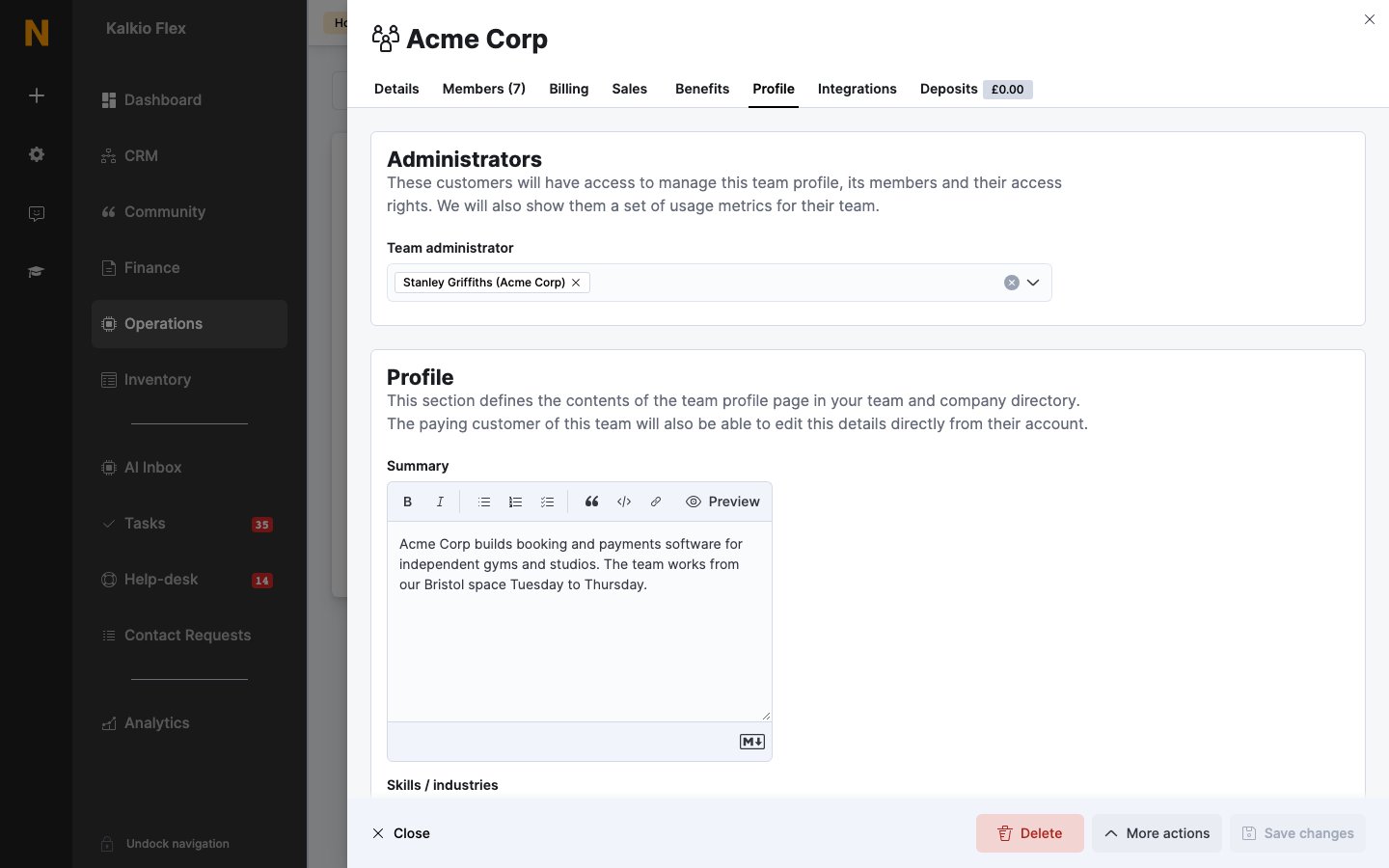 ## Add or remove administrators
* **Add an administrator:** choose the customer in **Team administrator** and save. They get access straight away.
* **Remove an administrator:** remove them from **Team administrator** and save.
Administrators don't have to be members of the team, and the team paying customer isn't an administrator unless you add them.
Administrators can also see the team's [join link](/platform/operations/teams#sign-up-links) in their account, so they can invite their own staff.
## What administrators can do
Choose what team administrators can do for every team under **Settings → Features → Modules → Team**, in **Team and attendance modules**:
| Setting | What it does |
| - | - |
| **Send a reminder to customers set to 'work from the office' the next day but with no bookings in the calendar for that day** | Reminds members to book when their attendance says they'll be in. |
| **Send an attendance report to all team administrators once a week** | Sends a report every Sunday, added to each administrator's **Files** in the Members Portal. |
| **Team administrators can remove members from their teams** | Lets administrators remove members. |
| **Team administrators can cancel contracts for their team members** | Lets administrators cancel members' contracts. Whether they can cancel their own also depends on whether customers can change or cancel their plan. |
| **Let team administrators update access card details for their team members** | Lets administrators manage members' access cards. |
See [Team management](/member-portal/teams/team-management) for what administrators see in the Members Portal.
## Team profile
The rest of the **Profile** tab sets up the team's page in your team and company directory:
| Section | Fields |
| - | - |
| **Profile** | **Summary**, **Skills / industries**, and **Publish this profile in the teams directory** |
| **Logo and Images** | **Company logo** and up to three images for the team's profile. |
| **Social networks** | Website and social profiles, shown as icons on the team's profile. |
| **Discussion board** | **Provide a private community group for this team**, so members can talk among themselves. |
| **Attendance dashboard** | **Enable attendance dashboard for this team** to let the team track when members work remotely or from your locations. |
The team's paying customer can also edit the profile from their account.
Only publish a team's profile once the team has agreed to appear in your directory.
## Related
* [Teams](/platform/operations/teams)
* [Set up a company](/platform/operations/teams/company-setup)
* [Team management in the Members Portal](/member-portal/teams/team-management)
This documentation is built and hosted on [Mintlify](https://mintlify.com), a developer documentation platform.
## Add or remove administrators
* **Add an administrator:** choose the customer in **Team administrator** and save. They get access straight away.
* **Remove an administrator:** remove them from **Team administrator** and save.
Administrators don't have to be members of the team, and the team paying customer isn't an administrator unless you add them.
Administrators can also see the team's [join link](/platform/operations/teams#sign-up-links) in their account, so they can invite their own staff.
## What administrators can do
Choose what team administrators can do for every team under **Settings → Features → Modules → Team**, in **Team and attendance modules**:
| Setting | What it does |
| - | - |
| **Send a reminder to customers set to 'work from the office' the next day but with no bookings in the calendar for that day** | Reminds members to book when their attendance says they'll be in. |
| **Send an attendance report to all team administrators once a week** | Sends a report every Sunday, added to each administrator's **Files** in the Members Portal. |
| **Team administrators can remove members from their teams** | Lets administrators remove members. |
| **Team administrators can cancel contracts for their team members** | Lets administrators cancel members' contracts. Whether they can cancel their own also depends on whether customers can change or cancel their plan. |
| **Let team administrators update access card details for their team members** | Lets administrators manage members' access cards. |
See [Team management](/member-portal/teams/team-management) for what administrators see in the Members Portal.
## Team profile
The rest of the **Profile** tab sets up the team's page in your team and company directory:
| Section | Fields |
| - | - |
| **Profile** | **Summary**, **Skills / industries**, and **Publish this profile in the teams directory** |
| **Logo and Images** | **Company logo** and up to three images for the team's profile. |
| **Social networks** | Website and social profiles, shown as icons on the team's profile. |
| **Discussion board** | **Provide a private community group for this team**, so members can talk among themselves. |
| **Attendance dashboard** | **Enable attendance dashboard for this team** to let the team track when members work remotely or from your locations. |
The team's paying customer can also edit the profile from their account.
Only publish a team's profile once the team has agreed to appear in your directory.
## Related
* [Teams](/platform/operations/teams)
* [Set up a company](/platform/operations/teams/company-setup)
* [Team management in the Members Portal](/member-portal/teams/team-management)
This documentation is built and hosted on [Mintlify](https://mintlify.com), a developer documentation platform.