> ## Documentation Index
> Fetch the complete documentation index at: https://learn.nexudus.com/llms.txt
> Use this file to discover all available pages before exploring further.
# Team Billing and Credit
> Merge a team's invoices onto one paying customer, give team discounts, share or pool credit and passes, and invoice some items to members directly.
## Overview
A team can be billed as one unit. Choose a **team paying customer** and turn on merged billing, and everyone's charges go on a single invoice to them. You can also give the whole team discounts, and share credit and passes between its members.
## How to access
Go to **Operations → Teams** and open the team. Billing is on the **Billing** tab; discounts and credit sharing are on the **Benefits** tab.
## Merged billing
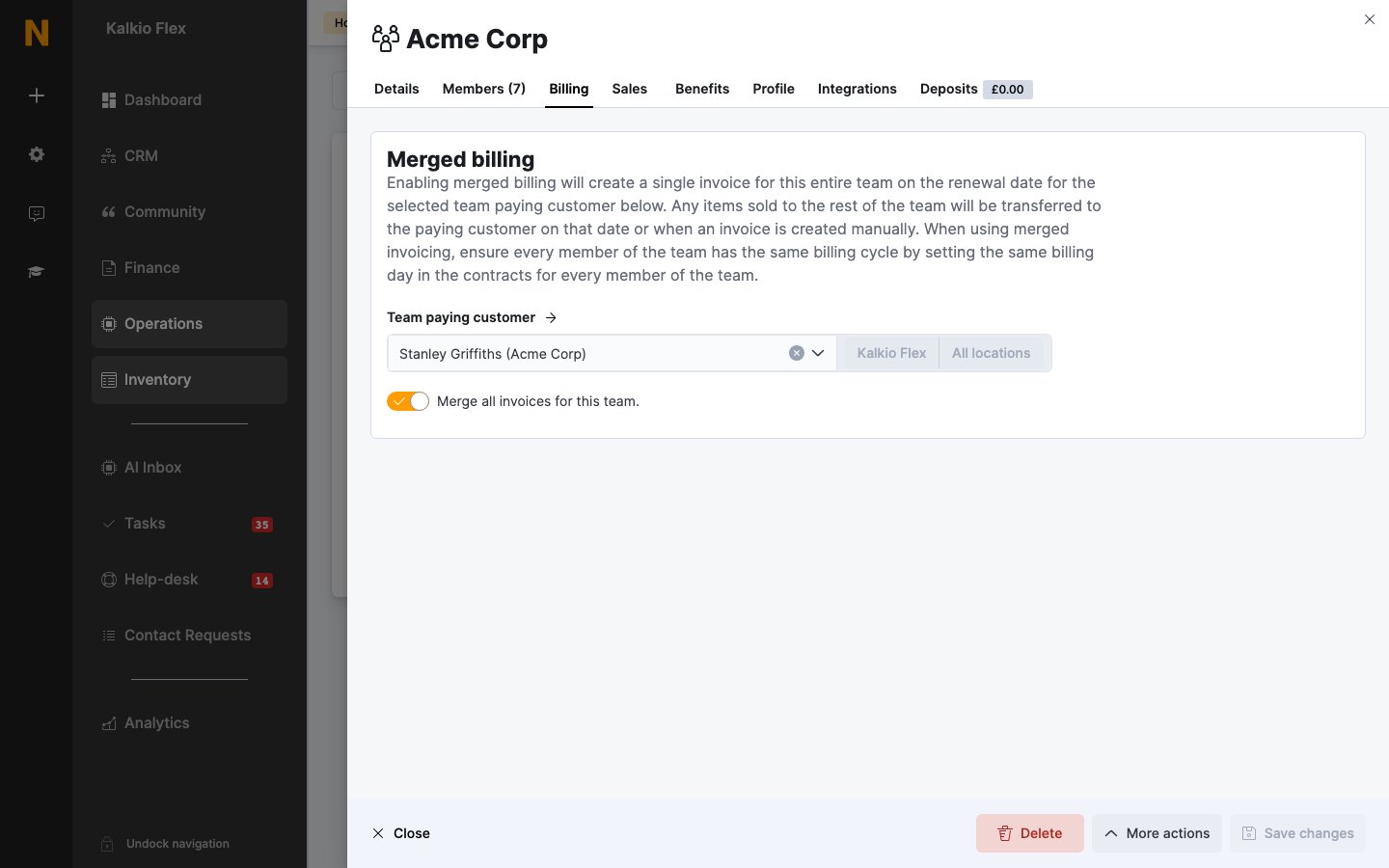 | Field | Description |
| - | - |
| **Team paying customer** | The member who receives merged invoices and whose credit can be shared. Only members of the team can be chosen. |
| **Merge all invoices for this team** | Creates a single invoice for the whole team on the paying customer's renewal date. Items sold to other members are moved to the paying customer on that date, or when you create an invoice manually. |
When merged billing is on:
1. On the paying customer's renewal date, Nexudus creates one invoice for the team, addressed to the paying customer.
2. Charges from every member are included: plan fees, bookings, products and other charges, except items you've set to [invoice the member directly](#charge-a-member-instead-of-the-paying-customer).
3. The paying customer's payment method is used to collect the invoice automatically, where set up.
Merged billing only affects invoices created from then on. Invoices already issued stay on the members' own accounts, so turn it on before the next billing date.
With merged billing, give every team member the same billing day in their contracts, so all their charges fall into the same invoice.
### Change the paying customer
Choose a different member in **Team paying customer** and save.
If you clear **Team paying customer**, merged billing and all the credit sharing options are turned off.
Use a company record as the paying customer rather than a person, so invoices stay correctly addressed when people change. See [Set up a company](/platform/operations/teams/company-setup).
## Discounts
| Field | Description |
| - | - |
| **Team paying customer** | The member who receives merged invoices and whose credit can be shared. Only members of the team can be chosen. |
| **Merge all invoices for this team** | Creates a single invoice for the whole team on the paying customer's renewal date. Items sold to other members are moved to the paying customer on that date, or when you create an invoice manually. |
When merged billing is on:
1. On the paying customer's renewal date, Nexudus creates one invoice for the team, addressed to the paying customer.
2. Charges from every member are included: plan fees, bookings, products and other charges, except items you've set to [invoice the member directly](#charge-a-member-instead-of-the-paying-customer).
3. The paying customer's payment method is used to collect the invoice automatically, where set up.
Merged billing only affects invoices created from then on. Invoices already issued stay on the members' own accounts, so turn it on before the next billing date.
With merged billing, give every team member the same billing day in their contracts, so all their charges fall into the same invoice.
### Change the paying customer
Choose a different member in **Team paying customer** and save.
If you clear **Team paying customer**, merged billing and all the credit sharing options are turned off.
Use a company record as the paying customer rather than a person, so invoices stay correctly addressed when people change. See [Set up a company](/platform/operations/teams/company-setup).
## Discounts
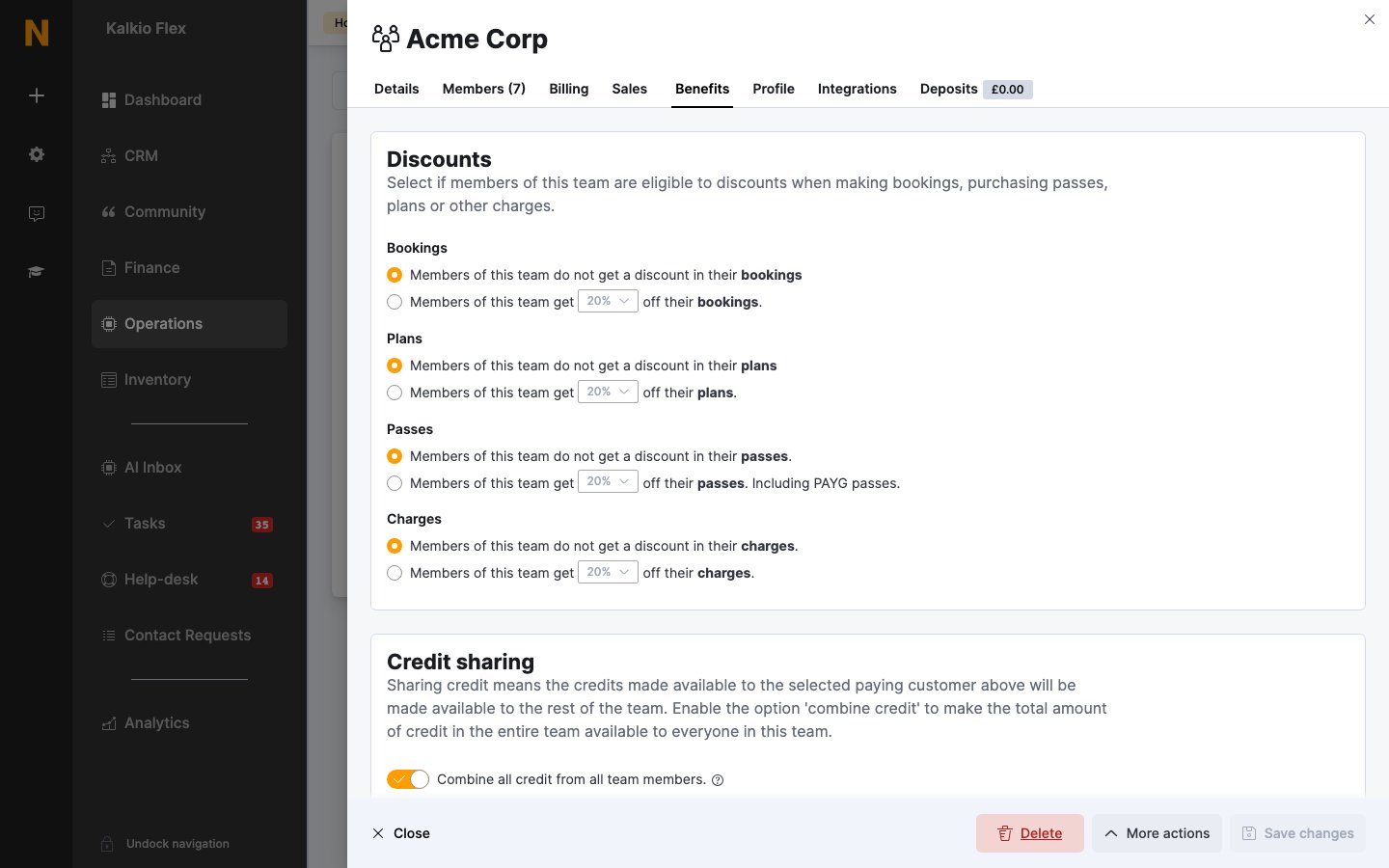 On the **Benefits** tab, give every team member a percentage discount on **Bookings**, **Plans**, **Passes** (including PAYG passes) and **Charges**. For each one, choose **Members of this team do not get a discount** or **Members of this team get** a percentage off.
Discounts don't need a paying customer. With merged billing, the discount appears on the paying customer's invoice.
## Credit sharing
Credit sharing is on the **Benefits** tab and needs a team paying customer.
| Setting | Effect |
| - | - |
| **Combine all credit from all team members** | Moves the credit and passes members get from their plans into the paying customer's account. |
| **Share access passes** | Makes the paying customer's passes available to every member. |
| **Share time credit and printing credit** | Makes the paying customer's time and printing credit available to every member. |
| **Share monetary credit** | Makes the paying customer's money credit available to every member. |
Common setups:
| Setup | Turn on | Result |
| - | - | - |
| **Share the paying customer's credit** | The **Share…** options you need | Members keep their own credit and can also use the paying customer's once theirs runs out. |
| **Pool everyone's credit** | **Combine all credit from all team members** and the **Share…** options | Plan credit from every member is pooled in the paying customer's account, and anyone in the team can use it. |
| **Collect credit centrally** | **Combine all credit from all team members** only | Members' plan credit moves to the paying customer, and only the paying customer can use it. |
* Members always use their own credit before shared credit.
* Credit and passes that come from products, or that you add to a member by hand, stay with that member and are never shared.
* **Combine all credit from all team members** works for teams of up to 50 members. With passes shared as well, a team can hold up to 500 passes. For larger teams, add credit to the paying customer's contract and use the **Share…** options instead.
### See the team's credit
The **Benefits** tab also shows:
* **Benefits overview**: the team's individual and shared credit and passes.
* **Money credit**, **Time credit**, **Printing credit** and **Passes** for the whole team.
* **Benefit use history**: which member used which credit. See [Credits and benefits](/platform/operations/members/credits-and-benefits#review-credit-usage) for what each field means.
## Charge a member instead of the paying customer
With merged billing, you can still invoice some items to the member who bought them:
| Item | How |
| - | - |
| **A product** | On the product, turn on **When using merged invoicing, always invoice the customer purchasing this product rather than their team paying customer**. This applies to every team. To treat teams differently, create two versions of the product. |
| **A booking** | On the booking, turn on **Invoice this customer directly instead of the paying member of the team**. Only admins can set this, booking by booking. |
| **Event tickets** | Under **Settings → Features → Sign-up and checkout → Checkout → Tickets**, turn on **Invoice event buyer instead of their team paying customer**. This applies to all tickets. |
## Other team billing setups
1. Set the Company record as the team paying customer.
2. On the **Benefits** tab, turn on the **Share…** options you need.
3. Add credit or passes to the Company record, for example through its plan or a product.
4. Every member can now use them once their own run out.
1. On the **Benefits** tab, set discount percentages, for example 10% on bookings.
2. Every member gets the discount automatically.
3. No paying customer is needed.
Leave **Team paying customer** empty. Each member is billed individually, and the team is used for grouping, communication and access.
## Related
* [Teams](/platform/operations/teams)
* [Set up a company](/platform/operations/teams/company-setup)
* [Invoices](/platform/finance/invoices)
* [Credits and benefits](/platform/operations/members/credits-and-benefits)
This documentation is built and hosted on [Mintlify](https://mintlify.com), a developer documentation platform.
On the **Benefits** tab, give every team member a percentage discount on **Bookings**, **Plans**, **Passes** (including PAYG passes) and **Charges**. For each one, choose **Members of this team do not get a discount** or **Members of this team get** a percentage off.
Discounts don't need a paying customer. With merged billing, the discount appears on the paying customer's invoice.
## Credit sharing
Credit sharing is on the **Benefits** tab and needs a team paying customer.
| Setting | Effect |
| - | - |
| **Combine all credit from all team members** | Moves the credit and passes members get from their plans into the paying customer's account. |
| **Share access passes** | Makes the paying customer's passes available to every member. |
| **Share time credit and printing credit** | Makes the paying customer's time and printing credit available to every member. |
| **Share monetary credit** | Makes the paying customer's money credit available to every member. |
Common setups:
| Setup | Turn on | Result |
| - | - | - |
| **Share the paying customer's credit** | The **Share…** options you need | Members keep their own credit and can also use the paying customer's once theirs runs out. |
| **Pool everyone's credit** | **Combine all credit from all team members** and the **Share…** options | Plan credit from every member is pooled in the paying customer's account, and anyone in the team can use it. |
| **Collect credit centrally** | **Combine all credit from all team members** only | Members' plan credit moves to the paying customer, and only the paying customer can use it. |
* Members always use their own credit before shared credit.
* Credit and passes that come from products, or that you add to a member by hand, stay with that member and are never shared.
* **Combine all credit from all team members** works for teams of up to 50 members. With passes shared as well, a team can hold up to 500 passes. For larger teams, add credit to the paying customer's contract and use the **Share…** options instead.
### See the team's credit
The **Benefits** tab also shows:
* **Benefits overview**: the team's individual and shared credit and passes.
* **Money credit**, **Time credit**, **Printing credit** and **Passes** for the whole team.
* **Benefit use history**: which member used which credit. See [Credits and benefits](/platform/operations/members/credits-and-benefits#review-credit-usage) for what each field means.
## Charge a member instead of the paying customer
With merged billing, you can still invoice some items to the member who bought them:
| Item | How |
| - | - |
| **A product** | On the product, turn on **When using merged invoicing, always invoice the customer purchasing this product rather than their team paying customer**. This applies to every team. To treat teams differently, create two versions of the product. |
| **A booking** | On the booking, turn on **Invoice this customer directly instead of the paying member of the team**. Only admins can set this, booking by booking. |
| **Event tickets** | Under **Settings → Features → Sign-up and checkout → Checkout → Tickets**, turn on **Invoice event buyer instead of their team paying customer**. This applies to all tickets. |
## Other team billing setups
1. Set the Company record as the team paying customer.
2. On the **Benefits** tab, turn on the **Share…** options you need.
3. Add credit or passes to the Company record, for example through its plan or a product.
4. Every member can now use them once their own run out.
1. On the **Benefits** tab, set discount percentages, for example 10% on bookings.
2. Every member gets the discount automatically.
3. No paying customer is needed.
Leave **Team paying customer** empty. Each member is billed individually, and the team is used for grouping, communication and access.
## Related
* [Teams](/platform/operations/teams)
* [Set up a company](/platform/operations/teams/company-setup)
* [Invoices](/platform/finance/invoices)
* [Credits and benefits](/platform/operations/members/credits-and-benefits)
This documentation is built and hosted on [Mintlify](https://mintlify.com), a developer documentation platform.