> ## Documentation Index
> Fetch the complete documentation index at: https://learn.nexudus.com/llms.txt
> Use this file to discover all available pages before exploring further.
# Predicted Bookings
> How the Predicted Bookings feature works for members and how space operators can configure it.
# Predicted Bookings
The Predicted Bookings feature helps your members save time by intelligently surfacing booking suggestions based on their past behaviour. Instead of manually repeating the same booking every week, members see ready-made suggestions on their personal dashboard — one click away from confirming.
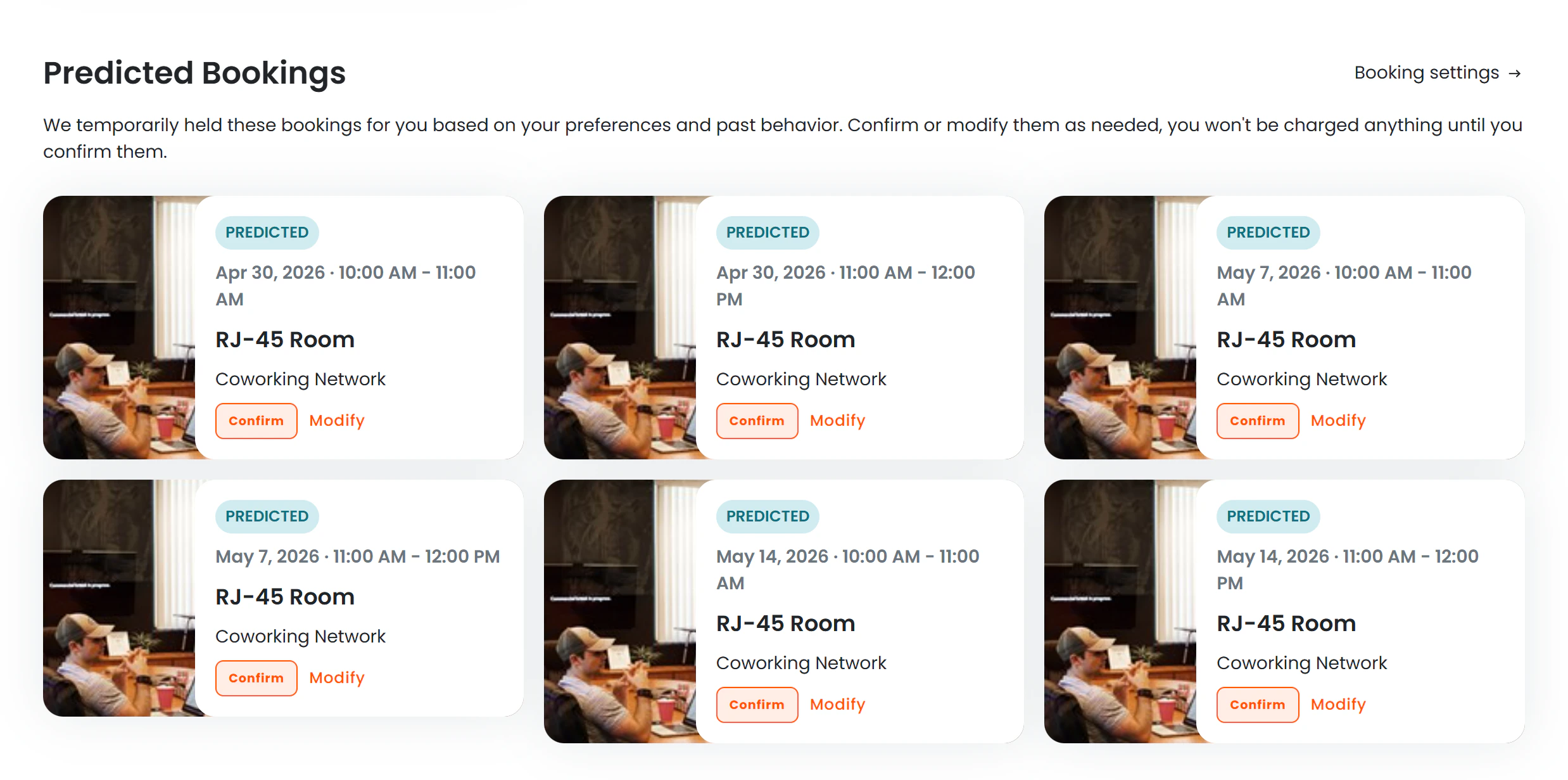 *The Predicted Bookings section appears on the member's personal dashboard.*
***
## How It Works
Nexudus continuously monitors each member's booking history over the **previous 8 weeks**. When the system detects that a member has booked the **same resource at the same time on the same day of the week at least 3 times**, it treats that as a recurring pattern and generates a suggestion for each matching upcoming date within the next 28 days.
For example, if a member has booked **Meeting Room A every Tuesday from 10:00–12:00** at least three times in the past 8 weeks, the system will suggest that booking for every upcoming Tuesday that doesn't already have a confirmed booking in that slot.
### What counts as a pattern
| Condition | Requirement |
| -------------------------------------- | ------------------------------------------------------------------ |
| Booking history window | Last 8 weeks |
| Minimum repetitions to qualify | 3 bookings |
| Pattern match criteria | Same resource + same day of week + same start time + same duration |
| Suggestion horizon | Next 28 calendar days |
| Maximum suggestions shown on dashboard | 6 |
Suggestions are only generated for **time slots not already booked**. If the member already has a confirmed booking for a given slot, no duplicate suggestion is created.
If the space has hot-desking with individual desk assignments, the suggestion also includes the specific desk that was used most often for that pattern.
***
## What Members See
### Predicted Bookings Section
When a member has qualifying patterns, a **"Predicted Bookings"** section appears on their personal dashboard, above or alongside their upcoming confirmed bookings.
Each card displays:
* A **"Predicted"** blue badge to distinguish suggestions from confirmed bookings
* The date and time range
* The resource (and desk name, if applicable)
* The location name
* A **"Confirm"** button to book the slot
* A **"Modify"** link to open the booking form with pre-filled details
The section also shows a link to **Booking settings** so members can manage their preferences without navigating away.
Predicted bookings are **not real bookings**. They are suggestions held temporarily for the member. No charges apply until the member confirms.
***
### Confirming a Predicted Booking
When a member clicks **Confirm**:
1. A booking confirmation dialog opens, showing the full details of the resource, date, and time.
*The Predicted Bookings section appears on the member's personal dashboard.*
***
## How It Works
Nexudus continuously monitors each member's booking history over the **previous 8 weeks**. When the system detects that a member has booked the **same resource at the same time on the same day of the week at least 3 times**, it treats that as a recurring pattern and generates a suggestion for each matching upcoming date within the next 28 days.
For example, if a member has booked **Meeting Room A every Tuesday from 10:00–12:00** at least three times in the past 8 weeks, the system will suggest that booking for every upcoming Tuesday that doesn't already have a confirmed booking in that slot.
### What counts as a pattern
| Condition | Requirement |
| -------------------------------------- | ------------------------------------------------------------------ |
| Booking history window | Last 8 weeks |
| Minimum repetitions to qualify | 3 bookings |
| Pattern match criteria | Same resource + same day of week + same start time + same duration |
| Suggestion horizon | Next 28 calendar days |
| Maximum suggestions shown on dashboard | 6 |
Suggestions are only generated for **time slots not already booked**. If the member already has a confirmed booking for a given slot, no duplicate suggestion is created.
If the space has hot-desking with individual desk assignments, the suggestion also includes the specific desk that was used most often for that pattern.
***
## What Members See
### Predicted Bookings Section
When a member has qualifying patterns, a **"Predicted Bookings"** section appears on their personal dashboard, above or alongside their upcoming confirmed bookings.
Each card displays:
* A **"Predicted"** blue badge to distinguish suggestions from confirmed bookings
* The date and time range
* The resource (and desk name, if applicable)
* The location name
* A **"Confirm"** button to book the slot
* A **"Modify"** link to open the booking form with pre-filled details
The section also shows a link to **Booking settings** so members can manage their preferences without navigating away.
Predicted bookings are **not real bookings**. They are suggestions held temporarily for the member. No charges apply until the member confirms.
***
### Confirming a Predicted Booking
When a member clicks **Confirm**:
1. A booking confirmation dialog opens, showing the full details of the resource, date, and time.
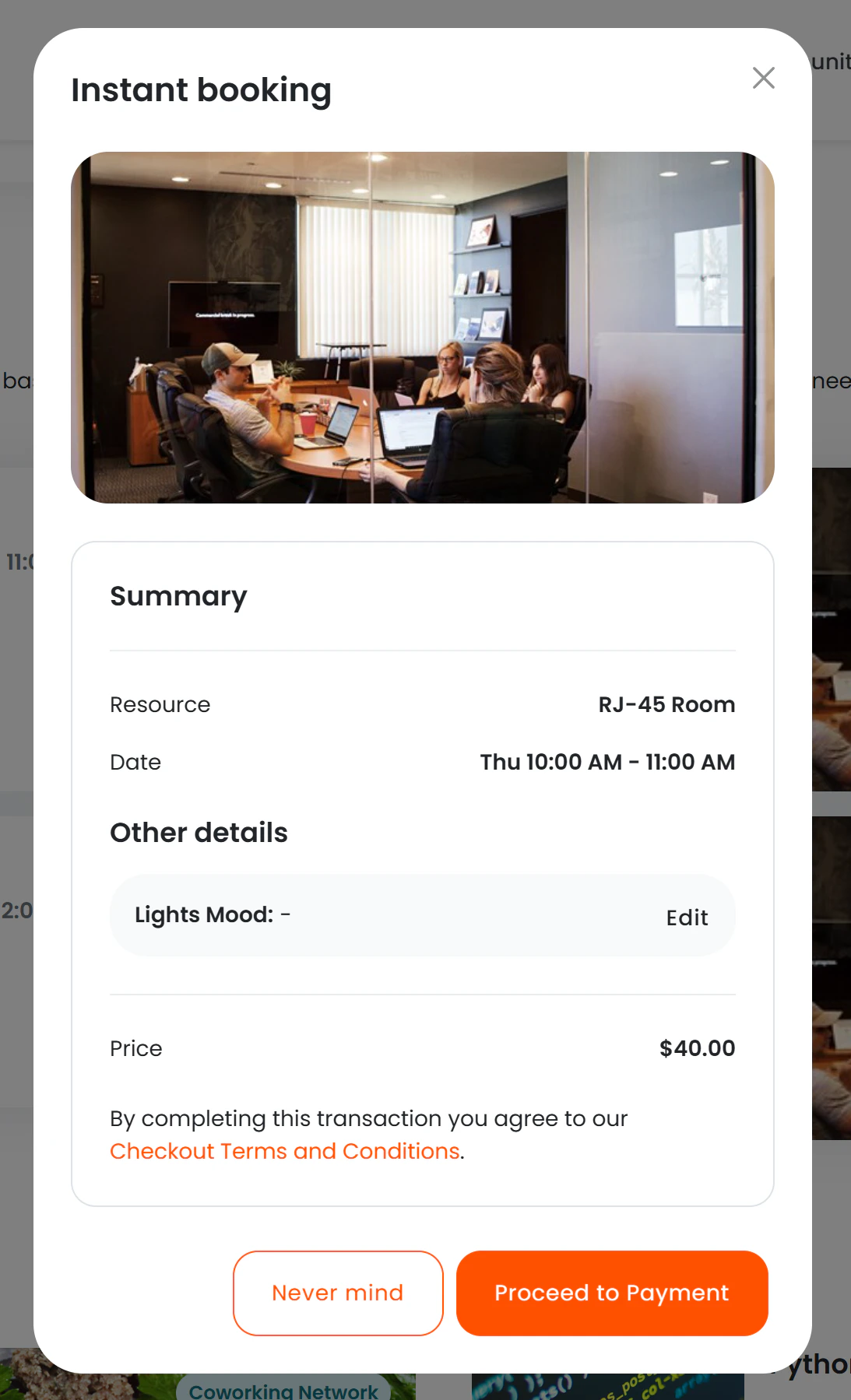 *The confirmation dialog lets the member review and adjust before committing.*
2. The member reviews the booking, optionally modifies it (date, time, desk, add-ons), and clicks **"Book now"**.
3. A final confirmation screen confirms the booking was saved.
The full standard booking flow applies at this point — credits are consumed, invoices raised, confirmation emails sent, and any approval workflows triggered, exactly as if the member had made the booking manually.
***
### Modifying a Predicted Booking
Members can click **"Modify"** instead of "Confirm" to open the standard booking form with all fields pre-filled. This is useful when the member wants to book a slightly different time, switch desks, or add services before confirming.
***
## Member Preferences
Members control their own predicted bookings behaviour from their **Profile → Settings → Bookings** section.
*The confirmation dialog lets the member review and adjust before committing.*
2. The member reviews the booking, optionally modifies it (date, time, desk, add-ons), and clicks **"Book now"**.
3. A final confirmation screen confirms the booking was saved.
The full standard booking flow applies at this point — credits are consumed, invoices raised, confirmation emails sent, and any approval workflows triggered, exactly as if the member had made the booking manually.
***
### Modifying a Predicted Booking
Members can click **"Modify"** instead of "Confirm" to open the standard booking form with all fields pre-filled. This is useful when the member wants to book a slightly different time, switch desks, or add services before confirming.
***
## Member Preferences
Members control their own predicted bookings behaviour from their **Profile → Settings → Bookings** section.
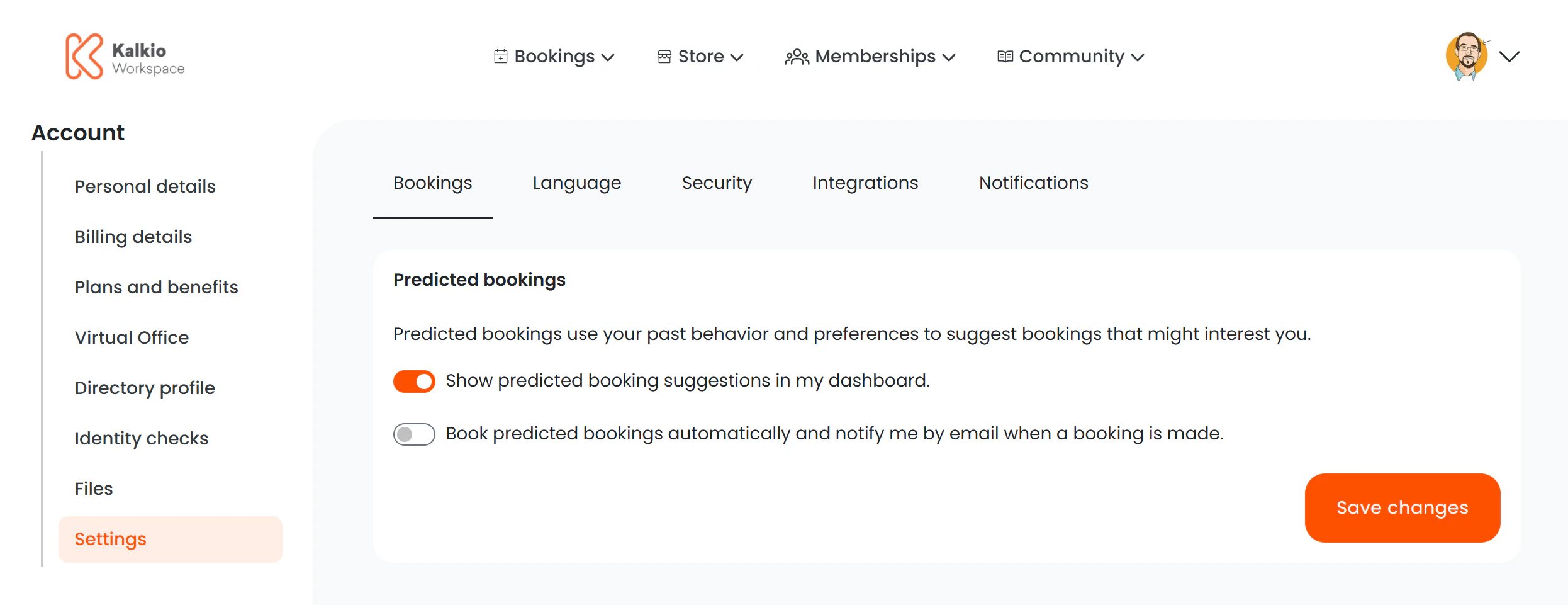 *Members access predicted bookings settings from their profile settings page.*
### Available toggles
| Setting | What it does |
| --------------------------------------------------------------------------------------- | ---------------------------------------------------------------------------------------------------------------------------------------------------------------------------------------- |
| **Show predicted booking suggestions in my dashboard** | Controls whether the Predicted Bookings section appears on the personal dashboard. Members can turn this off if they prefer not to see suggestions. |
| **Book predicted bookings automatically and notify me by email when a booking is made** | When enabled, Nexudus automatically confirms matching predicted bookings on the member's behalf and sends an email notification for each one. The member does not need to click Confirm. |
The **automatic booking** option means Nexudus will make real, chargeable bookings without requiring the member to confirm each one. Members should only enable this if they are certain their patterns are stable and they are comfortable being charged automatically.
***
## Frequently Asked Questions
The member must have booked the **exact same resource at the same start time and duration on the same day of the week at least 3 times** within the last 8 weeks. Variations in time, duration, or resource prevent a pattern from forming. Also check that the Predicted Bookings section is enabled in the portal editor and that the member has not hidden it in their personal settings.
Yes. Patterns are detected per resource, which means a member who books the same resource in a specific location on a recurring basis will receive suggestions for that location. Patterns at different locations are tracked independently.
The feature cannot currently be disabled per member from the admin side. Members can opt out themselves via their Booking settings. At the portal level, you can disable it entirely for all members by setting **Show predicted bookings** to **No** in the Personal Dashboard editor.
No. Predicted bookings are suggestions only. No booking is created and no charge applies until the member clicks **Confirm** and completes the booking flow. The exception is members who have enabled the **automatic booking** option — those members will be charged as soon as the system creates the booking on their behalf.
The standard booking conflict check runs at the moment the member confirms. If the slot has been taken, the member will see the same availability error they would see for any other booking attempt.
Booking confirmations originating from predicted bookings go through the same pipeline as standard bookings and appear in your standard booking reports. At present there is no separate report specifically for confirmed predicted bookings.
***
Full guide to how members book resources through the portal.
Overview of all sections available on the member's personal dashboard.
*Members access predicted bookings settings from their profile settings page.*
### Available toggles
| Setting | What it does |
| --------------------------------------------------------------------------------------- | ---------------------------------------------------------------------------------------------------------------------------------------------------------------------------------------- |
| **Show predicted booking suggestions in my dashboard** | Controls whether the Predicted Bookings section appears on the personal dashboard. Members can turn this off if they prefer not to see suggestions. |
| **Book predicted bookings automatically and notify me by email when a booking is made** | When enabled, Nexudus automatically confirms matching predicted bookings on the member's behalf and sends an email notification for each one. The member does not need to click Confirm. |
The **automatic booking** option means Nexudus will make real, chargeable bookings without requiring the member to confirm each one. Members should only enable this if they are certain their patterns are stable and they are comfortable being charged automatically.
***
## Frequently Asked Questions
The member must have booked the **exact same resource at the same start time and duration on the same day of the week at least 3 times** within the last 8 weeks. Variations in time, duration, or resource prevent a pattern from forming. Also check that the Predicted Bookings section is enabled in the portal editor and that the member has not hidden it in their personal settings.
Yes. Patterns are detected per resource, which means a member who books the same resource in a specific location on a recurring basis will receive suggestions for that location. Patterns at different locations are tracked independently.
The feature cannot currently be disabled per member from the admin side. Members can opt out themselves via their Booking settings. At the portal level, you can disable it entirely for all members by setting **Show predicted bookings** to **No** in the Personal Dashboard editor.
No. Predicted bookings are suggestions only. No booking is created and no charge applies until the member clicks **Confirm** and completes the booking flow. The exception is members who have enabled the **automatic booking** option — those members will be charged as soon as the system creates the booking on their behalf.
The standard booking conflict check runs at the moment the member confirms. If the slot has been taken, the member will see the same availability error they would see for any other booking attempt.
Booking confirmations originating from predicted bookings go through the same pipeline as standard bookings and appear in your standard booking reports. At present there is no separate report specifically for confirmed predicted bookings.
***
Full guide to how members book resources through the portal.
Overview of all sections available on the member's personal dashboard.