> ## Documentation Index
> Fetch the complete documentation index at: https://learn.nexudus.com/llms.txt
> Use this file to discover all available pages before exploring further.
# Registering a new sensor
> Learn how to register a sensor so the Nexudus Platform can start collecting environment data.
Registering a sensor is required for the Nexudus Platform to start collecting data. You can register a sensor using the REST API or from the Nexudus dashboard.
## Registering sensors
To register a sensor, access the **Settings** menu, click on **Sensors** and then click on **Add Sensor**.
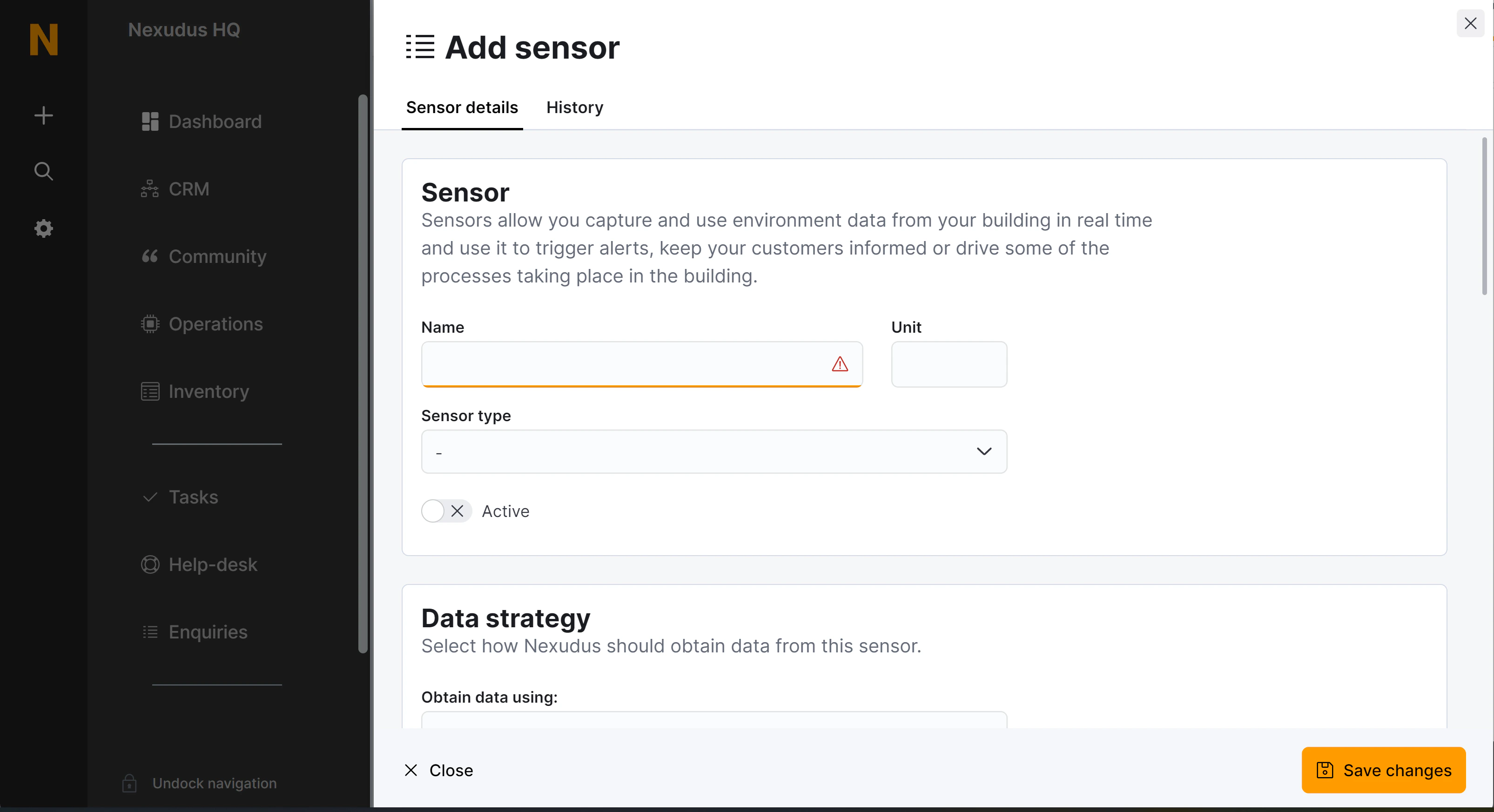 ## Sensor fields
| Field name | Description | API field name |
| ---------------------------------------------------------- | ----------------------------------------------------------------------------------------------------------------------------------------------------------------------------------------------------------------------------------------------------------------------------------------------------------------------- | ---------------------------------------- |
| **Name** | The name of the sensor as displayed in your dashboard and, if the sensor is published on your portal and app, as your customers will see it. | `Name` |
| **Unit** | A unit name or symbol to display by the current value of the sensor. | `Unit` |
| **Sensor type** | The kind of sensor this is. | `SensorType` |
| **Active** | Whether this sensor should collect and present data. | `Active` |
| **Obtain data using** | The way data should be pulled or received by this sensor. **Polling**: the data is fetched by Nexudus from an external endpoint every 15 minutes. **Endpoint**: Nexudus will create a dedicated endpoint URL to receive the data at. | `DataStrategy` (`Polling` \| `Endpoint`) |
| **Send an email alert** | Trigger an alert when the "Trigger function" returns `true`. If no trigger function is provided the alert will be triggered in every poll or every time data is received in the endpoint. | `ActionSendEmailAlert` |
| **Update unit/desk availability** | Makes a desk unit available or not based on the value of the sensor. The value should be `true`, `false` or a decimal number. The unit will be marked as available if the sensor value is `false` or, if numeric, zero. Otherwise the floor plan unit will be made unavailable. | `ActionUpdateDeskAvailability` |
| **Update booking occupancy** | Sets the `MaxOccupancy` property of all the bookings taking place in the selected resource when the data is polled or received. The sensor value must be a valid integer or decimal value. The `MaxOccupancy` property is updated only if the received value is greater than the current value stored in that property. | `ActionUpdateBookingOccupancy` |
| **Send alert to customer** | Sends an email alert to customers with current bookings in the selected resource. The message is sent using the selected message macro. | `ActionSendCustomerEmailAlert` |
| **Start a booking** | Starts any bookings currently taking place in the selected resource. | `ActionBookingStart` |
| **Terminate a booking** | Terminates any bookings currently taking place in the selected resource. | `ActionBookingTerminate` |
| **Trigger function** | An optional function to evaluate every time data is polled or received. The selected actions will only run if the function returns a `true` value. | `ActionTriggerFunction` |
| **Show as a tile in the 'Now' dashboard** | Display this sensor, its current value and last 12 hours history in the home page of the Nexudus dashboard. | `ShowInNowDashboard` |
| **Show in the portal or the app when users are logged in** | Display this sensor, its current value and last 12 hours history in the home page of the members portal and app. | `ShowInPortal` |
| **Shared signature secret** | A shared key to validate the source of incoming data. Only used when the data strategy is `Endpoint`. | `SharedSecret` |
## Sensor fields
| Field name | Description | API field name |
| ---------------------------------------------------------- | ----------------------------------------------------------------------------------------------------------------------------------------------------------------------------------------------------------------------------------------------------------------------------------------------------------------------- | ---------------------------------------- |
| **Name** | The name of the sensor as displayed in your dashboard and, if the sensor is published on your portal and app, as your customers will see it. | `Name` |
| **Unit** | A unit name or symbol to display by the current value of the sensor. | `Unit` |
| **Sensor type** | The kind of sensor this is. | `SensorType` |
| **Active** | Whether this sensor should collect and present data. | `Active` |
| **Obtain data using** | The way data should be pulled or received by this sensor. **Polling**: the data is fetched by Nexudus from an external endpoint every 15 minutes. **Endpoint**: Nexudus will create a dedicated endpoint URL to receive the data at. | `DataStrategy` (`Polling` \| `Endpoint`) |
| **Send an email alert** | Trigger an alert when the "Trigger function" returns `true`. If no trigger function is provided the alert will be triggered in every poll or every time data is received in the endpoint. | `ActionSendEmailAlert` |
| **Update unit/desk availability** | Makes a desk unit available or not based on the value of the sensor. The value should be `true`, `false` or a decimal number. The unit will be marked as available if the sensor value is `false` or, if numeric, zero. Otherwise the floor plan unit will be made unavailable. | `ActionUpdateDeskAvailability` |
| **Update booking occupancy** | Sets the `MaxOccupancy` property of all the bookings taking place in the selected resource when the data is polled or received. The sensor value must be a valid integer or decimal value. The `MaxOccupancy` property is updated only if the received value is greater than the current value stored in that property. | `ActionUpdateBookingOccupancy` |
| **Send alert to customer** | Sends an email alert to customers with current bookings in the selected resource. The message is sent using the selected message macro. | `ActionSendCustomerEmailAlert` |
| **Start a booking** | Starts any bookings currently taking place in the selected resource. | `ActionBookingStart` |
| **Terminate a booking** | Terminates any bookings currently taking place in the selected resource. | `ActionBookingTerminate` |
| **Trigger function** | An optional function to evaluate every time data is polled or received. The selected actions will only run if the function returns a `true` value. | `ActionTriggerFunction` |
| **Show as a tile in the 'Now' dashboard** | Display this sensor, its current value and last 12 hours history in the home page of the Nexudus dashboard. | `ShowInNowDashboard` |
| **Show in the portal or the app when users are logged in** | Display this sensor, its current value and last 12 hours history in the home page of the members portal and app. | `ShowInPortal` |
| **Shared signature secret** | A shared key to validate the source of incoming data. Only used when the data strategy is `Endpoint`. | `SharedSecret` |