> ## Documentation Index
> Fetch the complete documentation index at: https://learn.nexudus.com/llms.txt
> Use this file to discover all available pages before exploring further.
# Contacting support
> How to contact the Nexudus support team — by email with your support code, or by raising a ticket from the Admin Panel.
## Overview
No matter how big or small your question is, our support team is ready to help. You can reach us two ways: by email using your support code, or by raising a ticket directly from the Admin Panel.
## Email us using your support code
You can email us at **[support@nexudus.com](mailto:support@nexudus.com)**, as long as you include your **support code** in the email. This code confirms you're an authorised user and lets our support team access your account if they need to troubleshoot an issue.
To get your support code:
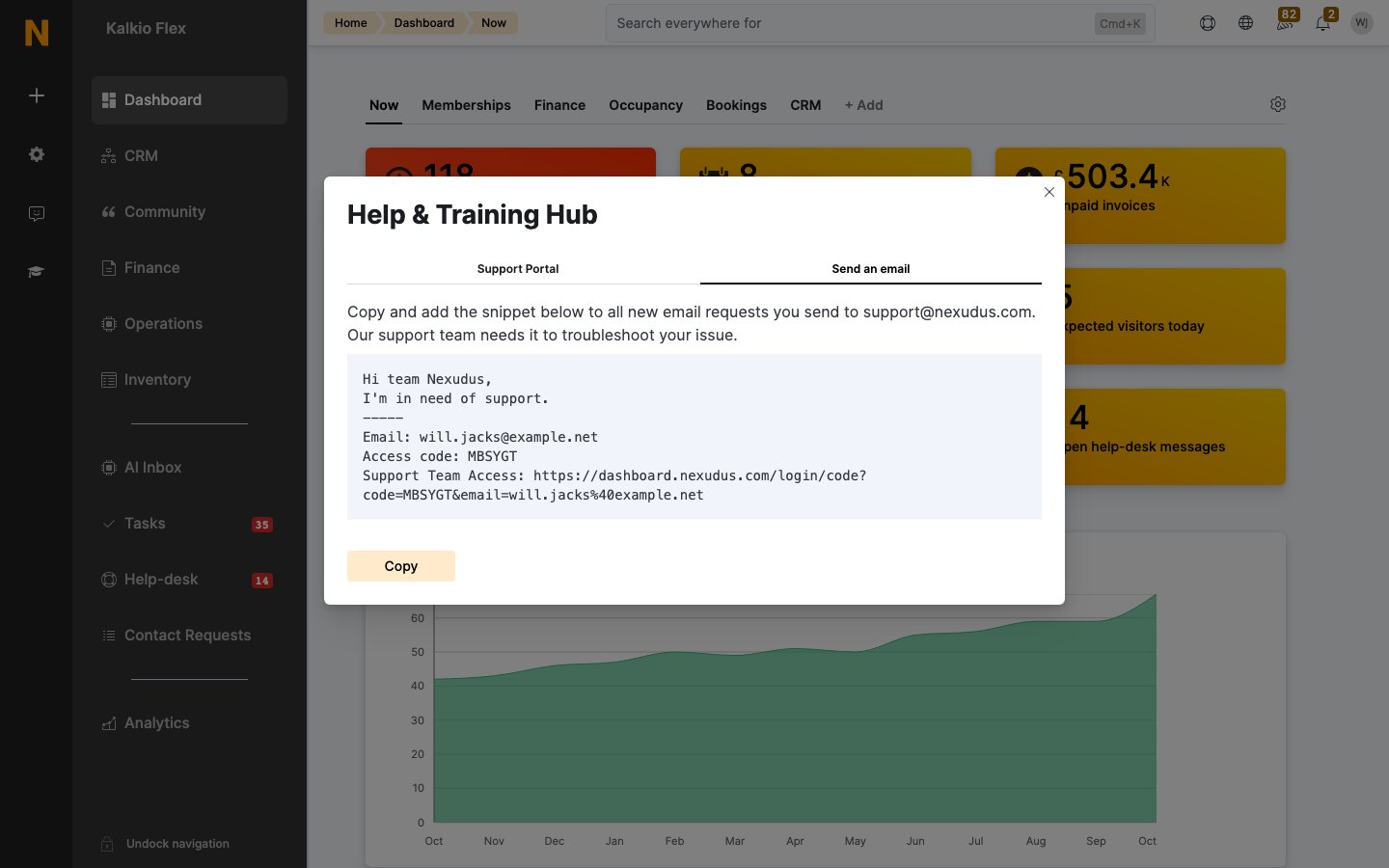
1. Click the **lifesaver icon** in the Admin Panel, then **Email support → Send an email**.
2. Copy the support code snippet.
3. Paste it into your email, add your subject and message, and attach any relevant files.
4. Send it to **[support@nexudus.com](mailto:support@nexudus.com)**.
 Each support code is valid for **21 days** from the moment you copy it.
Always copy the **full snippet**, not just the access code. Our support team needs the full snippet, including the link, to troubleshoot your issue and answer your request.
Our support team gets back to you as soon as possible, usually within the next working day.
## Raise a ticket from the Admin Panel
If you don't have any images or files to share, you can create a ticket directly from the Admin Panel:
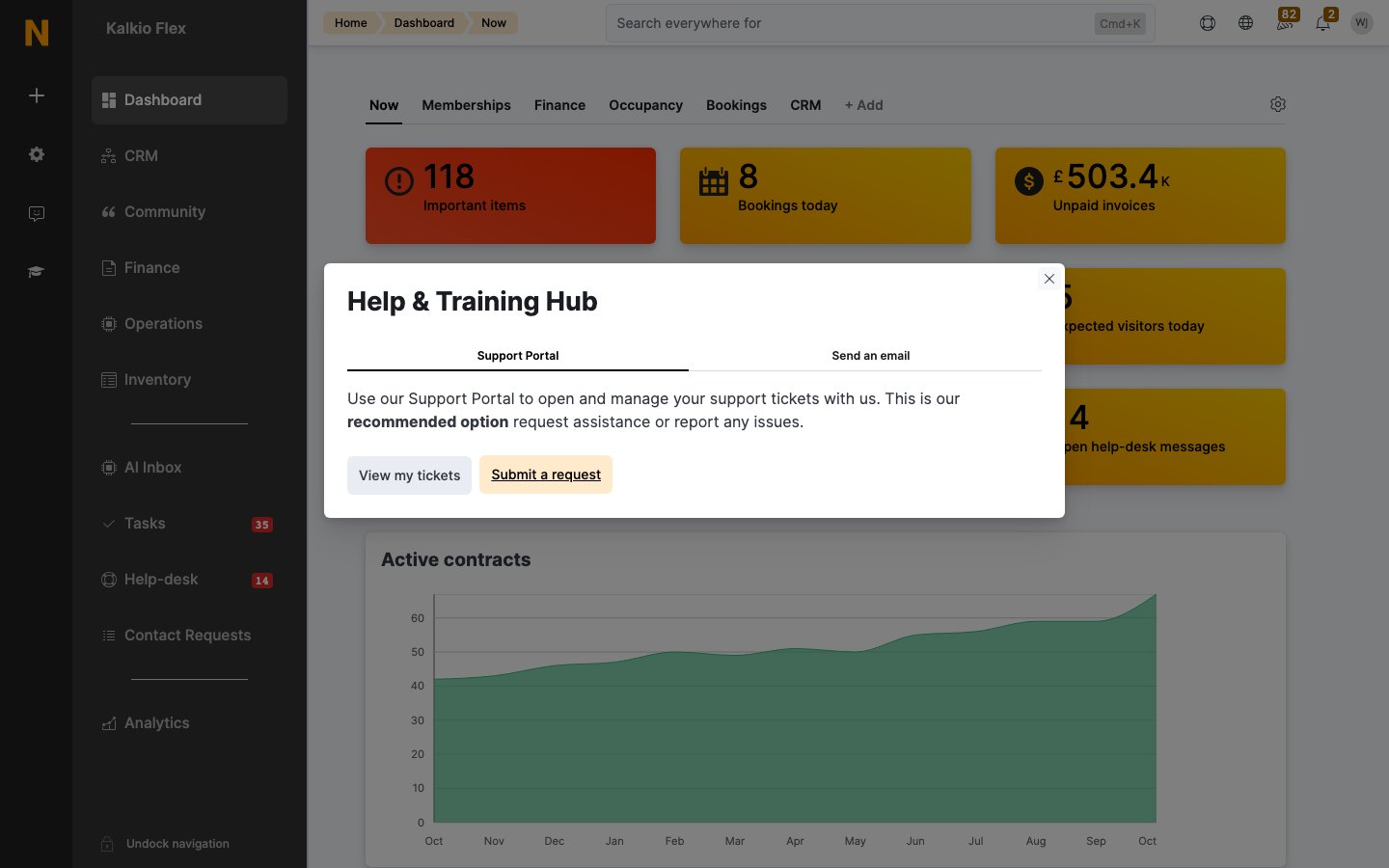
1. Click the **lifesaver icon** in the Admin Panel, then **Email support**.
2. On the **Support Portal** tab, click **Submit a request**.
3. Fill in your message and submit it.
It's that easy — our support team gets back to you as soon as possible, usually within the next working day.
Each support code is valid for **21 days** from the moment you copy it.
Always copy the **full snippet**, not just the access code. Our support team needs the full snippet, including the link, to troubleshoot your issue and answer your request.
Our support team gets back to you as soon as possible, usually within the next working day.
## Raise a ticket from the Admin Panel
If you don't have any images or files to share, you can create a ticket directly from the Admin Panel:
1. Click the **lifesaver icon** in the Admin Panel, then **Email support**.
2. On the **Support Portal** tab, click **Submit a request**.
3. Fill in your message and submit it.
It's that easy — our support team gets back to you as soon as possible, usually within the next working day.
 ## FAQ
### Can I add screenshots or files to my messages in the Admin Panel?
No. The **Message us** tab in the Admin Panel currently only supports text. If you need to include any type of file or image, [email us using your support code](#email-us-using-your-support-code).
### Can I save my support code in my inbox for easy reference?
Nexudus automatically refreshes the access code of your support snippet every time you open it. Each support code is valid for 21 days from the moment we issue it. You can reuse it within 21 days if you need to send multiple tickets in a short span of time — just remember that it expires.
Always copy the **full snippet**, not just the access code. Our support team needs the full snippet, including the link, to troubleshoot your issue and answer your request.
### Can anyone use my support code to access my account?
Absolutely not. Our support agents are the only users who can access your account using your snippet's details. These credentials won't work for anyone else — not even you.
## See also
* [Support tiers](/support/training/support-tiers) — what's included in Standard and Support Plus.
* [Training calls](/support/training/training-calls) — book a one-to-one session with a specialist.
This documentation is built and hosted on [Mintlify](https://mintlify.com), a developer documentation platform.
## FAQ
### Can I add screenshots or files to my messages in the Admin Panel?
No. The **Message us** tab in the Admin Panel currently only supports text. If you need to include any type of file or image, [email us using your support code](#email-us-using-your-support-code).
### Can I save my support code in my inbox for easy reference?
Nexudus automatically refreshes the access code of your support snippet every time you open it. Each support code is valid for 21 days from the moment we issue it. You can reuse it within 21 days if you need to send multiple tickets in a short span of time — just remember that it expires.
Always copy the **full snippet**, not just the access code. Our support team needs the full snippet, including the link, to troubleshoot your issue and answer your request.
### Can anyone use my support code to access my account?
Absolutely not. Our support agents are the only users who can access your account using your snippet's details. These credentials won't work for anyone else — not even you.
## See also
* [Support tiers](/support/training/support-tiers) — what's included in Standard and Support Plus.
* [Training calls](/support/training/training-calls) — book a one-to-one session with a specialist.
This documentation is built and hosted on [Mintlify](https://mintlify.com), a developer documentation platform.