

PII Redaction
The Nexudus MCP server can replace personally identifiable information (PII) in every tool response with safe tokens before the response leaves the server. With redaction on, the AI provider only ever sees tokens like«PII:NAME:7f3a…» — never your customers’ real names, emails, phones, or addresses.
You choose whether redaction is on or off when you sign in. The default is on.
Redaction protects values that come back from Nexudus. It does not sanitise anything you type into the AI client yourself — that text is sent to
the AI provider under its own terms, regardless of this setting.
What gets redacted
Redaction covers the same categories of data as the Nexudus CLI’s PII redaction:
Tokens are deterministic across calls within your session: the same customer always maps to the same token, so the assistant can still answer questions like “how many bookings did this person make this month?” without ever seeing their name. The tokens are derived from a salted hash, so they cannot be reversed back to the original value.
Choosing the setting on the login page
You see two checkboxes at the bottom of the Nexudus sign-in page. The second one controls PII redaction.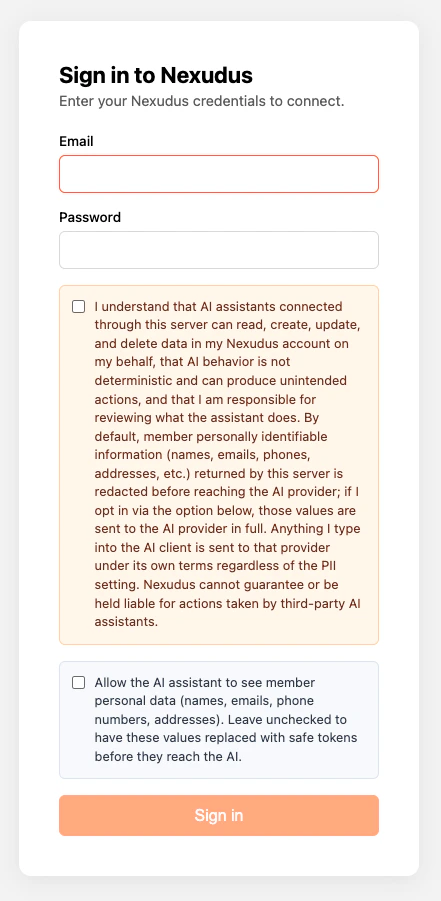
Your choice is signed into the access token, so it stays the same for the whole 8-hour session.
When to leave redaction on (recommended)
Leave the box unchecked when:- You only need totals, counts, breakdowns, or other aggregate answers.
- You are debugging a workflow and do not need to look at real customer data.
- You are working in a shared chat or screen-sharing the session.
- You want to keep customer PII out of the AI provider’s logs and training data.
- You are not sure — the safer default is to keep redaction on and turn it off later if you genuinely need to.
When to turn redaction off
Tick the “Allow the AI assistant to see member personal data” box if you specifically need the assistant to:- Show you a customer’s contact details verbatim.
- Send an email or message that includes a real name.
- Compose copy or invoices that address a customer by name.
- Look at a specific customer’s free-text bio or notes.
Switching mid-conversation
The PII setting is signed into your access token, so it cannot be flipped without re-authenticating. The server provides two helper tools so the assistant can guide you through it:nexudus_change_pii_redaction_setting— acceptsdesiredState: 'show' | 'redact'and replies with the exact wording of which checkbox to tick or untick on the next sign-in.nexudus_reauthenticate— revokes the current session so the client falls back to its OAuth flow.
Claude.ai and Claude Desktop
When you ask Claude to switch off (or on) PII redaction, it callsnexudus_reauthenticate and Claude asks you to confirm the tool call. Approve it.
Claude then tries the next tool call, but because the session has been revoked it shows the entry as “Authentication required to use this tool” with a Connect button next to it. You may need to unfold the tool call entry in the conversation to see the Connect button.
Click Connect. Claude opens the Nexudus sign-in page in a pop-up — flip the PII checkbox to match the new setting, sign in, and the conversation continues using the new redaction mode.
ChatGPT
ChatGPT does not currently reconnect connectors automatically. When you ask it to switch off PII redaction, the assistant callsnexudus_reauthenticate to revoke the session, then replies with a short confirmation along the lines of “Done — I signed out the Nexudus MCP session so the PII setting can be changed” followed by step-by-step instructions for you to follow in ChatGPT’s settings.
The instructions ChatGPT prints look like this:
- Open ChatGPT → Settings → Connectors → Nexudus.
- Disconnect the connector.
- Reconnect it. ChatGPT opens the Nexudus sign-in page.
- On the Nexudus sign-in page, tick (or untick) the “Allow the AI assistant to see member personal data” checkbox to match the new setting and sign in.
- Reply “done” in the chat. ChatGPT picks up where you left off using the new redaction mode and usually verifies it by re-fetching a record and showing the names in their new form (real names if you switched redaction off, tokens if you switched it back on).
Any MCP client (fallback)
If the in-chat flow does not work — the assistant does not call the reauthenticate tool, the Connect button does not appear, or the client does not re-open the sign-in page — you can always fall back to the manual route:- Open your MCP client’s connector settings.
- Disconnect the Nexudus connector.
- Reconnect it.
- On the Nexudus sign-in page, tick or untick the “Allow the AI assistant to see member personal data” checkbox to match the setting you want, then sign in.
Why this matters
- Customer privacy. Member names, emails, and addresses are not exposed to the AI provider’s logs, training data, or downstream services unless you opt in.
- Compliance. Many coworking operators are subject to data protection regulations (GDPR, CCPA, and similar). Keeping redaction on by default is a defensible posture for routine reporting work.
- No loss of analytical power. Counts, groupings, time ranges, and per-record questions all work identically against tokens.
Related
Authentication
The full sign-in flow and what is stored.
Good practice
Do’s and don’ts for responsible AI use.
CLI PII redaction
The same redaction in the Nexudus CLI.