Documentation Index
Fetch the complete documentation index at: https://learn.nexudus.com/llms.txt
Use this file to discover all available pages before exploring further.
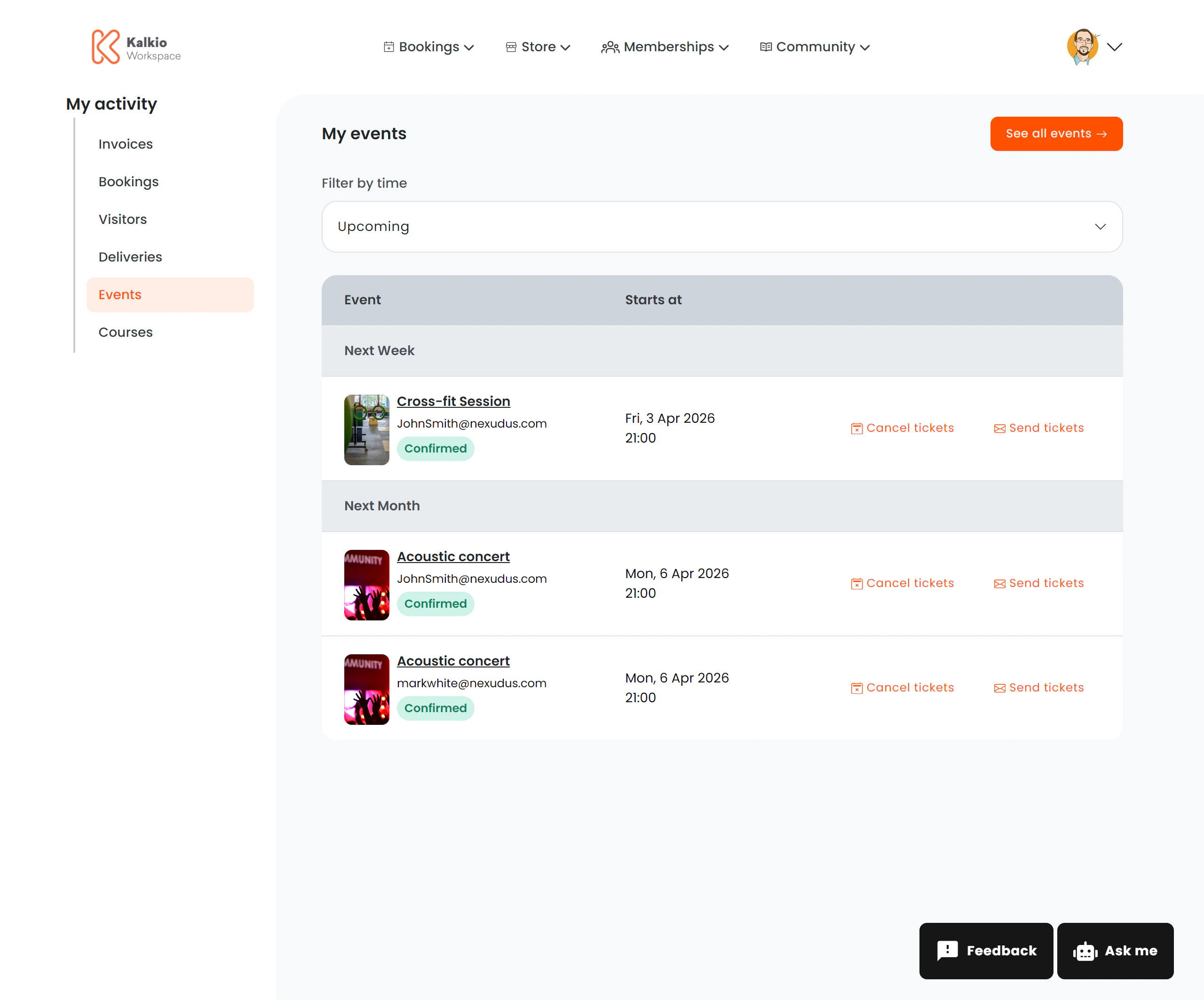
The events activity page shows all events a member has registered for, with ticket management actions.
What members see
A list of event tickets grouped by date. Each row shows:
| Column | Description |
|---|
| Event name | Linked to the full event details page |
| Event image | A thumbnail of the event (optional) |
| Registered email | The email address associated with the ticket |
| Start date & time | When the event takes place |
| Status | Confirmed badge (green) |
Members can toggle between Upcoming and Past events using the filter dropdown.
Actions
| Action | Description |
|---|
| Send Tickets | Emails the ticket to the registered email address. A confirmation dialog shows the recipient email before sending. |
| Cancel Tickets | Cancels the event registration. A warning dialog shows the event name and attendee name before confirming. |
| See All Events | Link to the main events catalogue |
Configurable sections
| Setting | Default | Effect |
|---|
| Show title | On | Display the section heading |
| Show filter bar | On | Show the time filter (upcoming/past) |
| Show event card | On | Display event images |
| Show ticket action buttons | On | Enable send/cancel ticket actions |
| Show See All Events button | On | Link to the events catalogue |