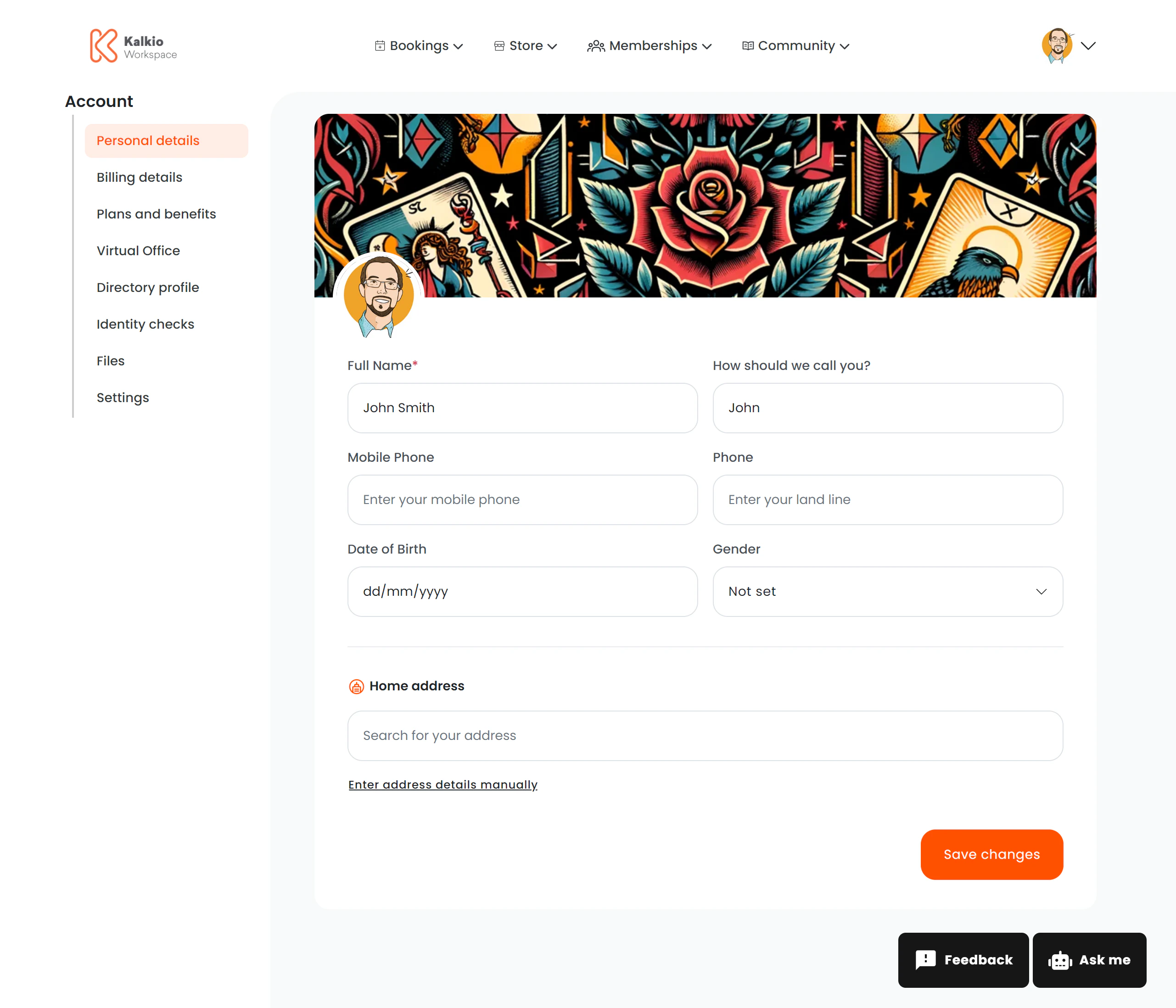
The personal information page lets members view and update their profile data, including photos, contact details, and custom fields.Documentation Index
Fetch the complete documentation index at: https://learn.nexudus.com/llms.txt
Use this file to discover all available pages before exploring further.

What members see
Profile images
| Element | Specification |
|---|---|
| Banner / cover image | Minimum 1200 × 300 px, under 10 MB |
| Avatar / profile picture | 400 × 400 px |
Editable fields
The form can include any of the following fields, depending on how your location is configured:| Field | Description |
|---|---|
| Full name | First and last name |
| Billing name & company | Company or billing entity name |
| Tax ID / registration number | Tax or company registration number |
| Date of birth | Member’s date of birth |
| Address | Street, postal code, city, state, country |
| Mobile phone | Mobile number |
| Landline phone | Landline number |
| Gender | Gender selection |
| Salutation | Title / salutation |
| Custom fields | Any additional fields configured per business |
Address lookup
The address field includes location autocomplete — members can type an address and select from suggestions rather than filling in every field manually.Key features
- Dynamic form — only the fields you enable in the dashboard appear on the page.
- Custom fields — add business-specific fields tailored to your operations.
- Image handling — failed image loads automatically reset to a placeholder.
- Validation — fields are validated in real time before saving.
- Analytics — profile updates are tracked (“profile_updated” event).