

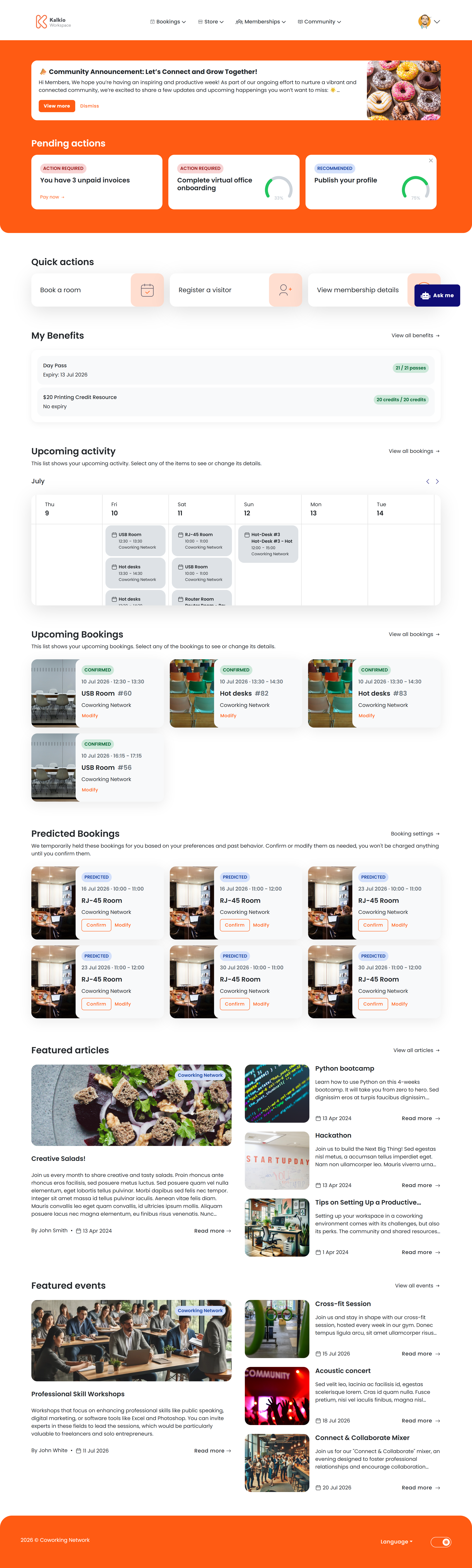
What members see
The dashboard is assembled from configurable sections:Key features
- Personalised greeting — addresses the member by first name.
- Quick booking — the header button sends members straight to the booking flow.
- Announcement visibility — post location news and it appears automatically on every member’s dashboard.
- Onboarding guidance — helps new members complete setup steps (can be dismissed once done).
- My Benefits summary — displays the member’s available booking credits, extra services, and time passes at a glance, combining both personal and team benefits.
- Predictive bookings — AI analyses past behaviour to suggest likely booking times.
- Team bookings — members can toggle to include team bookings in their upcoming activity calendar, with booking owner names visible.
- Quick actions — when no activity is scheduled, members see quick-action buttons to book a room, book a desk, register a visitor, or view events.
- Perks preview — showcases up to 4 partner perks as horizontal cards. Members can click a card to view full details or claim the perk directly.
- Featured events — displays upcoming events as cards with a “See all events” link for browsing the full events catalogue.
- Discussion threads — shows recent discussion board conversations to keep members engaged with their community.