

Overview
When AI agents initiate outbound voice calls to your members or contacts, Nexudus automatically checks that the call is being made during acceptable hours in the recipient’s local timezone. This protects your reputation, respects your members’ boundaries, and helps you comply with legal restrictions on calling times in different jurisdictions. Calls that fall outside the configured calling hours are automatically deferred until the next available window — they are never rejected or lost.Business hours enforcement applies to all outbound voice calls from AI agents, whether automated or manually approved. You can disable enforcement entirely in settings, but it’s enabled by default for safety.
How It Works
The system uses three pieces of information to decide when a call can be made:- Recipient’s timezone — Determined from the recipient’s primary location (Invoicing Business). All calling hours are evaluated in the recipient’s local time, not yours.
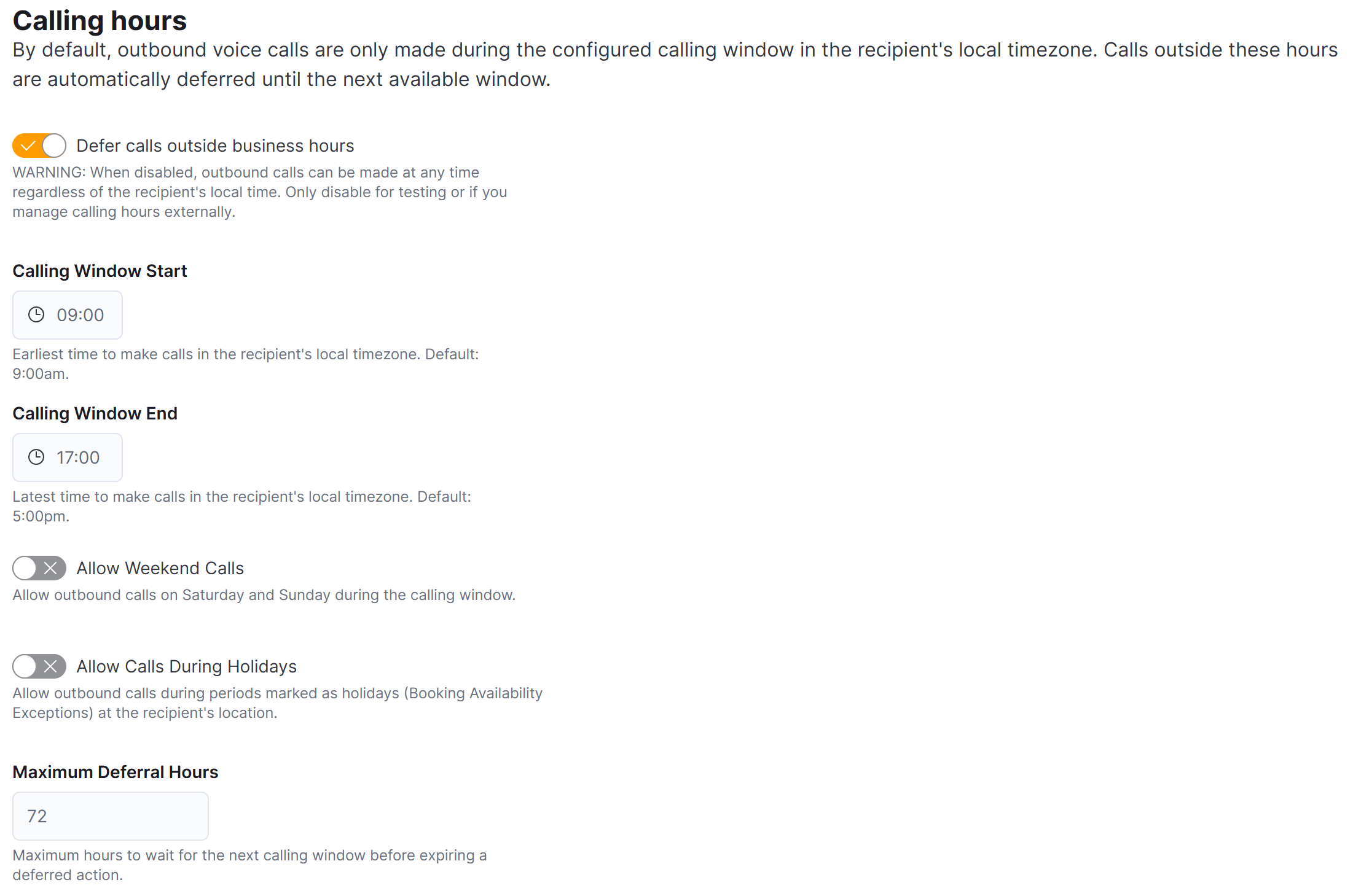
- Your calling window — The start and end times you configure for when calls are acceptable (default: 9:00am – 5:00pm).
- Holiday and closure periods — If the recipient’s location is marked as closed on a particular day, or if there’s an active holiday period, calls are blocked during that time.
The Decision Flow
When an AI agent proposes a voice call, the system checks:- Is enforcement enabled? — If you’ve disabled business hours checks, the call proceeds immediately.
- Is the recipient’s location on a holiday? — Checks against any active Booking Availability Exceptions (like “Christmas Day” or “Bank Holiday”).
- Is it a weekend? — If weekend calls are disabled and today is Saturday or Sunday, the call is deferred.
- Is the recipient’s location closed today? — Uses the per-day opening hours configured for the recipient’s business.
- Is it within the calling window? — Checks if the current time (in recipient’s local timezone) falls between your configured start and end times.
Configuration
Business hours settings are configured per location in the Dashboard. Navigate to Settings → AI Assistants → Voice Agent to find the calling hours section.Calling Hours Settings
Timezone Handling
The system automatically handles timezone conversions and daylight saving time (DST) changes. For example:- Your location is in London (BST, UTC+1)
- Your member is in New York (EDT, UTC-4)
- You schedule a call at 3:00pm London time on a summer day
What Happens When a Call Is Deferred
When a call cannot be made immediately, the system:- Changes the action status to “Deferred” in your AI Inbox
- Records the reason — For example, “After calling hours (closed at 5:00pm recipient time)” or “Recipient location is on holiday”
- Schedules the next attempt — Sets a
ScheduledExecutionTimefor the next available calling window - Tracks deferral count — Increments a counter so you can see how many times an action has been delayed
Viewing Deferred Actions
Deferred actions appear in your AI Inbox with:- A Deferred badge showing the next scheduled execution time
- The reason for deferral (e.g., “Outside calling hours”)
- The recipient’s local time when the check was performed
- The next execution time in both UTC and recipient local time
Manual Execution
If you manually approve or execute a deferred voice action from the Inbox:- Business hours checks are still applied
- If it’s still outside calling hours for the recipient, the action returns to Deferred status with an updated scheduled time
- The only way to bypass enforcement is to disable it entirely in settings
Holiday Detection
Nexudus uses Booking Availability Exceptions to detect holiday and closure periods. When you mark a period as a holiday at a recipient’s location (for example, “Christmas Day” or a “Bank Holiday”), the system treats that entire period as a time when calls should not be made. If Allow Calls During Holidays is enabled, holiday periods are ignored and calls proceed according to the normal calling window.Closed Days
The system respects the per-day opening hours configured for each business. If a recipient’s location is marked as closed on a particular day of the week (for example, closed on Sundays), calls are automatically blocked on that day. When calculating the next available calling time, the system skips over closed days and finds the next day the recipient’s location is open and within the calling window.Best Practices
- Keep enforcement enabled — Business hours protection is a safety feature that helps maintain professional standards and legal compliance.
- Set appropriate calling windows — Consider the jurisdictions your members are in and set calling hours that respect local norms.
- Use holiday detection — Mark closure periods in Booking Availability Exceptions so the system knows not to schedule calls during those times.
- Review deferred actions — Regularly check your AI Inbox for deferred actions and verify that the deferral reasons make sense for each recipient.
- Be careful with weekend calls — If your members span multiple timezones, enabling weekend calls may result in calls being made at unexpected times in some regions.
Related Features
- Proactive Agents — How AI agents monitor patterns and propose actions
- AI Inbox — Review and manage proposed actions
- Configuring Agents — Set up and customize your AI agents
- Booking Availability Exceptions — Configure holiday and closure periods