

Overview
Nexudus AI is powered by two complementary systems that work together to deliver a complete communication experience: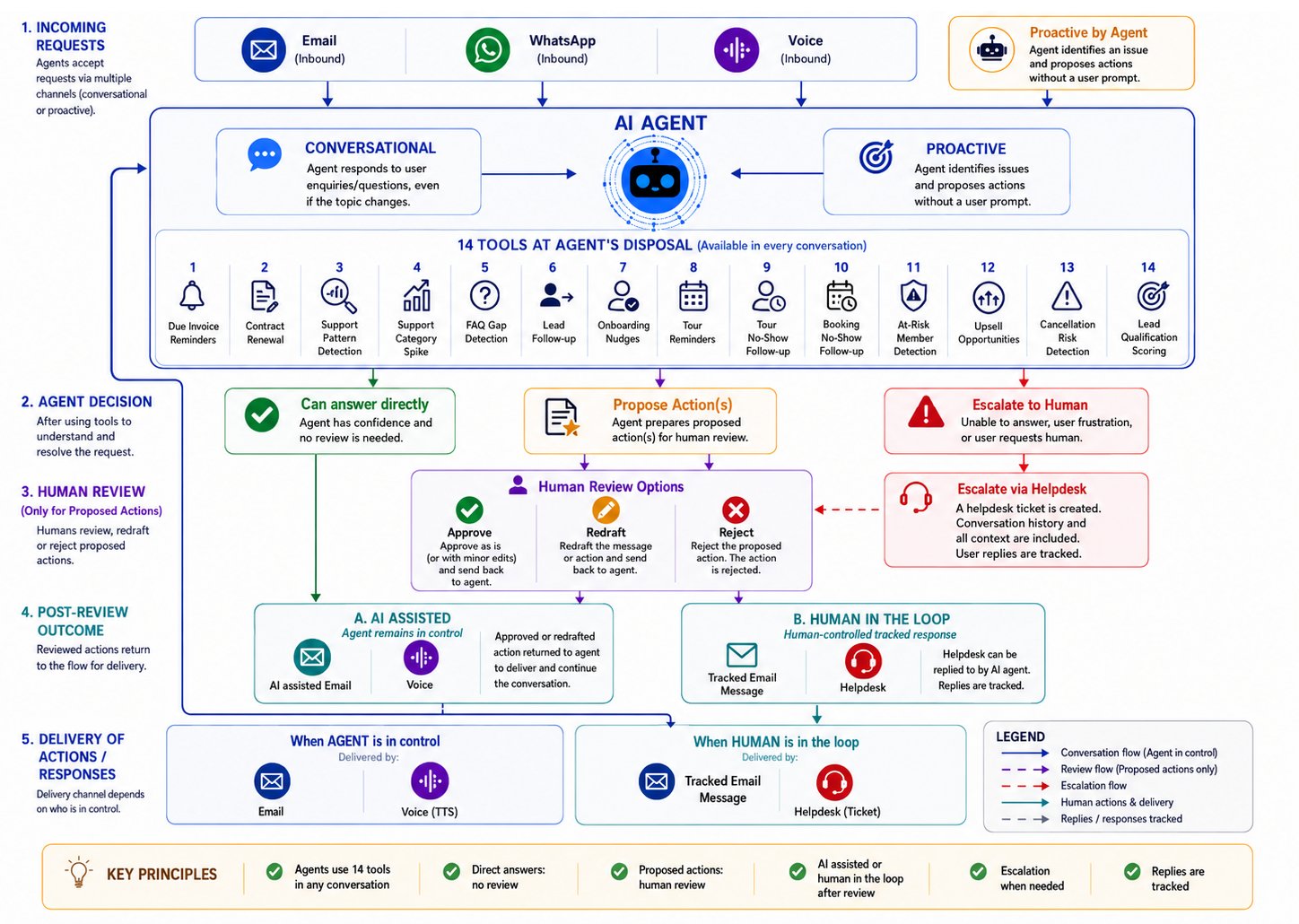
How Conversational AI and Proactive Agents work together
- Conversational AI — responds to customers in real time across chat, email, WhatsApp, and voice.
- Proactive Agents — monitor your space for patterns and opportunities, then propose outbound actions for your review.
The Two Systems at a Glance
Conversational AI
Direction: Customer initiates
Channels: Chat, Email, WhatsApp, Voice
Purpose: Answer questions, make bookings, provide information
Lives in: Members Portal + email inbox + phone + WhatsApp
Channels: Chat, Email, WhatsApp, Voice
Purpose: Answer questions, make bookings, provide information
Lives in: Members Portal + email inbox + phone + WhatsApp
Proactive Agents
Direction: System initiates
Channels: Email, WhatsApp, Voice
Purpose: Detect opportunities and propose outreach
Lives in: Dashboard AI Inbox
Channels: Email, WhatsApp, Voice
Purpose: Detect opportunities and propose outreach
Lives in: Dashboard AI Inbox
How They Connect
The diagram below shows the complete flow from pattern detection to customer conversation:
Full lifecycle: from proactive detection to two-way conversation
The Proactive-to-Conversational Journey
Here’s what happens, step by step, when a proactive agent identifies an opportunity and the customer responds:Step 1: Detection
Proactive agents run automatically in the background, scanning your location’s data for patterns you’ve configured. For example:- An invoice has been overdue for 5 days
- A contract expires in 30 days and hasn’t been renewed
- A lead inquired about workspace last week but never followed up
- A new member hasn’t made their first booking yet
Step 2: Message Composition
When a pattern is detected, the AI composes a personalized draft message using:- Your location’s tone and personality — the same voice used in conversational AI
- Customer context — their name, history, activity patterns, and relevant data (like invoice amounts or contract dates)
- Channel-appropriate formatting — email messages include subject lines and structured content; WhatsApp and voice scripts are conversational and concise
Step 3: Your Review
The proposed action appears in your AI Inbox where you can:- Approve — send the message exactly as drafted
- Edit & Approve — personalize the message before sending
- Reject — dismiss the action if it’s not appropriate right now
- Snooze — defer it for later review
Step 4: Delivery
Once approved, the message is delivered through the configured channel:Email delivery
Email delivery
The AI sends a personalized email to the customer. The email is formatted as a natural message from your location — not a marketing template. It includes a special reply address so that any response from the customer automatically connects back to the AI conversation.
WhatsApp delivery
WhatsApp delivery
The AI sends a message via WhatsApp Business API. If the customer has messaged you on WhatsApp within the last 24 hours, the message is delivered immediately. If not, a pre-approved template message is sent first to initiate the conversation — the customer must reply with a keyword (e.g., “YES”) to receive the actual message. This follows WhatsApp Business API messaging window rules.
Voice delivery
Voice delivery
The AI places an outbound phone call to the customer. The voice agent speaks naturally using your configured voice and language, delivers the message conversationally, and can answer questions during the call. If the customer asks something the voice agent can handle (like making a booking or checking availability), it uses the same tools as the chat assistant — in real time, during the call. Any links or URLs are sent as an SMS rather than being read aloud.
Step 5: The Conversation Begins
This is where the handoff happens. The moment the customer replies (to an email or WhatsApp message) or speaks back (on a voice call), they’re in a conversational AI session — the same system that powers the Members Portal chat. The key difference: this conversation was initiated by the proactive agent, not the customer. But from this point on, it behaves exactly like any other AI conversation:- The AI has access to all the same tools (bookings, plans, resources, FAQ)
- It knows the full context of why the outreach happened
- It can answer follow-up questions, take actions, or escalate to your team
- The entire exchange is logged in AI Conversations with a link back to the original proposed action
How Replies Are Handled
When a customer responds to a proactive outreach, the reply routes back through the same channel and is handled by the conversational AI:
Reply routing: customer responses flow back to the conversational AI with full context
Email Replies
When a customer replies to an email sent by a proactive agent:- The reply arrives at a special address that encodes the conversation session.
- The system identifies which session the reply belongs to and loads the full context — including why the outreach happened, the original message, and all prior exchanges.
- The conversational AI processes the reply with that context and composes a response.
- The response is sent back via email, continuing the thread naturally.
WhatsApp Replies
When a customer replies to a WhatsApp message sent by a proactive agent:- If the agent sent a template opt-in message, the customer’s keyword reply (e.g., “YES”) triggers delivery of the actual message. Further replies are handled as a normal conversation.
- If the agent sent a direct message (customer had messaged within 24 hours), replies are processed immediately.
- The system identifies the conversation session and loads the full context — including the original proactive action.
- The conversational AI processes the reply and responds via WhatsApp, continuing the conversation naturally.
- The conversation remains active for 24 hours after each customer message, allowing free-form AI responses during that window.
Voice Replies
Voice works differently because the conversation happens in real time:- The proactive agent places an outbound call and delivers its message.
- The customer can immediately ask questions or take actions during the same call.
- The voice AI uses the same tools available in chat — it can check availability, create bookings, provide pricing, or look up information.
- If the customer needs something the AI can’t handle, it offers to connect them with your team (see Escalation below).
- Any links (like payment pages or booking confirmations) are sent via SMS during the call instead of being read aloud.
Escalation: Connecting to Your Team
Both conversational and proactive AI share the same escalation capability. When the AI reaches the limits of what it can handle — whether during a proactive outreach or a regular customer conversation — it seamlessly connects the customer with your team.When Escalation Happens
The AI will offer to connect a customer with your team when:- The customer explicitly asks to speak with a person
- The question falls outside what the AI can answer (not covered in FAQ or its tools)
- The customer is frustrated or the topic is sensitive (billing disputes, complaints)
- The customer needs something that requires human judgment
What Gets Transferred
When escalation occurs, a support ticket is created in your Help Desk with:- A summary of the conversation and what the AI tried
- The full exchange history so your team doesn’t ask the customer to repeat themselves
- The channel the conversation happened on (email, WhatsApp, voice, or chat)
- The customer’s identity and relevant context (invoices, bookings, contract details)
How Your Reply Gets Back to the Customer
Once a conversation is escalated, the Help Desk takes over and all further communication happens via email. This is true regardless of which channel the original conversation was on:
Escalation is an intentional handoff from real-time AI to your team’s asynchronous workflow. The customer receives an email from your Help Desk with the operator’s reply — just like any other support ticket.

Escalation flow: from AI conversation to your Help Desk (email)
Real-World Examples
Example 1: Overdue Invoice → Payment
1
Agent detects pattern
The Due Invoice Reminders agent notices that a member’s invoice has been overdue for 5 days. It composes a friendly payment reminder using their name, the invoice amount, and a payment link.
2
You review (or auto-execute sends it)
The draft appears in your AI Inbox. You glance at it, confirm it looks good, and click Approve.
3
Email is delivered
The member receives a personalized email: “Hi Sarah, just a quick note that your June invoice for £450 is still outstanding. You can pay it here: [link]. Let me know if you have any questions!”
4
Customer replies
Sarah replies: “Oh sorry, I forgot! Can you remind me what this covers?”
5
Conversational AI responds
The AI — knowing this is about the invoice — pulls up the invoice details and responds with a breakdown of the charges, along with the payment link again.
6
Issue resolved
Sarah clicks the link and pays. The conversation is marked as resolved, and you can see the full journey from the original proposed action through to payment.
Example 2: Lead Follow-up → Booking
1
Agent detects pattern
The Lead Follow-up agent notices that someone inquired about desk availability via the chat widget a week ago but never signed up or booked a tour.
2
You review
The draft in your inbox reads: “Hi Marcus, you asked about hot desks last week. We still have availability — would you like to book a tour or try a day pass?”
3
Email is delivered
Marcus receives the follow-up email.
4
Customer replies
Marcus replies: “Yes, I’d love to try a day pass for next Tuesday.”
5
Conversational AI takes action
The AI checks availability for next Tuesday, confirms there’s space, and sends Marcus a day pass booking link with all the details (time, location, WiFi instructions).
6
Lead converts
Marcus visits on Tuesday. The original lead inquiry, the proactive follow-up, and the booking are all linked — giving you visibility into the full conversion journey.
Example 3: Contract Renewal → Voice Call → Escalation
1
Agent detects pattern
The Contract Renewal agent notices that a long-time member’s contract expires in 14 days and they haven’t renewed.
2
You approve a voice outreach
The proposed action is configured for Voice channel. You approve the AI to call the member.
3
AI places the call
The AI calls the member and says: “Hi David, this is a quick call from [Your Space]. I wanted to check in — your membership renews in two weeks and I wanted to see if everything’s working well for you.”
4
Customer asks a complex question
David says: “Actually, I’ve been thinking about switching to a private office. What options do you have?”
5
AI provides information
The AI uses its tools to look up available private offices, pricing, and availability. It tells David what’s available and sends an SMS with a link to view the options online.
6
Customer wants to negotiate
David says: “Those prices are higher than I expected. Can we work something out?”
7
AI escalates gracefully
The AI recognizes this is a negotiation — something that requires human judgment — and offers to connect David with your team. It creates a Help Desk ticket with the full context: David’s tenure, current plan, the offices he’s interested in, and the pricing concern.
8
You follow up via email
You see the ticket in your Help Desk with the complete conversation transcript. You reply via the Help Desk with a personal email containing a custom offer — already knowing exactly what David wants without needing to ask again.
What Makes This Different from Automation Rules
You might wonder how proactive agents differ from traditional automation (like automated email sequences or reminder rules). Here are the key differences:Shared Capabilities
Both conversational and proactive AI share the same underlying capabilities:Tools
The AI can take actions on behalf of your customers during conversations — whether those conversations started from the Members Portal chat, a proactive email, WhatsApp message, or a voice call:- Check resource availability and create bookings
- Look up plan and pricing information
- Search your FAQ and knowledge base
- Provide location details and operating hours
- Generate portal links for payments, bookings, and profiles
- Create day pass purchases
Knowledge Base
Both systems draw from the same knowledge sources:- Your published FAQ articles
- Location details and operating information
- Plan and pricing configurations
- Resource availability data
Business Persona
Whether a customer chats in the portal or receives a proactive email, the AI uses the same tone, personality, and communication style configured for your location. This ensures a consistent experience regardless of which system initiated the conversation.Privacy and Control
Key safeguards
- Opt-out respected — Customers who have opted out of communications are excluded from all proactive outreach.
- Rate limiting — Each agent has a configurable cooldown period and daily maximum. The same customer won’t receive multiple messages in rapid succession.
- Deduplication — If an agent has already proposed an action for a specific situation (e.g., this specific overdue invoice), it won’t propose it again.
- Expiry — Proposed actions expire if not reviewed within a configurable window, preventing stale outreach.
- Auto-execute is opt-in — Every agent starts in manual review mode. You choose which agents (if any) to promote to automatic sending.
- Business hours — Actions configured with business hours enforcement will only be delivered during your operating hours.
Getting Started
Configure your agents
Enable the agents that match your workflow and set their thresholds.
Review the AI Inbox
Learn how to process proposed actions efficiently.
Set up Email channel
Required for email-based proactive outreach.
Set up Voice channel
Required for voice-based proactive outreach.